

Implementing Renewal Forecasting to identify and safeguard renewals early
Renewal risk that surfaces at 90 days before renewal almost always exists at 6 months as well. The problem is that without a structured process, it stays invisible for too long. CSMs know something feels off, but there’s no consistent moment to surface it, no documented action, and no leadership visibility until it’s nearly too late.
We built a Renewal Forecasting process in Gainsight to fix exactly that. Happy to answer questions or compare notes: drop a comment or send me a message!
How it works
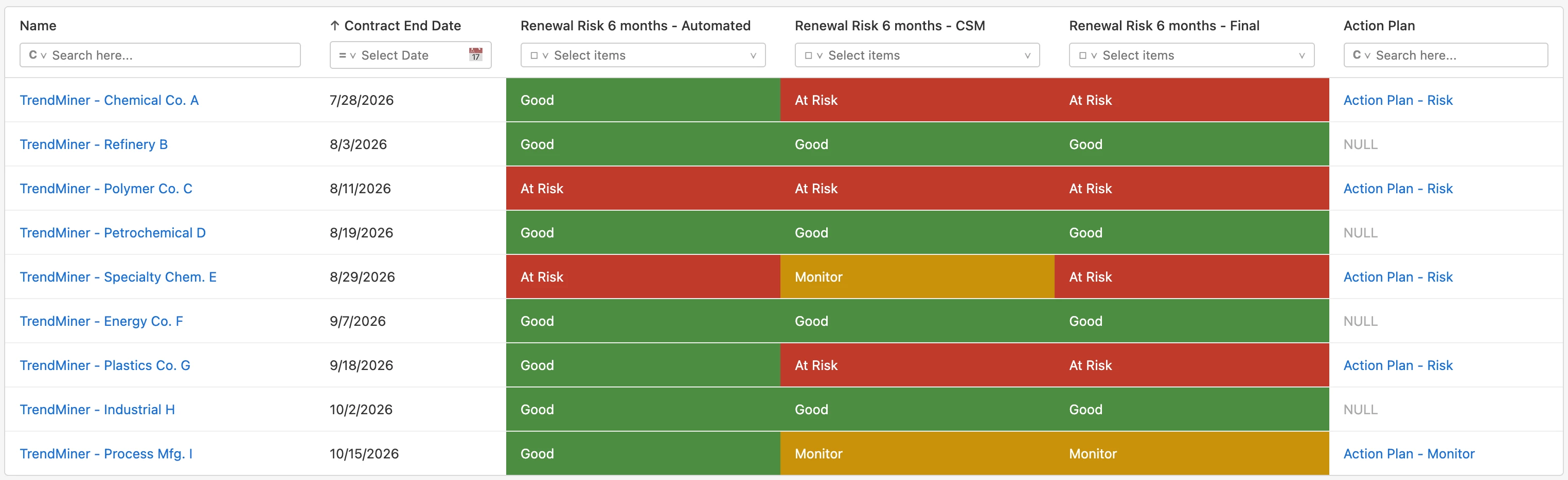
The process runs at two fixed checkpoints: 6 months before renewal and 3 months before renewal. At each one, an automated risk signal meets a CSM assessment. When they align, the status is confirmed. When they don’t, CS leadership reviews and sets the final call. The disagreement doesn’t get averaged away or ignored.
Every at-risk or uncertain renewal triggers a mandatory Action Plan CTA, where the CSM documents risk drivers, mitigation actions and next steps. Progress is tracked through linked Timeline notes.
At 3 months, Monitor is no longer a valid status. CSMs must commit to Good or At Risk.
Implementing Renewal Forecasting in Gainsight CS
Prerequisites
This process assumes you have a Gainsight Scorecard in place with measures that meaningfully reflect renewal risk. The automated risk assessment is only as good as the signals feeding into it. At TrendMiner, we use the overall Score, Adoption Score, and Risk Score as the three triggers, but the right measures will depend on your specific setup.
Our setups works on the Relationship level, but it’ll do just as well on the Company level (just read Company wherever I write Relationship).
Enrich your Relationship Object
In Data Management, add the following fields to the Relationship Object:
- Renewal Risk 6 months (Automated / CSM / Final): Dropdown (Good, At Risk, Monitor)
- Renewal Risk 3 months (Automated / CSM / Final): Dropdown (Good, At Risk)
- Renewal Risk Comments: Text field for CSM and leadership notes
- Renewal Action Plan CTA: Lookup to CTA Object (GSID of the linked Action Plan CTA)
Set up CTA Types
Create two CTA Types:
- Renewal Risk Assessment 6 months
- Renewal Risk Assessment 3 months
Build the Automated Risk Rules
Create two Rules (one per checkpoint) that:
- Calculate automated renewal risk from scorecard data. Our logic: if Overall Score OR Adoption Score OR Risk Score < 50 → At Risk; otherwise → Good
- Write the result to the corresponding Relationship field
- Create the assessment CTA for the CSM
Add the CSM Assessment Step (CTA)
The CSM receives the CTA and selects their assessment in the Relationship tab: Good, At Risk, or Monitor (6-month only). The assessment should reflect current reality: usage, value perception, stakeholder alignment, renewal signals. Not just what the scorecard says. The use the Comments field to explain their assessment.
Calculate the Final Renewal Risk
A Rule compares the automated and CSM assessments:
- If they match, the Final status is confirmed
- If they don’t, CS leadership reviews and sets the Final status through a Renewal Forecasting dashboard
Trigger Action Plan CTAs
A Rule automatically creates an Action Plan CTA for all At Risk and Monitor customers. For At Risk customers, the CSM documents key risk drivers, planned mitigation actions, and next customer-facing steps. For Monitor customers, the CTA outlines what additional information is needed and how it will be gathered. All updates are tracked via linked Timeline notes.
A Timeline Template is available for the Update Activity Type to guide CSMs on what to cover in each update.
Write the Action Plan CTA reference back to the Relationship
A Rule writes the Action Plan CTA’s GSID to the Renewal Action Plan CTA field on the Relationship, so the latest action plan is always one click away from any report or dashboard.
Build a Daily Snapshot Object
A Daily Snapshot Rule captures renewal risk status for each upcoming renewal once per day, ensuring each renewal appears only once and giving leadership a clean portfolio view.
Build the Renewal Forecasting Dashboard
Create a dashboard for CS leadership with two views: renewals within 3 months and renewals in the 3 to 6 month window. For each renewal, surface Automated Risk, CSM Risk, and Final Risk at both checkpoints, plus a direct link to the latest Action Plan CTA.
Add a cleanup Rule
After each renewal closes, a Rule clears all renewal risk fields on the Relationship, keeping the object clean for the next cycle.
What this gives you
No renewal reaches the last 90 days without a documented risk status. Every at-risk customer has a maintained action plan. Leadership spends their time on exceptions, not on chasing down missing data. When automated and CSM assessments diverge, there’s a clear owner and a clear decision. Not a gap.
We’re not yet at the point of attaching ARR impact to each renewal in the forecast. That’s the next step. But the foundation is solid: risk identified early, actions documented, visibility consistent.