

shannon
Contributor ⭐️⭐️⭐️⭐️
October 11, 2019
Question

Data Analyzer - seeing filter not working on front page of analysis

  • October 11, 2019
  • 4 replies
  • 103 views
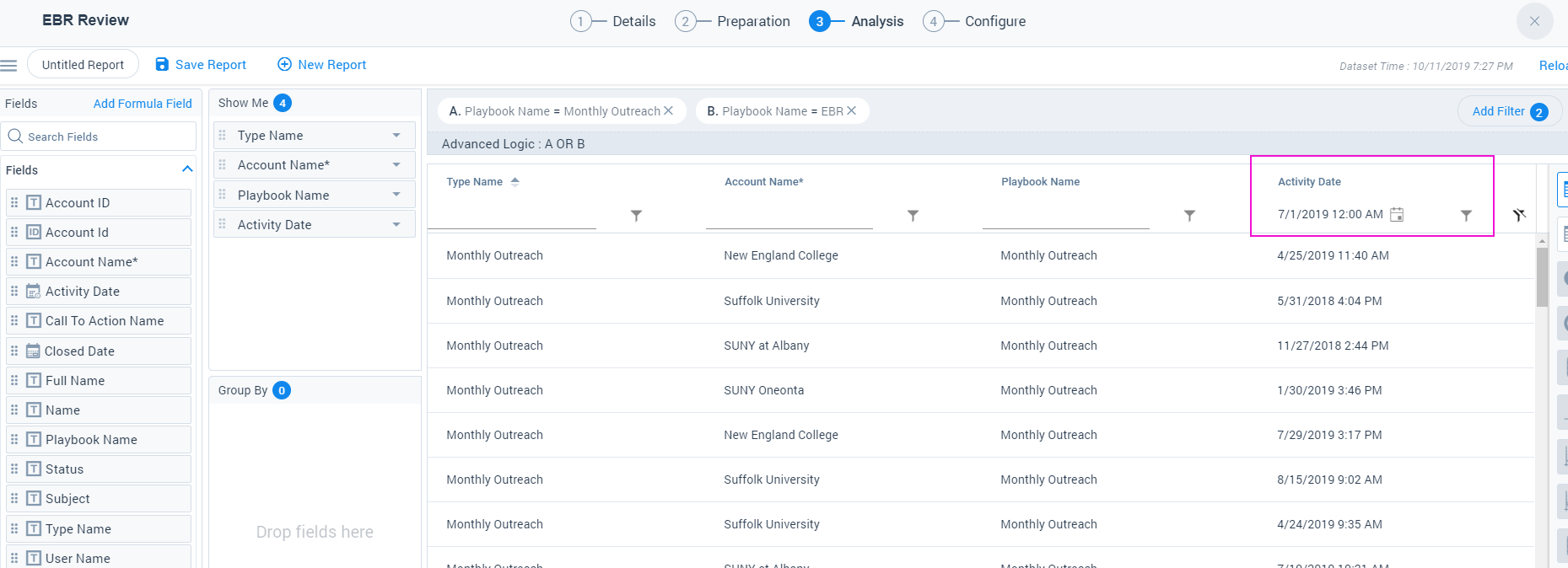
I entered a filter to pull last 60 days and get 0 records. So I noticed new filters on table and added a filter there and it doesn't appear to apply. I say to bring everything from 7/1 forward and still see April date directly below as well as other before 7/1. Am I misunderstanding what these are for?


4 replies

shannon
shannonAuthor
Contributor ⭐️⭐️⭐️⭐️
October 11, 2019


showing filter using traditional method not removing old dates

dan_ahrens
Expert ⭐️⭐️⭐️
October 14, 2019
VP of Customer Success at Forcepoint
rakesh
Gainsight Employee ⭐️
Lets put your data to work!
October 14, 2019
Hi Shannon,

Thanks for posting feedback on Data Designer.

The table level filters do not stick next time you visit => They are for exploring the data. The filters in Add Filters section are sticky.

In this scenario, I think you might be having is before operator in the filter on Activity Date. Is it possible for you to confirm this? You modify filter operator by clicking on the filter icon beside the date.

shannon
shannonAuthor
Contributor ⭐️⭐️⭐️⭐️
October 15, 2019
I think its working now. I realize it is not a sticky filter. when I went in today and added filter to be any date greater than last 120 days it came back as no results. which is not correct but when I change to greater than last quarter I got results. Then reapplied the greater than last 120 days and get results. Not sure why the inconsistency but so far so good right now.