

New Idea

Ability to Choose Fuzzy or Exact Search in C360

Related products:CS C360 & R360 & P360
  • June 1, 2023
  • 5 replies
  • 71 views

spencer_engel
Forum|alt.badge.img+5

I’ve never noticed this before, but it seems that the C360 search bar defaults to a “fuzzy” search. This is fine for the most part, but it’s become a little annoying because a lot of our team uses a 7-digit ID to search for their customer. So, for example, when you search for the customer that has the ID 6012853, Gainsight thinks it’s being helpful by giving me results that have an ID close to that number too. 
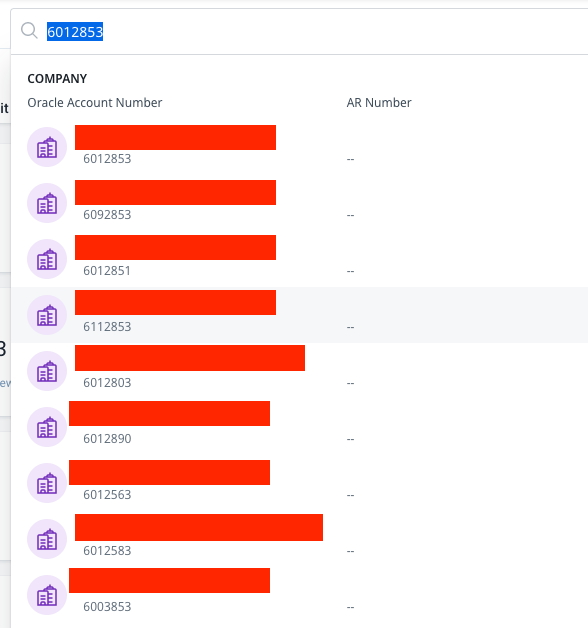
However, we don’t want that. We want an exact search so that I can see the Relationship records associated with 6012853 too. But I can never get the search to show me the Relationship records because of this “fuzzy search” behavior that I apparently can’t turn off.

5 replies

bradley
Forum|alt.badge.img+9
  • Expert ⭐️
  • June 1, 2023

It also maxes out accuracy at a certain character length. I’ve had long customer names that won’t show up unless I type the full thing in exactly.


This is a year old and maybe not going anywhere, but a good search improvement ideas thread: 


Prasanna Krishna

We use Relationships all the time and navigating to the exact R360 is taking lots of efforts as we have to scroll all the Company results to see Relationships.

We should get an option to choose Fuzzy or Exact Match in Search configuration (on Company level)


dayn.johnson
Forum|alt.badge.img+8
  • VIP ⭐️⭐️⭐️⭐️⭐️
  • April 24, 2024

This, 100!

a lot of our team uses a 7-digit ID to search for their customer

Our teams use the SFDC account ID as their gold standard to specify the account in question, but the same logic applies. I’m unable to search by that ID, which makes it difficult -- especially when companies can have different names in Salesforce and C360.


heather_hansen
Forum|alt.badge.img+15
  • VIP ⭐️⭐️⭐️⭐️⭐️
  • July 24, 2025

Even worse when you are looking for a company that just happens to contain some characters of a CSM’s name.  For example: CSM Name contains Charlie, and you are looking for Charlie’s Angels company.


alexander.mahan
Forum|alt.badge.img+2

Even worse when you are looking for a company that just happens to contain some characters of a CSM’s name.  For example: CSM Name contains Charlie, and you are looking for Charlie’s Angels company.

We disabled the ‘searchable’ option for the CSM Name in our org to avoid this. We never search by CSM so it wasn’t necessary to have enabled for us.