
TMaier
Helper ⭐️
December 3, 2021
Open

Show more data in Company search results in GS Assist conflict resolution pop-up

Related products:CS Timeline & Activity TrackingCS Plugins
  • December 3, 2021
  • 20 replies
  • 367 views

We’ve experienced an issue with some select Companies where one recipient may be listed at multiple Companies with identical names. While this in itself is not ideal, our SFDC configuration requires it and I’d prefer to maintain parity between SFDC and Gainsight.


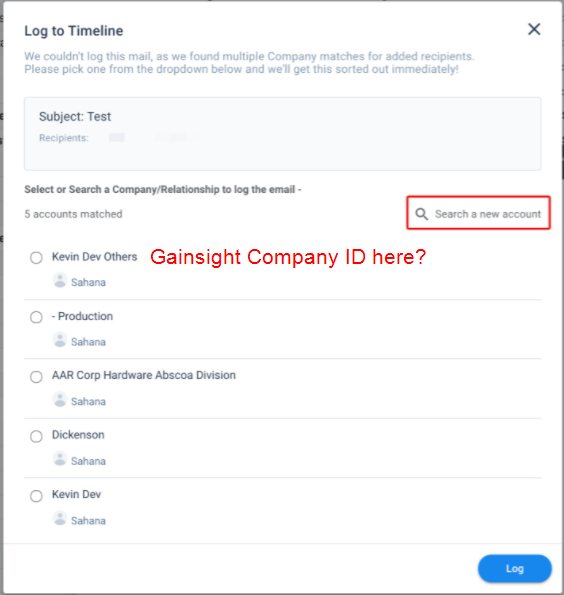
Since the Company names are identical, our end users have no way to confidently select the correct Company in the conflict resolution pop-up when emailing one of these contacts through the Gainsight Assist email plugin.


This problem would be far less of an issue if we had some additional data displayed along with the Companies in that pop-up which identified the Companies. GSID comes to mind, but is very long. If you could allow end users (or admins) to configure the search results in Assist in the same way that we do in Gainsight itself, we could add fields from Attributes at will.


See excellent recreation below for reference...


20 replies

anirbandutta
Expert ⭐️
December 6, 2021

@PavanCh would this be in your area?

It's an opportunity for engagement
Contributor ⭐️
November 28, 2022

We are experiencing this same issue.

romihache
VIP ⭐️⭐️⭐️⭐️⭐️
January 13, 2023

This would be great, we have the same issue.

Continuous improvement is better than delayed perfection
anirbandutta
Expert ⭐️
January 16, 2023

@arunabhat could you pl take a look?

It's an opportunity for engagement
Helper ⭐️
March 2, 2023

Adding to this as we have a similar issue but between logging emails to the Company vs. Relationship. It would be helpful if the search results displayed similar to in Gainsight when you search and it splits the company vs. relationship results.


Contributor ⭐️⭐️⭐️⭐️
March 3, 2023

We have the same issue where we have multiple accounts with the same name and its getting difficult to identify the right account. If GS can provide extra fields along with Company name then it will be helpful to identify the right account.

sacha
Contributor ⭐️⭐️⭐️⭐️⭐️
March 23, 2023

Same issue here, it shows Inactive accounts which is confusing for the team. This should be configurable or at least updated to not show Inactive accounts, it seems unlikely anyone would ever want to log timeline entries for those.

spencer_engel
Expert ⭐️
April 29, 2024

We have the same problem, and it could easily be fixed if we were able to add our internal 7-digit unique ID like we do for the C360 search. Please consider this enhancement!

B.Abrahams
Contributor ⭐️⭐️⭐️
August 29, 2024

Adding a +1 here. It would be nice if the search results displayed the same company details we have configured in the Company Search.

markglenwalker
Helper ⭐️
September 25, 2024

I realize there has been an update since this idea was submitted, however the nature of the problem remains the same. This occurs for us when we use Gainsight Assist to log an email to the timeline and the company we are searching has the same name as another company (but they are completely different companies). It’d be great to have the same kind of options in the chrome extension that we have when searching for a company in Gainsight (extra fields we can include to make it clear which company it is). We are facing timeline activities created under the wrong company because the search functionality is inadequate.