
New Idea
Add the ability to select a snoozed option when setting audience rules
I’ve been thinking about scheduling PX engagements and the snooze option. I don’t use it often because it counts as a view, so it doesn’t change the schedule. So, when a user gets their last view in the schedule and they click snooze, they are expecting to see that engagement again, but with the current functionality, they won’t see it again.
A couple potential solutions:
- Make the click on snooze not count as one of the views. For example, if the schedule is set to show the engagement 3 times with at least 7 days between views:
- Upon first view, user just closes engagement; that counts as their first view and they have 2 left.
- Upon second view, user clicks snooze. This should not count as a view and they should still have 2 left
- If user continues to click snooze on their third view, they should qualify to see it again in 7 days; potentially indefinitely if they keep clicking snooze.
- Add a SNOOZED option to the In App Engagement audience rule. This would give us the opportunity to target users for a “last chance” at the engagement. If the user has previously only VIEWED or COMPLETED the engagement, they wouldn’t qualify to see the last chance engagement. My assumption here is that if a user is clicking snooze, they want to see the engagement again and just may not have time to review it at that moment. (That is my thought when I’m presented with a snooze option.)
-
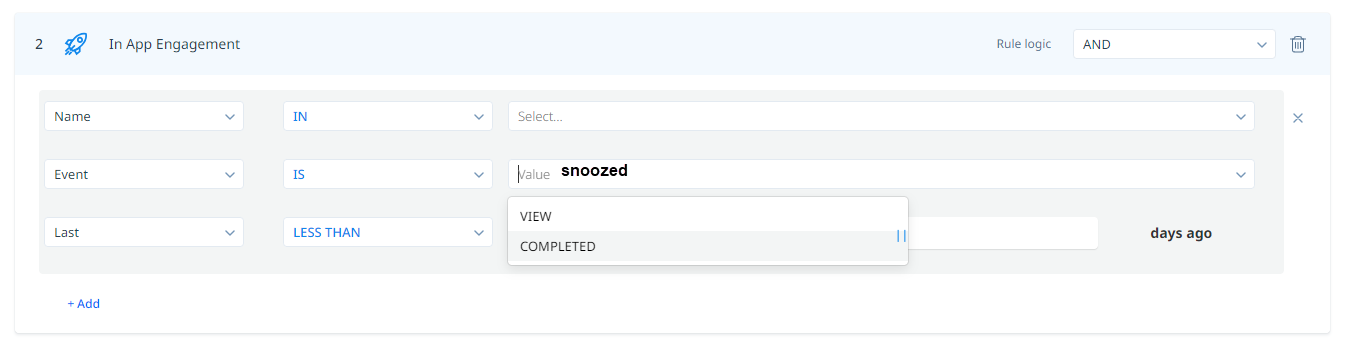
Add SNOOZED option to the Event category
-
I’m referencing this article:
cc: