

romihache
VIP ⭐️⭐️⭐️⭐️⭐️
January 4, 2024
New Idea

Allow a "select all" checkbox (report builder, dashboard builder, rules)

Related products:CS Reports
  • January 4, 2024
  • 10 replies
  • 140 views

I can think of several use cases for this:
Organizing/deleting reports or rules, emptying the trash, restoring all contents, selecting all to unselect a few because it’s more efficient. 

For example, let’s say you want to move all contents from one folder to another: you select the first, the second, and then for the third, you miss the click for 1 mm, clicking outside the box. That will cause the report to open, and when you go back, all reports are unselected again. The same behaviour happens in rules engine and report builder. 

The other thing I would like to point out is that the order breaks when this happens, going back sets the landing page to the default view again.  It would be great if the latest view set by the user was respected.
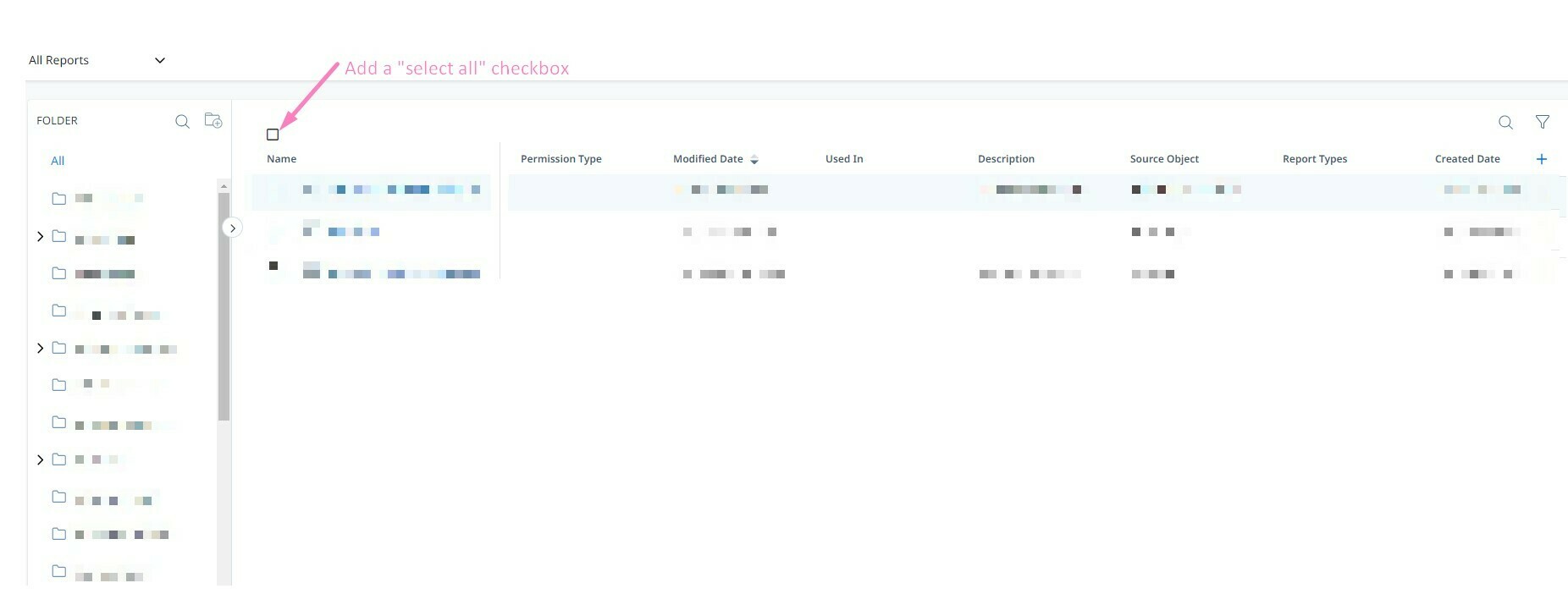
 

Suggested addition: select all checkbox

This is a small ask but a nice win on the admin quality of life front.


10 replies

alizee
VIP ⭐️⭐️⭐️⭐️⭐️
January 4, 2024

Yes - do we need to also highlight how mis clicking the box can throw off your meticulous selection and forcing you to start over?

We also need the matching “unselect all”. 

But since that’s now out there, I want to enrich this to say it actually needs to be implemented everywhere and especially in multi-select picklists. 

Thank you for listening to my hyperactivity. 

  1.  
The most expensive part of building is the mistakes. That's true in construction. Not so much in CSOps. So ask questions, make mistakes and learn. All views expressed here are my own.
romihache
romihacheAuthor
VIP ⭐️⭐️⭐️⭐️⭐️
January 4, 2024

In fact, I attached a short GIF in the idea showcasing exactly that but realized is not here 😅
I’m with support right now because the 1.2MB GIF is not loading

Yes! All in for product parity🙌🏼

Continuous improvement is better than delayed perfection
Stuart
Helper ⭐️⭐️
January 4, 2024

+1.  Just deleted hundred of reports, to find out they still register as dependencies in Data Management in the Trash folder.  Deleting the reports from the trash requires selecting each report individually (sidenote, the selection box is very small, so a slight error in mouse movement means you enter into the report, losing however many reports you had selected at that time).


tl;dr - please add a select all button!

cankney
Contributor ⭐️⭐️⭐️
January 4, 2024

+1.  Just deleted hundred of reports, to find out they still register as dependencies in Data Management in the Trash folder.  Deleting the reports from the trash requires selecting each report individually (sidenote, the selection box is very small, so a slight error in mouse movement means you enter into the report, losing however many reports you had selected at that time).


tl;dr - please add a select all button!

Came to say this too! I just did a big cleanup of reports and it took so much longer than it needed to to delete them from the trach

dayn.johnson
VIP ⭐️⭐️⭐️⭐️⭐️
January 4, 2024

Wish I could vote more than once for this… and in a product parity note… the “Select All” box is present in the new email templates!


Staff CS Content & Comms Manager, 2x Gainsight CS Ops Product Council Member
alizee
VIP ⭐️⭐️⭐️⭐️⭐️
January 4, 2024

Lol is that our next request: “allow two votes per person on the Community” 😅. Sorry, am in a cheeky mood. 

The most expensive part of building is the mistakes. That's true in construction. Not so much in CSOps. So ask questions, make mistakes and learn. All views expressed here are my own.
Expert ⭐️
April 23, 2024

I know Romi already knows this workaround from Slack. But, figured I’d post here too so anyone reading thread can use it too.


While sslect all is still needed. Especially if you have more reports than the first page, like data management.


You can get around this on the first page by shift clicking. Select your first report, wherever it may be, and then scroll to the last one that needs to be selected and then shift click. This will select them all.


Additionally ctrl click works on this page. But, that’s no different than just clicking.

alizee
VIP ⭐️⭐️⭐️⭐️⭐️
April 23, 2024

Thanks @Wayne - didn’t even occur to me to try that out in GS. Will have to check that in rules. 

The most expensive part of building is the mistakes. That's true in construction. Not so much in CSOps. So ask questions, make mistakes and learn. All views expressed here are my own.
romihache
romihacheAuthor
VIP ⭐️⭐️⭐️⭐️⭐️
April 23, 2024

Thank you for calling that out here @Wayne !!!

Continuous improvement is better than delayed perfection
dayn.johnson
VIP ⭐️⭐️⭐️⭐️⭐️
June 18, 2025

Coming back to revisit this feature request… and also to thank ​@Wayne for this workaround.

The “Select All” checkbox is there for email templates – but not for JO programs.

While select all is still needed. Especially if you have more reports than the first page, like data management.


You can get around this on the first page by shift clicking. Select your first report, wherever it may be, and then scroll to the last one that needs to be selected and then shift click. This will select them all.


Staff CS Content & Comms Manager, 2x Gainsight CS Ops Product Council Member