
johnny_burtchaell
Helper ⭐️
November 29, 2017
Solved

Cannot Load Data into MDA Drop Down List via Rules Engine

  • November 29, 2017
  • 10 replies
  • 308 views
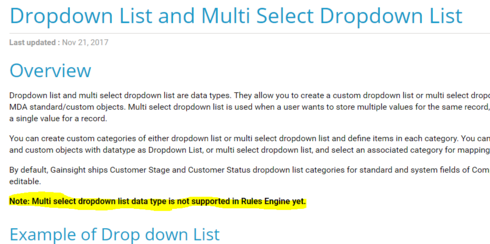
How do you suggest I automatically load data each day into the Multi Select Drop Down List within the MDA if the Rules Engine doesn't support it?

Open to suggestions other than doing it manually...each day...forever...
Best answer by sai_ram
Hi All, You can find all the above enhancements in our Winter Release. Our Winter Release notes is out,please refer this article. Thanks for sharing 🙂

10 replies

johnny_burtchaell
Helper ⭐️
November 29, 2017
and exporting the data from a Report that was built off that MDA object won't work, because you cannot import data into a formula field - the mappings won't validate - which means i need to build a duplicate MDA object with fields that aren't formulas and THEN import the data. Way too time consuming, especially when management wants to be able to view these ad-hoc, which means i'm never allowed to leave my desk in case i'm needed to generate the report. 
jeffrey_coleman
Helper ⭐️
January 5, 2018
Adding on to this as it seems like the most relevant post...

I'm trying to load to a single-option dropdown and can't do that either. I have a value being returned by the bionic rule of type String and I can't select the picklist as the target. Obviously I have ensured that the string values match the picklist values and I would expect any mismatch to fail.

Anyone solved for this?
jitin_mehndiratta
Helper ⭐️⭐️⭐️
January 9, 2018
Hi,

Multipicklist data type will be supported in Bionic Rules in the upcoming (Winter) release.

Regards,
Jitin
jeffrey_coleman
Helper ⭐️
January 10, 2018
What source data types will be supported/accepted for multi- and single-option dropdowns at that time?
jitin_mehndiratta
Helper ⭐️⭐️⭐️
January 18, 2018
Hi Jeff,

Multiselect picklist and picklist data types both will be available in the Rule set up part.

In the actions, following mappings are supported:
1. Picklist to String
2. Multiselect Picklist to String
3. Picklist to Picklist 
4. MultiSelectpicklist to Multiselectpicklist

Regards,
Jitin
sai_ram
sai_ramAnswer
Expert ⭐️⭐️
February 22, 2018
Hi All, You can find all the above enhancements in our Winter Release. Our Winter Release notes is out,please refer this article. Thanks for sharing 🙂
upendra_damacherla
Gainsight Employee ⭐️
June 29, 2018
I think there should be an option to populate Multi Select fields based on Text inputs and also an option to persist previously selected values, just Multi Select -> Multi Select may not solve all the use cases.
Upendra
samantha_braastad
Contributor ⭐️⭐️⭐️⭐️⭐️
August 20, 2018
We would like to see further enhancements for this as well. We have customer data that is a multi-picklist in our product. Gainsight received the data as a string into the S3 bucket (.csv file) which is loaded into the MDA table as a string. We want to write this data to Salesforce into a multi-picklist but the rule fails leaving us no way to get back to a picklist. 
lila_meyer
Gainsight Employee ⭐️⭐️⭐️
August 20, 2018
Hi Samantha,

If this is an important enhancement, I recommend adding it as a new Idea. This post was originally created as a Problem, and is now set to "Solved," so our PM team won't have good visibility into your suggestions moving forward. 
Lila Krutel, Dir. Global Education Services
phani_kumar
Gainsight Employee ⭐️⭐️
June 18, 2020

Hi.

Recently I created a rule that will load the data to the Multi Picklist Datatype field.

You can refer to this link.