Contributor ⭐️
April 22, 2020
Solved

Color health scores in reports

  • April 22, 2020
  • 4 replies
  • 503 views

Hi,


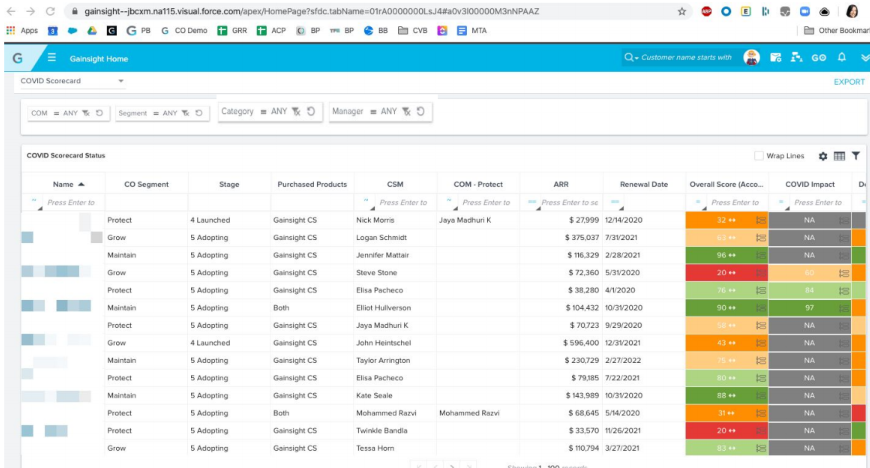
How is it possible to color the health scores in the reports like shown here?


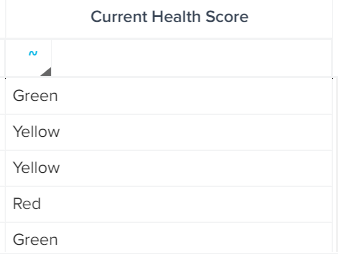
I’m only able to make it like this:
 

Best,

Håkon

Best answer by kendra_mcclanahan


Thank you for this Lila - I’ve read those articles before, but I still can’t see how I can color a field in a tabular report like the screenshot I pasted (this was from your COVID presentation). Do you have a link that explains how to do that?


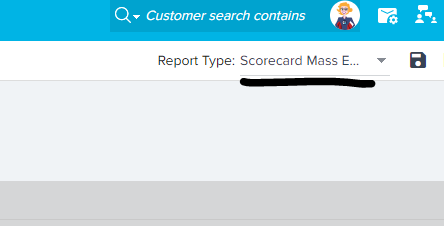
Did you try to make this a mass edit report vs. a standard report? By selecting the Scorecard Fact object, you should see this dropdown.


4 replies

lila_meyer
Gainsight Employee ⭐️⭐️⭐️
April 22, 2020

Hi Hakon, welcome to the Community! I think there are a few articles that can help you with adjusting the report colors: this article is about the color settings in reports, and this article is about setting the colors in Scorecards specifically. 

Lila Krutel, Dir. Global Education Services
Contributor ⭐️
April 22, 2020

Thank you for this Lila - I’ve read those articles before, but I still can’t see how I can color a field in a tabular report like the screenshot I pasted (this was from your COVID presentation). Do you have a link that explains how to do that?

kendra_mcclanahan
Gainsight Employee ⭐️⭐️
April 22, 2020


Thank you for this Lila - I’ve read those articles before, but I still can’t see how I can color a field in a tabular report like the screenshot I pasted (this was from your COVID presentation). Do you have a link that explains how to do that?


Did you try to make this a mass edit report vs. a standard report? By selecting the Scorecard Fact object, you should see this dropdown.


Contributor ⭐️
April 23, 2020

Thanks - now solved it!:)