

joe.huber
Helper ⭐️
October 27, 2021
Question

'Custom message' for 'Invite users to X group' shows up "clumped" together.

  • October 27, 2021
  • 3 replies
  • 61 views

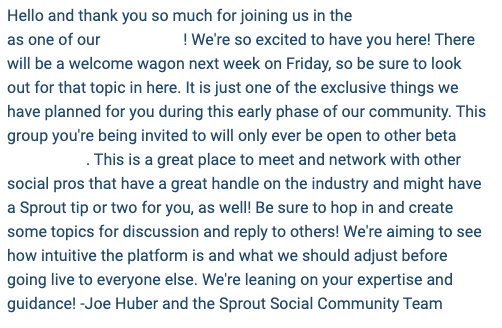
When I go to send a custom message to people, the lines all show up in a single jumble (see below).

So, where I’ve just hit enter/return and made this line on a new line, it would just show up in one continuous line. It looks really ugly.

Is there a way to adjust this?
 

    3 replies

    Julian
    Gainsight Employee ⭐️⭐️⭐️
    October 27, 2021

    Thanks for sharing this with us here.

    Am I right with the assumption that we are looking at an automated private message that users receive when they reach a certain rank?

    It is not super-straightforward to have beautifully styled messages here, unfortunately. There are some limitations, but also some ways that will help you to achieve a better experience.

    Can you name me the rank or the ranks for which you are sending such a message? Feel free to send the url in a private message if you like. I quickly checked but could not find the exact text that you are showing above...

    I follow my nose, it always knows
    joe.huber
    joe.huberAuthor
    Helper ⭐️
    October 27, 2021

    Hey Julian,

    This is for the custom message when I invite users to a group. I don’t really need a ton of formatting, but if it could read line breaks, I’d be set.

    Julian
    Gainsight Employee ⭐️⭐️⭐️
    October 27, 2021

    Oh yes, now I see it - sorry I had a tunnel vision when I saw the message, as I usually deal with questions around styling automated private messages for ranks.

    I will dive into this and get back to you as soon as possible!

    I follow my nose, it always knows