
Kamakshi V
Contributor ⭐️⭐️⭐️
Jun 1, 2023 9:29 AM UTC
Solved

Customizing Button Title for Community RSVP

Is there a way to edit the button title for a community RSVP event? I want to change the name as “ Register for Series” instead of “Attend” ? Attend is the default title. Can someone help?

Alistair FIeld
Expert ⭐️
Jun 1, 2023 9:44 AM UTC

@Kamakshi V 

Nice find.. Good self service 😀


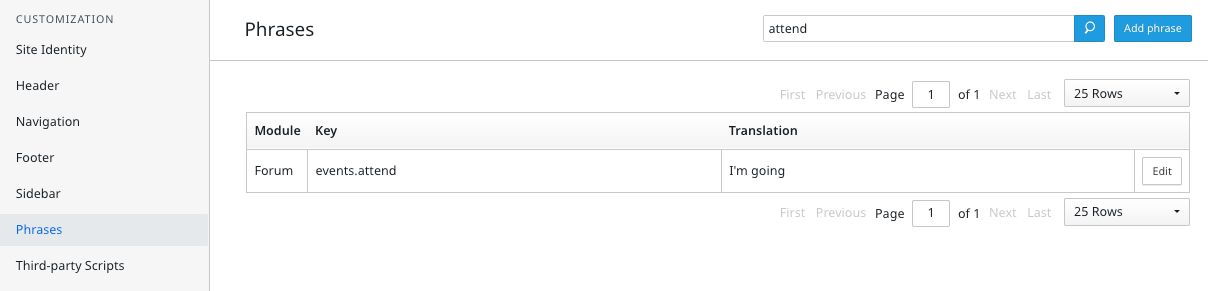
The exact phrase you need is this:

Translation = Text you want.

The needs of the many, outweigh the needs of the few. 🖖

3 replies

Kamakshi V
Contributor ⭐️⭐️⭐️
Jun 1, 2023 9:33 AM UTC

Got this article!

Thanks :)


Translate
Cheers
Alistair FIeld
Expert ⭐️
Jun 1, 2023 9:44 AM UTC

@Kamakshi V 

Nice find.. Good self service 😀


The exact phrase you need is this:

Translation = Text you want.

Translate
The needs of the many, outweigh the needs of the few. 🖖
DannyPancratz
VIP ⭐️⭐️⭐️⭐️⭐️
Jun 1, 2023 1:09 PM UTC

I’ll add two tips:

  1. you should also be able to do this via the front end phrasing tool
     
  2. changing the phrase changes it site-wide for all events, but you have options if you need it to be unique for specific events
    1. Events that link out to external registration pages give you the option to customize the text for the registration button
    2. I believe @leo-inspired ‘s reply to my question here indicates you could put custom CSS to style specific pages, so perhaps you could do that to style individual reg buttons on events that use the native registration feature 


Translate
FYI: I am no longer active in this community