

bjoern_schulze
Helper ⭐️⭐️⭐️
November 6, 2020
Question

Flag topic: How to change the error message phrase
  • November 6, 2020
  • 4 replies
  • 148 views


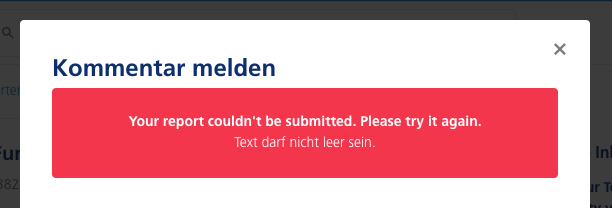
When users report content, they need to insert a message (is it new that the message is mandatory?). If they don’t put in text, then the above message appears.

I’d like to translate / change the phrases “Your report couldn’t be submitted. Please try again.” and “Text darf nicht leer sein” but I can’t find the phrases in Control.

4 replies

Julian
Gainsight Employee ⭐️⭐️⭐️
November 13, 2020

HI Bjoern,

I was first unable to find this myself, however sometimes the right solution can sit right in front of your face. :D The correct codes you have to enter are:


Module: Forum

Key: Your report couldn't be submitted. Please try it again.


This should work, please let me know if not!

I follow my nose, it always knows
Julian
Gainsight Employee ⭐️⭐️⭐️
November 13, 2020

When users report content, they need to insert a message (is it new that the message is mandatory?).

I think that field always has been mandatory, but I could be wrong. I don't recall any changes to this in the past 12 months at least...

I follow my nose, it always knows
bjoern_schulze
Helper ⭐️⭐️⭐️
November 16, 2020

Thanks @Julian, it worked for the title “Your report couldn't be submitted. Please try it again.”. I would also like to change the phrase for the following: “Text darf nicht leer sein”, can you also help me out here?

Julian
Gainsight Employee ⭐️⭐️⭐️
November 16, 2020

I have found a phrase, but it is not really what I expected:

You can change “Text”, but for “darf nicht leer sein”, the phrase does not seem to apply...

Maybe it will help you already though, you can change it to “Feld” or something else:

Module: Forum

Key: Text


I follow my nose, it always knows