DannyPancratz
VIP ⭐️⭐️⭐️⭐️⭐️
January 20, 2021
Solved

What is the "Input placeholder (optional)" field when editing a profile field?

  • January 20, 2021
  • 1 reply
  • 153 views

I’m not seeing what this is in the documentation for configuring profile fields. 

    Best answer by bjoern_schulze

    If you - for example - add a profile field “Country of origin”, you can put in a placeholder text “e.g. Norway”. This placeholder text will be shown to the user when he/she hasn’t filled out that field with his/her own value yet. The best way to use the placeholder (in my opinion) is to give an example or a short description of the field in order to make it clear to users what they are supposed to fill in.

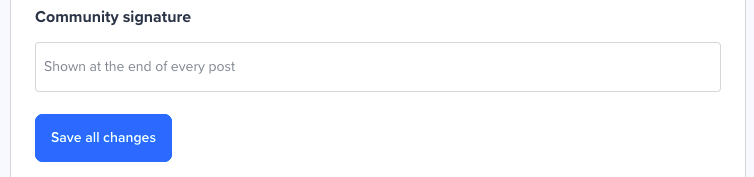
    You can see one placeholder text in action here on inSpired. If you go to you own profile and click on “Edit profile”, you’ll find the field “Community signature” and the placeholder text “Shown at the end of every post”.


    1 reply

    bjoern_schulze
    Helper ⭐️⭐️⭐️
    January 21, 2021

    If you - for example - add a profile field “Country of origin”, you can put in a placeholder text “e.g. Norway”. This placeholder text will be shown to the user when he/she hasn’t filled out that field with his/her own value yet. The best way to use the placeholder (in my opinion) is to give an example or a short description of the field in order to make it clear to users what they are supposed to fill in.

    You can see one placeholder text in action here on inSpired. If you go to you own profile and click on “Edit profile”, you’ll find the field “Community signature” and the placeholder text “Shown at the end of every post”.