courtney_james
Contributor ⭐️⭐️
Aug 26, 2016 7:15 PM UTC
Solved

NPS: Auto-schedule Survey Resend

I'd like to find a way that allows me to auto-schedule the resend of a NPS survey if the initial survey has not yet been sent. [i]Has anyone found a way around this problem without having a co-worker go in for them? 

Current Functionality: NPS Survey must be sent to Participants. Once sent, the user must go back to the survey to select the "Resend" Option within the "Distribute" area. The Resend can then be scheduled for a future date.

Use Case: Admin/Survey Creator is out of the office (any reason) and can not schedule the follow-up.

Example:
  1. Create survey August 30
  2. Initial Survey Sent on September 2
  3. Desired Reminder to be sent September 8
  4. Survey Sender out of the office from Sept 1 to Sept 10

Thanks everyone!
dan_ahrens
Expert ⭐️⭐️⭐️
Sep 8, 2016 1:36 PM UTC
Hi Courtney,

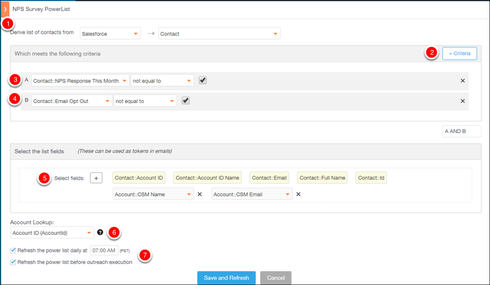
The method I would recommend for resending the outreach would be an amalgam of your original powerlist added with steps 1 & 2 from the linked article. Basically you would want to send the reminder to everyone that qualified for the original NPS survey, with the exception of those who already responded (which steps 1 & 2 would build and then add the "NPS Response This Month" filter as shown below). 


Does this sound like a workable approach?
VP of Customer Success at Forcepoint

4 replies

dan_ahrens
Expert ⭐️⭐️⭐️
Aug 29, 2016 3:57 PM UTC
Hi Courtney,

Have you considered using CoPilot to resend the survey in the case of individuals who were invited but who did not respond? This could eliminate some manual effort. See this article for details on how to create the automation around this: https://support.gainsight.com/Product_Documentation/Surveys_and_NPS/Examples_and_Tutorials/Tutorial_...
Translate
VP of Customer Success at Forcepoint
courtney_james
Contributor ⭐️⭐️
Sep 8, 2016 1:23 PM UTC
Hi Dan!

Thanks for your response! Looked over the article and I'm not sure how to get around filtering the contacts.

We are planning on sending out our surveys based on the schedule in the presentation slide below. Per the article, GS would search SFDC for unchecked boxes to find contacts to 're-send' the survey out. Certain accounts however would need to have an unchecked box but would not qualify to be sent a survey based on their renewal date. 

Do you have any thoughts on how to work around that item? 

Translate
dan_ahrens
Expert ⭐️⭐️⭐️
Sep 8, 2016 1:36 PM UTC
Hi Courtney,

The method I would recommend for resending the outreach would be an amalgam of your original powerlist added with steps 1 & 2 from the linked article. Basically you would want to send the reminder to everyone that qualified for the original NPS survey, with the exception of those who already responded (which steps 1 & 2 would build and then add the "NPS Response This Month" filter as shown below). 


Does this sound like a workable approach?
Translate
VP of Customer Success at Forcepoint
courtney_james
Contributor ⭐️⭐️
Sep 14, 2016 9:35 PM UTC
Thanks Dan! I'll give it a go as we continue to develop our process. 
Translate