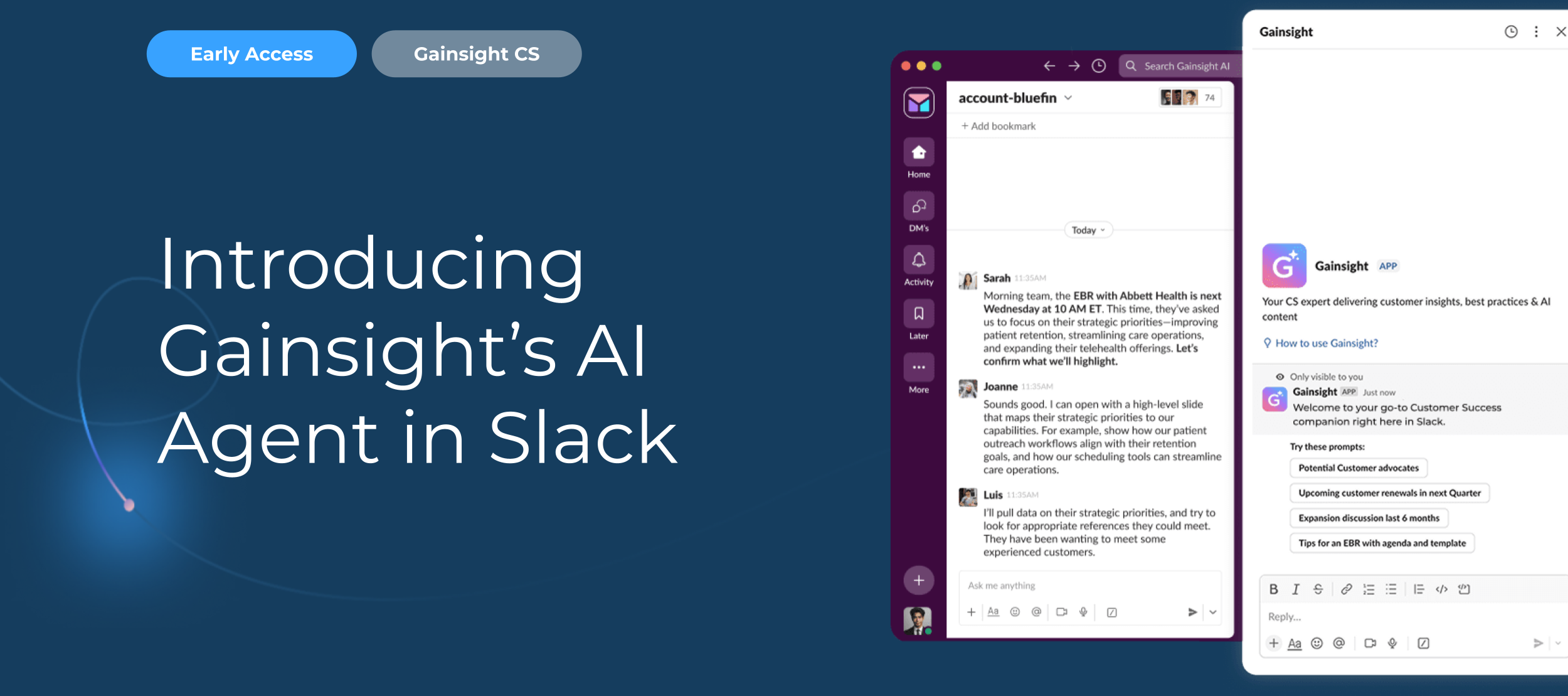
Introducing Gainsight’s AI Agent for Slack—Customer Data, Right Where You Work
Customer-facing teams are dealing with bigger portfolios, tighter budgets, and rising expectations—all without extra hands to help (or at least not enough of them). The challenge isn’t just keeping up, it’s staying ahead.But despite the pressing need, the data these teams need to actually stay ahead isn’t always easy to get to.For frontline CSMs who use Gainsight daily, data is always at their fingertips. But for cross-functional teams and executives, and even some CS team members who don’t log in regularly, getting the right information can require extra steps that slows them down and creates inefficiencies in their workflows.That’s where Gainsight’s AI Agent for Slack comes in.Now, key customer insights, data, and best practices are right in Slack. No more switching tabs, waiting on reports, or chasing down updates. Just quick answers, shared insights, and the ability to take action.What You Can Do with Gainsight’s AI Agent for Slack:Instant access to customer data: Ask about ARR, renewals, risks, adoption trends, and more. Keep teams aligned: Share updates directly in Slack channels so customer-facing teams can stay on the same page. Stay ahead of risks and opportunities: Identify potential churn or expansion opportunities early, so you can act before it’s too late. Effortless follow-ups: Quickly draft emails, meeting recaps, and content for EBRs. On-demand best practices: Instantly get strategies for onboarding, renewals, and customer growth, plus quick answers on Gainsight functionality.Whether it’s a CSM preparing for a renewal, a Sales rep checking account details, a Product team member reviewing top feature requests, or an executive looking at customer health, Gainsight’s AI Agent makes data available to everyone who needs it—right when they need it.By eliminating unnecessary steps, making data more accessible, and reducing time spent searching, our AI agent helps teams move faster, stay aligned, and focus on what really matters: building relationships with customers and driving better outcomes.Because at the end of the day, AI isn’t about replacing customer-facing teams; it’s about empowering them, which is exactly what our Slack app is designed to do.
- 5
- 349
- 1
- 1 year ago