

In-page Widget: FAQ

  • March 30, 2018
  • 7 replies
  • 829 views

Frank
In this topic you'll find answers to common questions about the in-page widget.

What is the in-page widget?


The in-page widget is a list of topics from the community that you can insert directly within pages of your website using an embed code.

🛠️ Questions about installation


Does the in-page widget use a separate embed code from the conversational widget?


No - both widgets are served by a single embed code. Once you've added the embed code to a page, the conversational widget will load. Then, you just need follow the additional instructions to install the in-page widget.


How much effort does it take to install the in-page widget on my webpages?


In total, probably about an hour. The in-page widget requires just a little more effort to install than the conversational widget, since it requires you to set up a container within the HTML of your pages. Add in a bit of extra time on your side for testing, and you’re looking at roughly just under half a morning's work.

Is it possible to use only the in-page widget?


Yes! Find out how to use only the in-page widget.

🎮 Questions about look and feel / behaviour


What information about each topic is shown in the in-page widget?


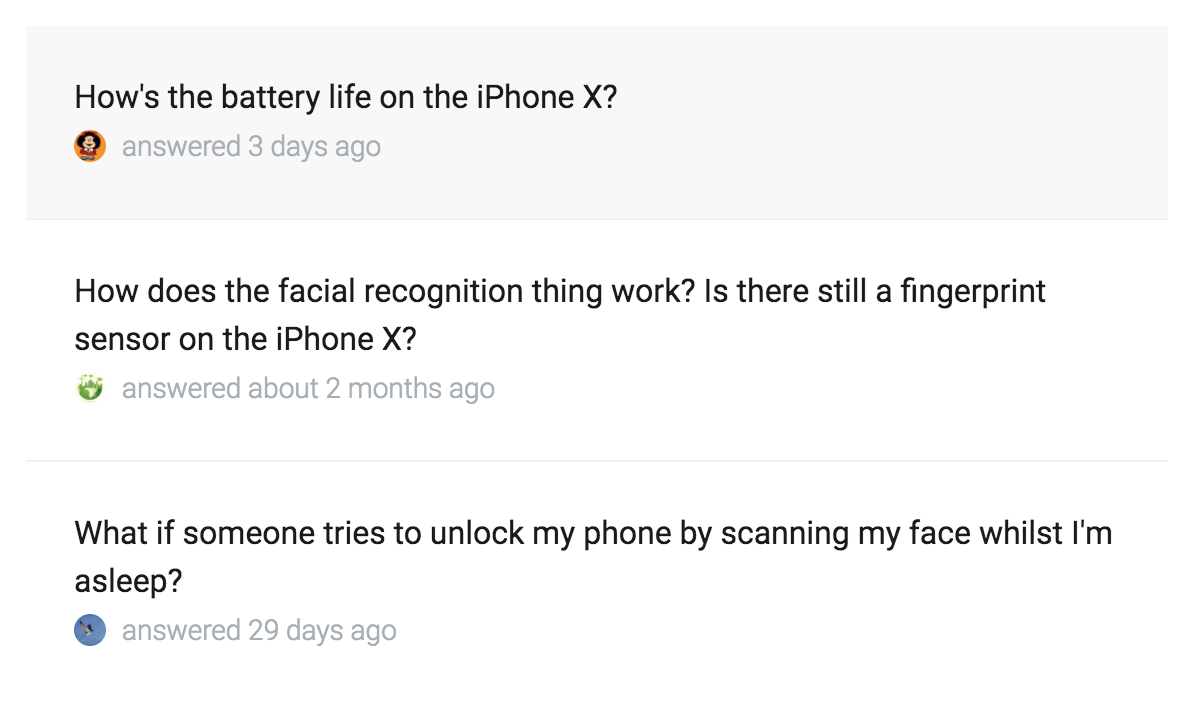
For each topic, the widget displays the topic title, the relative time since the topic was last active, and the avatar of the user who last posted in the topic.

What aspects of the in-page widget can I customize?


The in-page widget uses the same styling configuration as the conversational widget.

Specifically, the topics in the list use the ‘card’ styling - so you can customize the topic title text color, metadata text color, the color of the border between each topic row, and the style of the avatars. The height of the widget is fixed (based on the number of topics).

How many topics are shown in the in-page widget?


At the moment, the in-page widget only displays up to three topics - even if there are more than three topics found in the automatic search or added to the page using the content configuration tool.

What happens when a user clicks a topic in the in-page widget?


The conversational widget pops up to show the details of the topic.

Does the in-page widget automatically adjust to various screen sizes?


Yes, the in-page widget is fully responsive and looks great on mobile, tablet, and desktop screens - it adjusts to take up 100% of the width of the HTML container you place it in.


7 replies

revote
Forum|alt.badge.img+2
  • VIP ⭐️⭐️⭐️⭐️⭐️
  • May 20, 2022

I have three questions:


  1. Can you provide example url where this in-page widget is in use?


What happens when a user clicks a topic in the in-page widget?


The conversational widget pops up to show the details of the topic.


  1. So I can to read the topic, read the comments and so on. What if I want to reply to the topic, is it possible? (If there is SSO in use in our community and .com) Usecase would be that user remains in our .com, user doesnt have to jump between the .com and the community.
  2. Can I see how many times topics are clicked / how many times conversational widget is loaded? This is important, to know is it helpful or not

revote
Forum|alt.badge.img+2
  • VIP ⭐️⭐️⭐️⭐️⭐️
  • January 2, 2023

Also, if I want to dislay certain topic(s) in in-page / conversational widget, it seems it isn´t possible? There isnt way to specify just certain topic?


revote
Forum|alt.badge.img+2
  • VIP ⭐️⭐️⭐️⭐️⭐️
  • January 11, 2023

I have three questions:

  1. So I can to read the topic, read the comments and so on. What if I want to reply to the topic, is it possible? (If there is SSO in use in our community and .com) Usecase would be that user remains in our .com, user doesnt have to jump between the .com and the community.

I have understood it isnt possible to add comments using widget? Earlier is has been possible but not any more, is this right?


  1. Can I see how many times topics are clicked / how many times conversational widget is loaded? This is important, to know is it helpful or not

This question is open and I would like to know the answer.


Also, if I want to dislay certain topic(s) in in-page / conversational widget, it seems it isn´t possible? There isnt way to specify just certain topic?

Also this is open. Is this possible?

Example use case: In the product page x, I would like to add conversational widget there, displaying only the product x review (article) from the community.


revote
Forum|alt.badge.img+2
  • VIP ⭐️⭐️⭐️⭐️⭐️
  • April 28, 2026

I´ll continue with my questions. 😀

We are just testing this In-Page widget. I just want to make sure how this works:

If we add script and div container to every page to our .com, but we don´t define the URL´s what content and where it should be displayed, the widget is not displayed – correct?

So far, we have been testing this with Tag Manager, and it seems that the widget is displayed and shows random content on pages where it should not be displayed.

We are going to test this by adding script and div container directly to the source code to pages to see whether this behavior occurs because of Tag Manager.


samanthahamlet
Gainsight Employee ⭐️
Forum|alt.badge.img
  • Gainsight Community Manager
  • April 28, 2026

Hey ​@revote 

Thanks for flagging this and for testing so thoroughly!

The behaviour you're seeing is likely related to the "Show automatic topic suggestions" setting in the widget configuration. When this is enabled, the widget will display topics based on a search algorithm, which would explain the random content appearing. If you disable this, only content that has been specifically configured will display.


revote
Forum|alt.badge.img+2
  • VIP ⭐️⭐️⭐️⭐️⭐️
  • April 29, 2026

The behaviour you're seeing is likely related to the "Show automatic topic suggestions" setting in the widget configuration. When this is enabled, the widget will display topics based on a search algorithm, which would explain the random content appearing. If you disable this, only content that has been specifically configured will display.

Oh yes, you were right. We have several test widgets and for some reason two of them had that setting on. I disabled them, we continue testing. 😊


samanthahamlet
Gainsight Employee ⭐️
Forum|alt.badge.img
  • Gainsight Community Manager
  • April 29, 2026

Glad to hear it ​@revote, keep us updated on the testing!! 😄