
mdfahd
Gainsight Employee ⭐️⭐️
January 13, 2026

AI Answers in Customer Communities

  • January 13, 2026
  • 18 replies
  • 549 views

This article helps to understand AI Answers in Customer Communities.

Overview


AI Answers enhances the Customer Community experience by empowering users with AI-powered search and response capabilities. This feature uses latest advanced AI models to deliver real-time, conversational responses that feel natural, accurate, and dynamic.

When users search for information within the community, AI Answers provides instant, cited responses that include relevant sources for transparency and trust. The AI Answer panel also includes an expandable list that allows users to explore deeper insights and related content.

Key Highlights

  • AI-Driven Search: Provides answers to your questions.
  • Cited Responses: Provides AI-generated answers with source links for further reading.
  • Real-time Streaming: Displays answers as they are generated for an interactive experience.
  • Expandable Insights: Allows users to view additional context or sources with one click.
  • Continuous Learning: Improves over time based on user interactions and community feedback.

Configure AI Answers in Community


Community admins and managers can configure the AI Answers from the settings page and can also enable AI Answers to be leveraged by end users in the community.

To configure the AI Answers:

  1. Log in to Control.
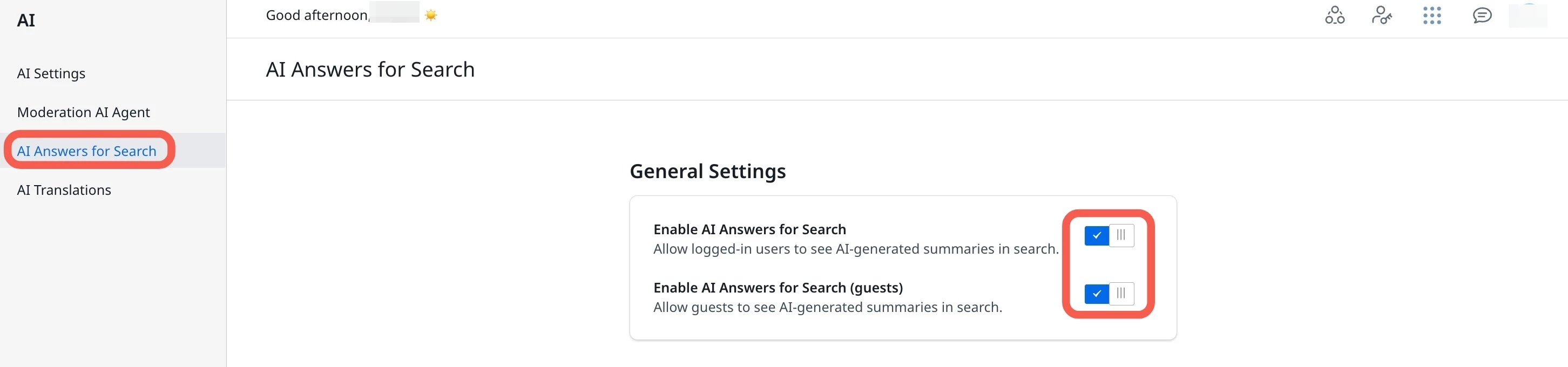
  2. Navigate to AI > AI Answers for Search. The AI Answers for Search page appears.
  3. Turn on the Enable AI Answers for Search toggle. This provides direct AI-generated responses to the search queries in real-time.
  4. (Optional) Turn on the Enable AI Answers for Search (guests) toggle. This enables end users to leverage AI summaries.
 

Use AI Answers in Community


Community users can type a query into the search text field on the Community homepage. The AI Answers feature analyzes the query, searches through community discussions, documentation, and federated content, and displays the most relevant, cited answers within the AI Answers panel.

The following image displays an example search result for the query What is Gainsight MCP?
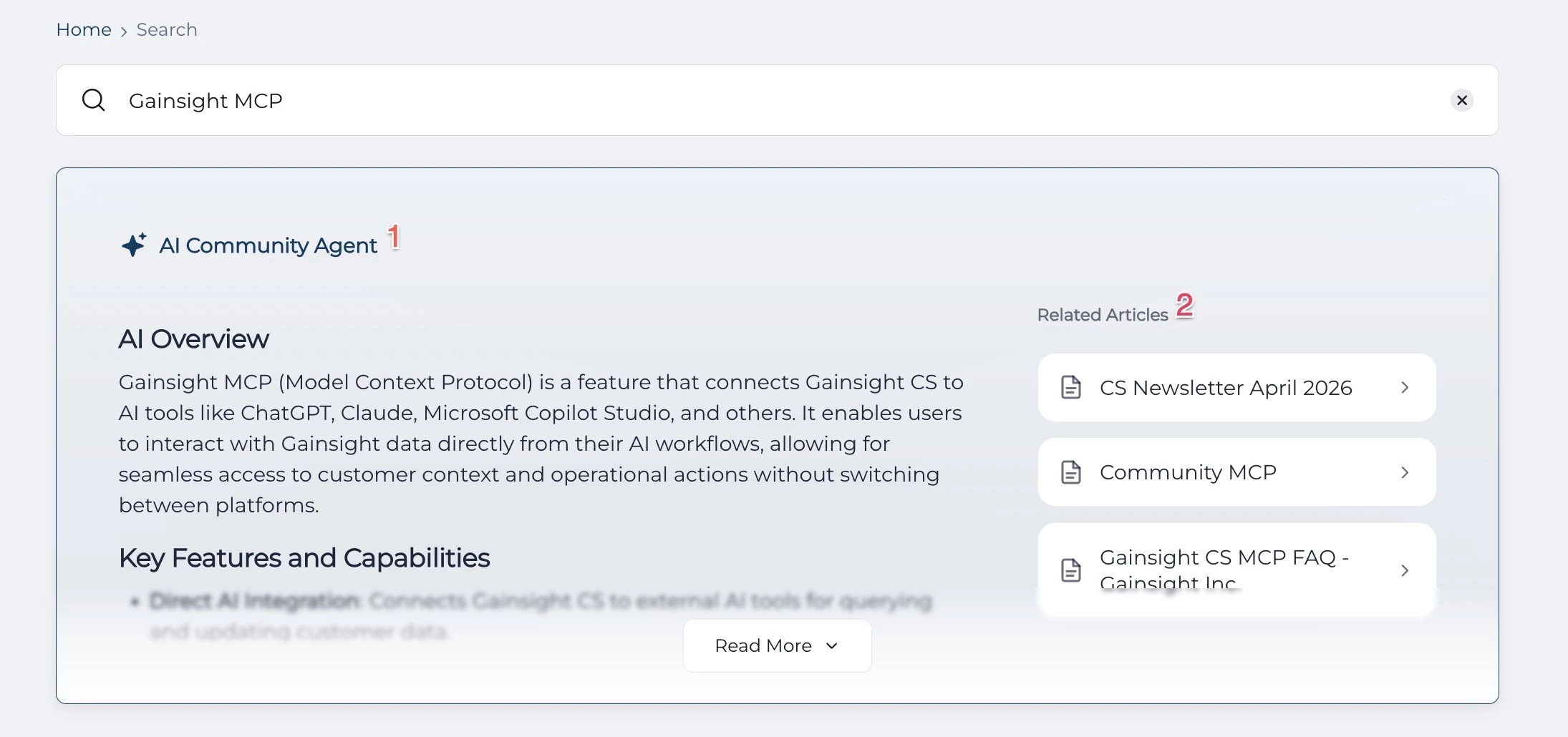
Key Elements in the AI Answers panel include:

  1. AI Answers Panel: Displays the AI-generated response synthesized from community posts, product documentation, and other federated content.
  2. Source Snippets: Lists brief content snippets from relevant sources. Select a snippet to open the original content.

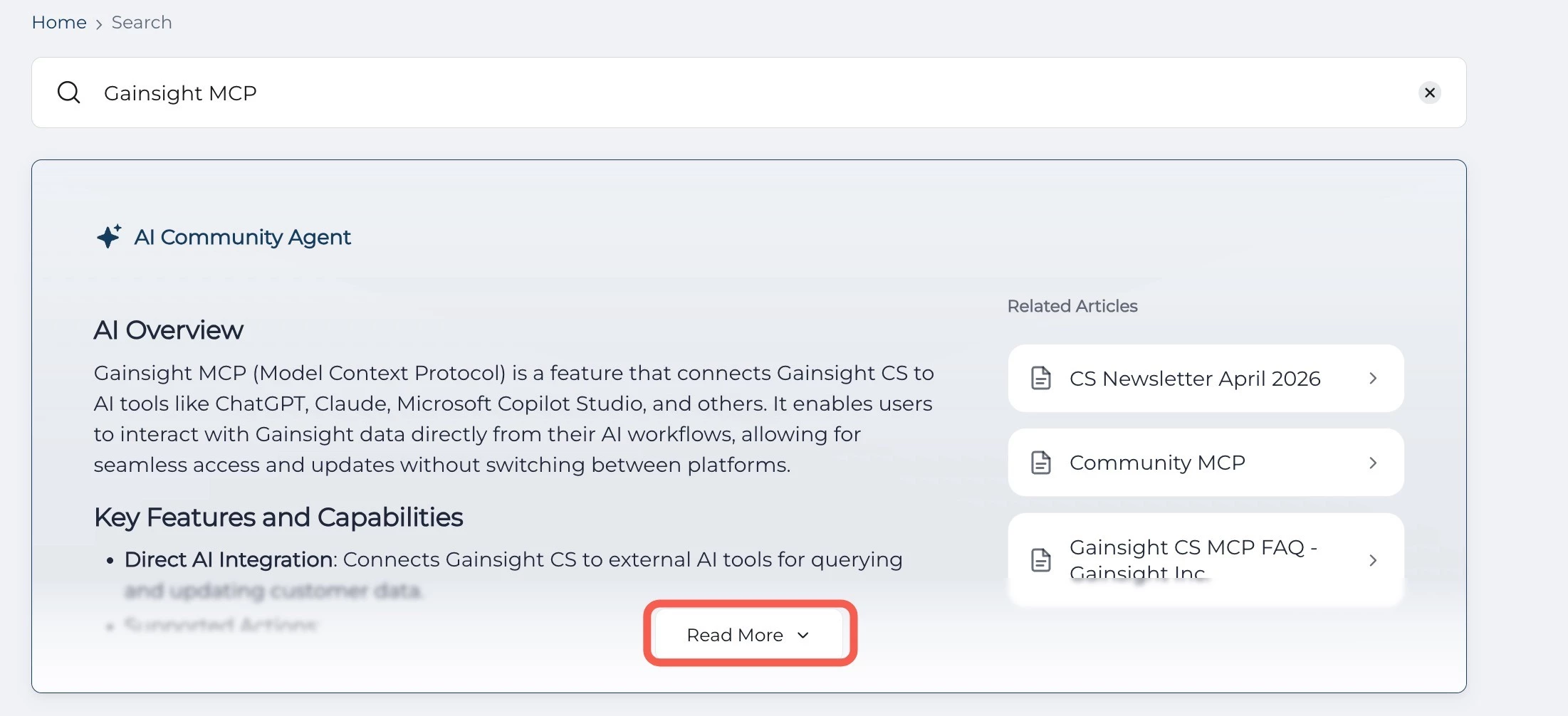
Click Read More to expand the AI Answer and view additional insights or detailed explanations.
 

    18 replies

    bjoern_schulze
    Helper ⭐️⭐️⭐️
    February 23, 2026

    In one test, we found that AI Answers pulls information from reported content, uses it as part of its answer and also links to the source (which can only be opened by administration). Can you please have a look at that?

    Graeme Rycyk
    Gainsight Employee ⭐️
    Gainsight Director of Product
    February 25, 2026

    Hi ​@emiller,

    Myself and the team really appreciate your feedback here. We are very glad to hear you are having a good experience, and I would be more than happy to discuss to any ideas you have for improvements in the future.

    P.s, I have made a note on the identification of different sourced content, and that improvement should be coming down the road.

    Cheers,

    Graeme

    Director of Product | AI & Search
    Graeme Rycyk
    Gainsight Employee ⭐️
    Gainsight Director of Product
    February 25, 2026

    Hey ​@bjoern_schulze,

    Thanks for reaching out, could you provide a little more information here (happy to do it via DM) as I would need the search query and source content that should not have been shown to dig in to this a little more, happy to do so, but I will just need a little more context.

    Cheers,

    Graeme

    Director of Product | AI & Search
    bjoern_schulze
    Helper ⭐️⭐️⭐️
    February 25, 2026

    Hi ​@Graeme Rycyk, ​@Julian will forward you the additional information via Slack. Thank you!

    Thomas Deely
    Contributor ⭐️⭐️⭐️
    March 6, 2026

    Does this work if we use a non gainsight 3rd party for federated search, such as yext? thanks

    Thomas Deely
    Graeme Rycyk
    Gainsight Employee ⭐️
    Gainsight Director of Product
    March 11, 2026

    Hey ​@Thomas Deely,

    Unfortunately not, AI Answers uses our first party search so it would require using our search to get that feature, but if you are interested I would love to have a chat about your search needs and what Yext is giving you and what you are missing from our current search experience.

    Cheers,

    Graeme

    Director of Product | AI & Search
    Contributor ⭐️⭐️
    April 8, 2026

    @Graeme Rycyk - It looks like the settings have changed for AI summaries. Currently, I don’t see a toggle for “all users”. I’m still trying to test our AI summaries as the primary admin on our community, but as far as I can tell, I can no longer enable it for admins only. Any suggestions?

    Graeme Rycyk
    Gainsight Employee ⭐️
    Gainsight Director of Product
    April 10, 2026

    Hey ​@khumphrey,

    Good question. We simplified the settings for AI Answers with the redesign. The "all users" toggle was removed because AI Answers is now treated as a core part of our search experience, rather than an opt-in feature.

    The current settings are:

    • AI Answers: enables AI-generated responses for registered users
    • AI Answers for guest users: separate toggle to extend this to non-logged-in users

    For testing before going live, I'd recommend using your sandbox environment, that way you can see exactly how it behaves without affecting your production community.

    That said, if testing in your sandbox isn't practical for your setup, please let me know, I would be happy to look into whether we can bring back a more granular rollout option.

    All the best,

    Graeme

    Director of Product | AI & Search