Forethought AI Agent in Customer Communities
This article helps Admins configure the Forethought AI Agent integration as an alternative to AI Answers, providing a conversational AI-powered search experience in Gainsight Customer Communities.
Overview
Forethought AI Agent serves as an alternative to the existing AI Answers functionality in your community. Powered by Forethought AI Agents by Zendesk, the integration provides community users with AI-generated answers to search queries, the ability to ask follow-up questions in a multi-turn chat experience, and configurable escalation workflows such as support ticket creation.
Unlike AI Answers, which generates summaries solely from your community content, the Forethought AI Agent is configured entirely through your Forethought account. This means you control which data sources the agent connects to, how the agent responds, and what workflows are available to your community users. You can connect the agent to your community content, external help centers, knowledge bases, and other data sources supported by Forethought.
How Forethought AI Agent Works
When a community user enters a search query, the Forethought AI Agent processes the query and returns an AI-generated response within the search results page. The agent experience includes the following capabilities:
- AI-Generated Answers: The agent provides a summary response to the search query, similar to AI Answers. The response is generated based on the data sources configured in your Forethought account.
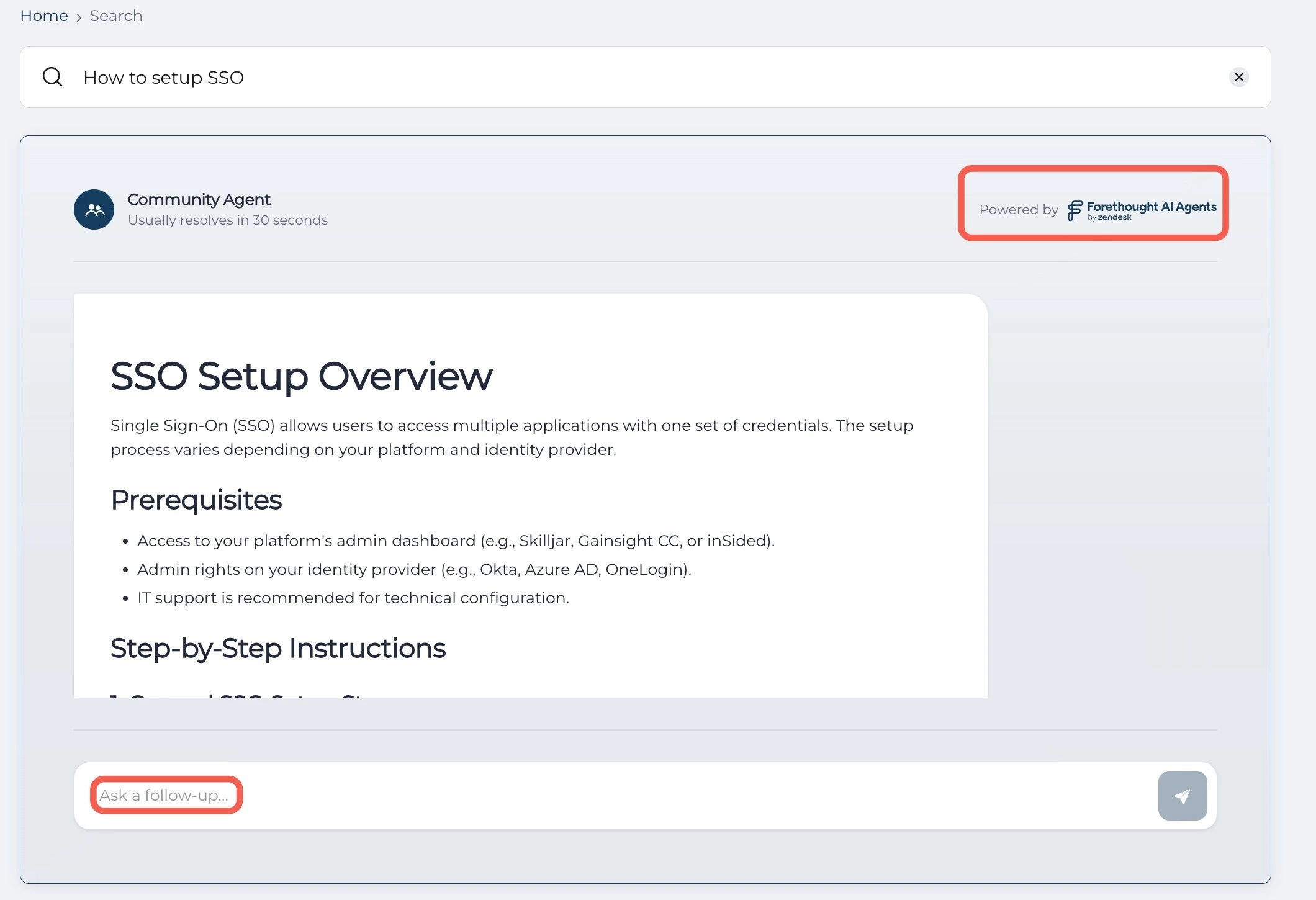
- Follow-Up Questions: Users can ask follow-up questions directly within the agent panel using the Ask a follow-up... text field. This enables a multi-turn conversational experience that is not available with AI Answers.
- Related Articles: The agent displays related articles within its response, linking users to the source content that informed the answer.
- Escalation Workflows: Depending on how you configure your Forethought agent, users can trigger escalation flows such as support ticket creation. For example, if a user asks a billing or refund-related question, the agent can prompt the user to submit a support ticket directly from the community search experience.
IMPORTANT: The agent experience, including what workflows are available and which data sources are connected, is entirely controlled through your Forethought account. Each community can have a unique agent configuration. Gainsight handles the integration layer; Forethought handles the agent configuration.
Key Differences Between AI Answers and Forethought AI Agent
The following table highlights the key differences between the existing AI Answers feature and the Forethought AI Agent integration.
| Capability | AI Answers | Forethought AI Agent |
| AI-Generated Search Summaries | Yes | Yes |
| Follow-Up Questions | No | Yes |
| Data Sources | Permission based Access - Configurable (community, help centers, external sources) | Configurable (community, help centers, external sources) |
| Escalation Workflows | No | Yes (configured in Forethought) |
| Agent Configuration | Managed by Gainsight | Managed by the customer in Forethought |
| Guest User Support | Yes (when Search Summaries for all users is enabled) | Yes (when Search Summaries for all users is enabled) |
Prerequisites
Before you enable the Forethought AI Agent, ensure the following requirements are met:
- An active Forethought account with access to the Solve API.
- A Solve API token generated from your Forethought account.
- UI Answers and UI Answers for guests toggles are enabled in AI > Search Agent settings.
Enable the Forethought AI Agent
Forethought AI Agent can be enabled from the control. To enable Forethought AI Agent:
- Log in to Control.
- Navigate to AI > Search Agent. The Secret Agent page appears.
- Turn on the Forethought Community Agent toggle.
- In the Solve API token field, enter the API token from the Forethought account.
The Forethought AI is now active in the Destination.
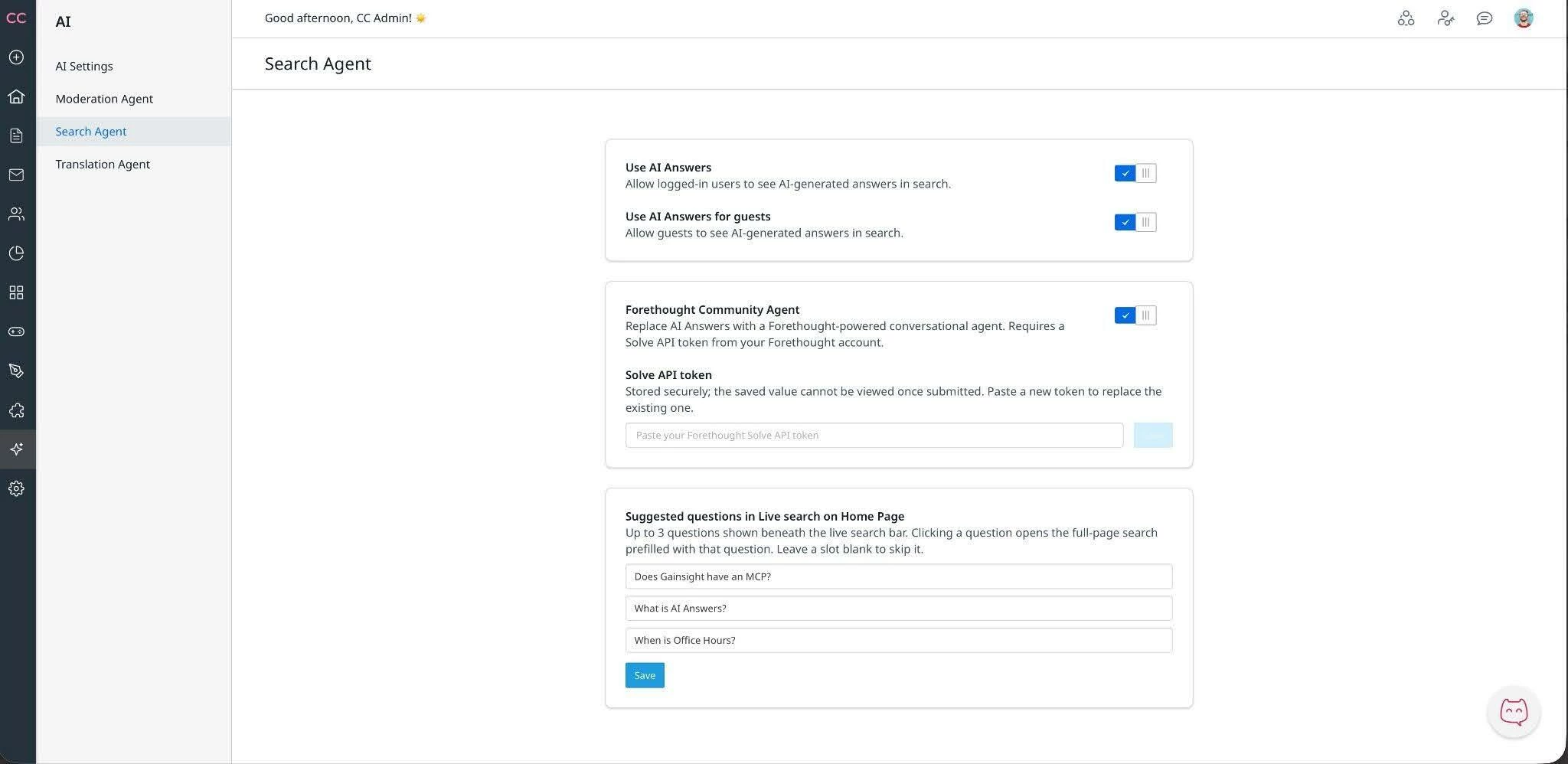
IMPORTANT: You do not need to turn off the existing AI Answers toggles. When the Forethought Community Agent toggle is enabled, and a valid API token is saved, the Forethought agent automatically serves as the active search experience for your community users. If the Forethought Community Agent toggle is not enabled, AI Answers continues to function as normal.
Community User Experience
When a community user performs a search, the Forethought AI Agent appears at the top of the search results in place of the AI Answers panel. The agent displays under the label Community Agent with a Powered by Forethought AI Agents badge.
The agent response includes an AI-generated answer with related articles. Users can continue the conversation by entering follow-up questions in the Ask a follow-up... text field at the bottom of the agent panel.