Paul_
Contributor ⭐️⭐️⭐️⭐️⭐️
January 17, 2024
Solved

Changing the color of the rank title via CSS?

  • January 17, 2024
  • 11 replies
  • 253 views

Hi,

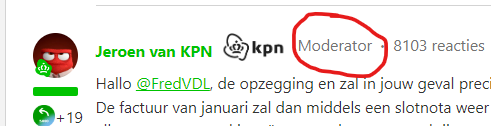
Is it possible to change the color of a specific (moderator) the rank title via CSS? I know about the settings in the back end but I specifically mean a specific rank title. 

I tried some stuff but I can't seem to target 1 specific rank title.💁🏾


    Best answer by lauro.lana

    Hey @Paul_, can you try adding this script? This should do the job, although it will change the color for all moderators

    <script>
    $(".usertitle.qa-usertitle:contains('Moderator')").css('color', 'green');

    </script>


    11 replies

    DannyPancratz
    VIP ⭐️⭐️⭐️⭐️⭐️
    January 17, 2024

    It should be possible. I’m not enough of a CSS wiz to provide the answer, but Support has helped me with that type of thing in the past. 

    Also want to point out that (in Control>Gamification>Ranks) you can customize the username display style for different ranks if you want to differentiate them that way. 


    FYI: I am no longer active in this community
    Paul_
    Paul_Author
    Contributor ⭐️⭐️⭐️⭐️⭐️
    January 17, 2024

    It should be possible. I’m not enough of a CSS wiz to provide the answer, but Support has helped me with that type of thing in the past. 

    I asked support but they didn't really help. I guess that's fair because it's CSS. But I'm kinda convinced this isn't that complicated, but I also am no wiz. :)


    They also mentioned this as an alternative. But that's not what I'm looking for. Thanks though!

    Also want to point out that (in Control>Gamification>Ranks) you can customize the username display style for different ranks if you want to differentiate them that way. 


    DannyPancratz
    VIP ⭐️⭐️⭐️⭐️⭐️
    January 17, 2024

    I asked support but they didn't really help. I guess that's fair because it's CSS. But I'm kinda convinced this isn't that complicated, but I also am no wiz. :)


    I’m quite surprised by this! Support has often been helpful to me with very simple CSS and third-party script requests. As a result, I’ve championed their willingness to help on simple things like this to community consultant reviews, in G2 reviews, and many customer reference calls. 

    If that’s no longer the case, I’m 1.) disappointed, and 2.) going to choose my words more carefully. 

    This is a pretty simple CSS request to help on. Confirming the element to target and assisting with simple CSS to change it. 

    FYI: I am no longer active in this community
    DannyPancratz
    VIP ⭐️⭐️⭐️⭐️⭐️
    January 17, 2024


    This might be something generative AI could help with (i’ve read it can prescribe simple code like this.) Or a search on the CSS to change a color, but you want to target that .usertitle.qa-usertitle element.

    FYI: I am no longer active in this community
    DannyPancratz
    VIP ⭐️⭐️⭐️⭐️⭐️
    January 17, 2024

    Looking at my custom CSS, we have a color change that I’m not quite sure about (pre-dates me, isn’t documented), but it provides us a template to try. 

    .slider-trigger {
        color: #092750;
    }

    but that suggests that all you need to do for your CSS is 

    .usertitle.qa-usertitle {

        color: #_hexcode goes here_;
    }


    FYI: I am no longer active in this community
    Paul_
    Paul_Author
    Contributor ⭐️⭐️⭐️⭐️⭐️
    January 17, 2024

    Looking at my custom CSS, we have a color change that I’m not quite sure about. 


    .slider-trigger {
        color: #092750;
    }


    but that suggests that all you need to do for your CSS is 

    .usertitle.qa-usertitle {

        color: #_hexcode goes here_;
    }

    Yeah, that's how far I got. But that changes the color for all rank titles and not specifically the ‘moderator’ one.


    Thanks for the effort!

    DannyPancratz
    VIP ⭐️⭐️⭐️⭐️⭐️
    January 17, 2024

    Ahh… I suspect that might be the issue. 

    I’ve never seen a CSS element specified to the user role. I imagine it’s a universal styling class for all ranks, so there wouldn’t be a way to target only specific ranks. 

    You should be able to find the user role/rank in the data that loads with the page (the Inspect console of your browser), but I’ve never see that data used with CSS. I think they are two separate components of the page:

    1. Styling code
    2. User data that loads within the code structure
    FYI: I am no longer active in this community
    Paul_
    Paul_Author
    Contributor ⭐️⭐️⭐️⭐️⭐️
    January 17, 2024

    And thát is where it gets too complicated for me 😅


    Maybe @olimarrio? You’re a wizzard, right? 

    lauro.lana
    Gainsight Employee ⭐️
    Gainsight Employee ⭐️
    January 17, 2024

    Hey @Paul_, can you try adding this script? This should do the job, although it will change the color for all moderators

    <script>
    $(".usertitle.qa-usertitle:contains('Moderator')").css('color', 'green');

    </script>


    Paul_
    Paul_Author
    Contributor ⭐️⭐️⭐️⭐️⭐️
    January 18, 2024

    Hey @Paul_, can you try adding this script? This should do the job, although it will change the color for all moderators

    <script>
    $(".usertitle.qa-usertitle:contains('Moderator')").css('color', 'green');

    </script>


    Rookie in your rank title doesn't do you justice, @leo-inspired! You’re a legend. This works. Thank you!


    1 follow up question. If I want to add a rank title in this code, hoe would that work? (Community manager in this case)