Daniele Cmty
Helper ⭐️⭐️
April 12, 2023
Solved

Content Helpfulness: How to modify

  • April 12, 2023
  • 13 replies
  • 295 views

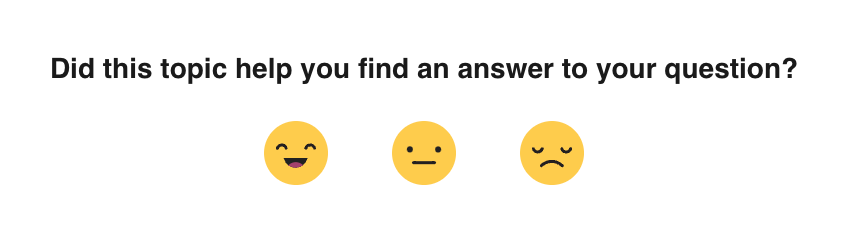
Hi there, we would like to adapt the Content Helpfulness bar to include only 2 options (positive / negative)? We would also like to change it to a thumbs up & thumbs down.


Is it possible in any way, with some CSS or Third Party Script, or other changes?

The reason why we would like to change this is that we want to make this score consistent with our other support channels (which have a 👍👎 voting bar) so we can better compare.


Cheers,
Daniele


Best answer by matt enbar

first thing you would need to do is add custom css to hide the neutral option like so:


.qa-topic-neutral-icon{
display:none;
}

to change the images of the happy and sad face you will need use a 3rd party script to change either the SVG image or insert a different image like so:

//For using an image URL

document.querySelector(".qa-topic-helpful-icon").innerHTML='<img src="thumb up image url here" />'
document.querySelector(".qa-topic-nothelpful-icon").innerHTML='<img src="thumb down image url" />'


// For using SVG
document.querySelector(".qa-topic-helpful-icon").innerHTML='code for SVG'
document.querySelector(".qa-topic-nothelpful-icon").innerHTML='code for SVG'

//example of SVG thumbs up

document.querySelector(".qa-topic-helpful-icon").innerHTML='<svg xmlns="http://www.w3.org/2000/svg" width="512" height="512" viewBox="0 0 512 512"><title>ionicons-v5-k</title><path d="M456,192,300,180l23-89.4C329,64,322.22,48.73,300.53,42l-34.69-9.85a4,4,0,0,0-4.4,1.72l-129,202.34a8,8,0,0,1-6.81,3.81H16V448H133.61a48,48,0,0,1,15.18,2.46l76.3,25.43a80,80,0,0,0,25.3,4.11H428.32c19,0,31.5-13.52,35.23-32.16L496,305.58V232C496,209.94,478,194,456,192Z"/></svg>'


 

13 replies

olimarrio
Gainsight Employee ⭐️
January 8, 2024

Hi @Eva 👋,

Yes you can use the following CSS to change the order of the emojis:

.qa-topic-nothelpful-icon {
order: 1;
}

.qa-topic-neutral-icon {
order: 2;
}

.qa-topic-helpful-icon {
order: 3;
}


Eva
Helper ⭐️
January 8, 2024

Hi @Eva 👋,

Yes you can use the following CSS to change the order of the emojis:

.qa-topic-nothelpful-icon {
order: 1;
}

.qa-topic-neutral-icon {
order: 2;
}

.qa-topic-helpful-icon {
order: 3;
}


Thanks! 🙂

Contributor ⭐️⭐️
April 9, 2024

Hello guys, I wanted to ask, I tried to operationalize the proposed solution using .innerHtml(), but unfortunately unsuccessfully. The problem is that the reaction smileys only load after maybe 1s after the whole DOM of the page is loaded. This means that third-party scripts can't work, as they run before these smileys are loaded. Even if I use for example addEventListener('DOMContentLoaded') I am not able to load the reactions element because it doesn't exist for another second. 

How did you solve this problem? The only solution that works is to use a timeout, but that means it can change before someone's eyes, which I think is an unwanted feature.

 window.addEventListener('load', () => {
    setTimeout(() => {
      const elHelpful = document.querySelector(".qa-topic-helpful-icon");
      console.log("loaded", elHelpful);
    }, 500);
  });

Thank you