Contributor ⭐️⭐️⭐️⭐️
August 6, 2025
Solved

"Did this topic help you find an answer to your question?" - what is the purpose of this feature?

  • August 6, 2025
  • 14 replies
  • 154 views

Hi!

As we’re preparing to launch our community we were wondering if the topic helpfulness feature is necessary to have. I’ve found this topic related to this feature: Topic helpfulness: now previewing on inSpired | Gainsight Community but I was wondering if it has any other impact than in GA? . Our community is a private one, so no need to boost our SEO. Happy to hear your thoughts on this :) 



    Best answer by revote

    So ‘enable’ is the same as ‘use default’ in this case?

    No.

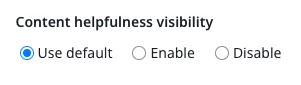
    If visibility of Content Helpfulness score is disabled from Control → Settings → Content Helpfulness, it is disabled from everywhere = Your default setting.

    But you can set it on only for the certain content and then choose “Enable” when the content is open in Control:


    14 replies

    jvdc
    Expert ⭐️
    August 6, 2025

    This is how I understand this:

    When a answer to a question gets marked as “best answer” it really only show value for the person who initially asked this question. But what about those who later on have a similar issue/question and land on this Q&A and find value through the existing exchange?

    These people can then mark that they found the Q&A helpful for their use-case.


    So in a way this can measure a solution re-use. 

    revote
    VIP ⭐️⭐️⭐️⭐️⭐️
    August 6, 2025

    In theory, you can create better content in the future, if you get sad faces. And vice versa.

    juliawAuthor
    Contributor ⭐️⭐️⭐️⭐️
    August 6, 2025

    Thank you both! So the values only appear for the author of the post, correct?

    jvdc
    Expert ⭐️
    August 6, 2025

    No, I believe the results are only accessible via the admin interface.

    revote
    VIP ⭐️⭐️⭐️⭐️⭐️
    August 6, 2025

    Thank you both! So the values only appear for the author of the post, correct?

    No, I believe the results are only accessible via the admin interface.

    You can see the results only from the Control so you have to be admin or moderator or so.

    EDIT: Also, you can enable this. It can be seen above the emojis.


    juliawAuthor
    Contributor ⭐️⭐️⭐️⭐️
    August 6, 2025

    I see! And if I enable this setting below, where should I see the changes? Apologies for all basic questions, we’re still very new to this platform. 


    revote
    VIP ⭐️⭐️⭐️⭐️⭐️
    August 6, 2025

    I see! And if I enable this setting below, where should I see the changes? Apologies for all basic questions, we’re still very new to this platform. 


    Changes, or do you mean results?

    General stats: Control → Home → Content


    Content level: Control → Analytics → Content and scroll down to see Content helpfulness score


    juliawAuthor
    Contributor ⭐️⭐️⭐️⭐️
    August 6, 2025

    I see! And if I enable this setting below, where should I see the changes? Apologies for all basic questions, we’re still very new to this platform. 


    Changes, or do you mean results?

    General stats: Control → Home → Content


    Content level: Control → Analytics → Content and scroll down to see Content helpfulness score


    Got it. So ‘enable’ is the same as ‘use default’ in this case?

    revote
    VIP ⭐️⭐️⭐️⭐️⭐️
    August 6, 2025

    Sorry, I gave wrong information. Please look my edit below:


    Thank you both! So the values only appear for the author of the post, correct?

    No, I believe the results are only accessible via the admin interface.

    You can see the results only from the Control so you have to be admin or moderator or so.

    EDIT: Also, you can enable this. It can be seen above the emojis.


    revote
    revoteAnswer
    VIP ⭐️⭐️⭐️⭐️⭐️
    August 6, 2025

    So ‘enable’ is the same as ‘use default’ in this case?

    No.

    If visibility of Content Helpfulness score is disabled from Control → Settings → Content Helpfulness, it is disabled from everywhere = Your default setting.

    But you can set it on only for the certain content and then choose “Enable” when the content is open in Control: