Madz Gunay
Contributor ⭐️
October 26, 2026
Solved

Edit product update label on published post

If adding a product update label is missed and the post got published. Is there a way to edit and add the label without deleting the whole post? At the moment I believe this is not an option. 

akhilv
akhilvAnswer
Gainsight Employee ⭐️
October 26, 2026

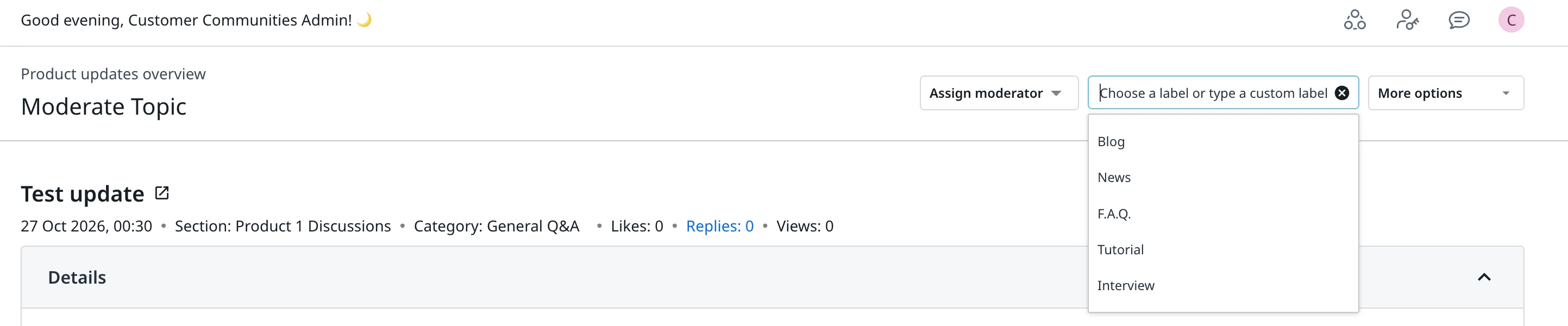
Oh sorry, you can still change it or add it after publishing. I've shared a screenshot below showing where to find it in Control.

4 replies

akhilv
Gainsight Employee ⭐️
October 26, 2026

Hi ​@Madz Gunay ,

I believe you're referring to the product area on a product update. If so, this shouldn't be a problem, and you don't need to delete the post. You can go to that particular product update in Control and add the product area from there. You can also tag product updates and ideas with product areas.

One thing to check: the product area needs to exist first. You can create and manage them in Control under Settings > Product Areas. 

If you meant a different label, let me know and I'm happy to take a look.
 

Translate
Madz Gunay
Contributor ⭐️
October 26, 2026

thank you for your response akhliv! it is actually a different product label. I shared a screenshot below. On that section I can select if the post is a tutorial or news etc. before publishing it, but once the post is published and missed selecting one from the option, I can’t edit to add it in anymore.


Translate
akhilv
Gainsight Employee ⭐️
akhilvAnswer
Gainsight Employee ⭐️
October 26, 2026

Oh sorry, you can still change it or add it after publishing. I've shared a screenshot below showing where to find it in Control.

Translate