
Solved

Error when adding an embedded video

  • April 28, 2026
  • 9 replies
  • 41 views

  • Contributor ⭐️⭐️⭐️⭐️

Hi community,

I’ve been embedding videos from vimeo pretty regularly and it has always worked well. Since yesterday I’ve been receiving the error shown on the screenshot below. Is anyone else experiencing the same? Worth mentioning all videos embedded in the past are displaying correctly. Any tips welcome. Thank you! 
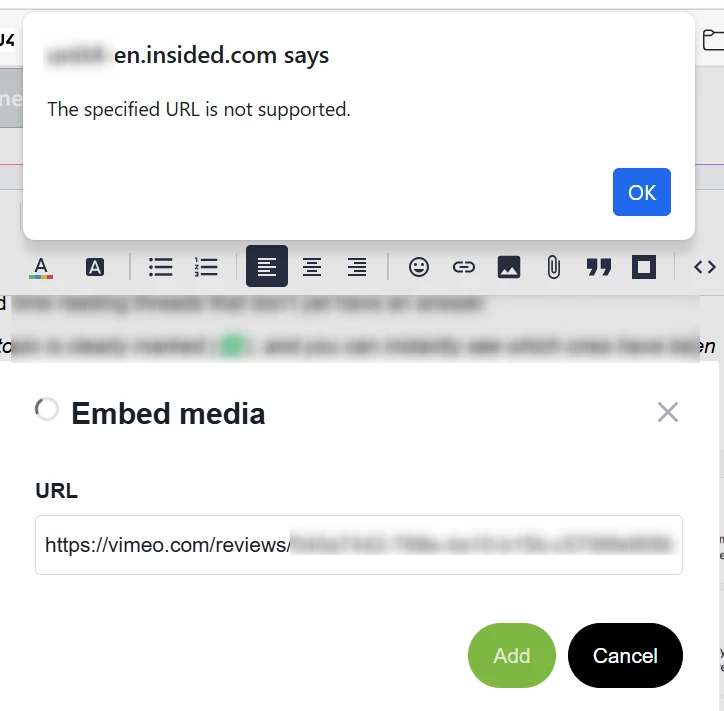
 

Best answer by mitchell.gordon

I have successfully embedded new content in posts and custom pages.


Your url looks off. After Vimeo there is a /reviews/. This is causing your issue. It looks like you are embedding a page not the video itself. The video should just say vimeo.com/(insert numbers)

9 replies

dawn.wayland
  • Contributor ⭐️⭐️⭐️
  • April 28, 2026

@juliaw based on the URL I would assume this is a private domain (used for collaboration)- the video needs to be public for it to embed I believe.  


  • Author
  • Contributor ⭐️⭐️⭐️⭐️
  • April 28, 2026

@juliaw based on the URL I would assume this is a private domain (used for collaboration)- the video needs to be public for it to embed I believe.  

I don’t think that’s the case. I’ve embedded videos from Vimeo the same way in the past and even those from the same folder worked last week. But thank you for the suggestion!


mitchell.gordon

Ive had troubles with this prior. I click the video link then wait till the video loads. I then take the url from the top of the page and embed that.

Sometimes compressed/tiny urls do not embed correctly in posts/pages.


  • Author
  • Contributor ⭐️⭐️⭐️⭐️
  • April 28, 2026

Ive had troubles with this prior. I click the video link then wait till the video loads. I then take the url from the top of the page and embed that.

Sometimes compressed/tiny urls do not embed correctly in posts/pages.

This is exactly what I’m doing but no success.. Are you able to check on your end if you’re experiencing it currently?


Mithila Jayalath

@juliaw I checked on my end and was able to embed without any issues. Could you please try using an incognito window to rule out a potential cache issue?


  • Author
  • Contributor ⭐️⭐️⭐️⭐️
  • April 28, 2026

@Mithila Jayalath just tried it, same result :(


mitchell.gordon

I have successfully embedded new content in posts and custom pages.


Your url looks off. After Vimeo there is a /reviews/. This is causing your issue. It looks like you are embedding a page not the video itself. The video should just say vimeo.com/(insert numbers)


  • Author
  • Contributor ⭐️⭐️⭐️⭐️
  • April 28, 2026

I have successfully embedded new content in posts and custom pages.


Your url looks off. After Vimeo there is a /reviews/. This is causing your issue. It looks like you are embedding a page not the video itself. The video should just say vimeo.com/(insert numbers)

You’re right! Because I opened the video from a folder in Vimeo the URL was different. The link to the individual video is working. Thank you for spotting this!


mitchell.gordon

I have successfully embedded new content in posts and custom pages.


Your url looks off. After Vimeo there is a /reviews/. This is causing your issue. It looks like you are embedding a page not the video itself. The video should just say vimeo.com/(insert numbers)

You’re right! Because I opened the video from a folder in Vimeo the URL was different. The link to the individual video is working. Thank you for spotting this!

There we go, awesome!!! Anytime! Glad we all figured it out and it was able to be be embedded properly.