Solved

Pop-up behavior when hovering on member profile image

  • June 23, 2026
  • 2 replies
  • 40 views

atwhite
Forum|alt.badge.img+2

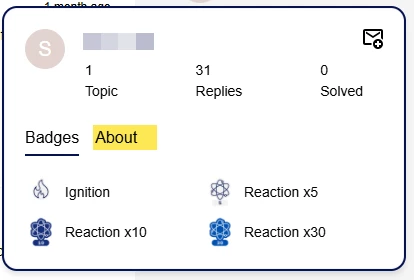
Two questions about the pop-up that appears when hovering over a member’s profile image in a post:

  1. Can you adjust this to display the About tab by default instead of the Badges tab?
  2. Can you adjust this to also pop-up when hovering over the user’s username, not just the profile image?


Best answer by akhilv

Hey ​@atwhite  I just tried this out using Claude and it works

 Third Party Scripts → INSERT BEFORE </BODY> TAG and drop this in:

<script>
// Auto-click "About" tab whenever the profile popup appears
new MutationObserver(() => {
const popup = document.querySelector('.popup-component');
if (!popup) return;
popup.querySelectorAll('.tabs__btn.qa-link-tab').forEach(tab => {
if (tab.textContent.trim().toLowerCase() === 'about' && !tab.classList.contains('tabs__btn--active'))
tab.click();
});
}).observe(document.body, { childList: true, subtree: true });

// Trigger the same popup on username hover as on avatar hover
['mouseover', 'mouseout'].forEach(evt =>
document.addEventListener(evt, e => {
const username = e.target.closest('.qa-username');
if (username) username.closest('.topic-view_header, .qa-topic-block')
?.querySelector('.default-avatar-link')
?.dispatchEvent(new MouseEvent(evt, { bubbles: true }));
})
);
</script>

And this in Custom CSS to show About first:

.qa-profile-tooltip-tabs {
display: flex;
flex-direction: row-reverse;
justify-content: flex-end;
}
2 replies

akhilv
Gainsight Employee ⭐️
  • Gainsight Employee ⭐️
  • Answer
  • June 23, 2026

Hey ​@atwhite  I just tried this out using Claude and it works

 Third Party Scripts → INSERT BEFORE </BODY> TAG and drop this in:

<script>
// Auto-click "About" tab whenever the profile popup appears
new MutationObserver(() => {
const popup = document.querySelector('.popup-component');
if (!popup) return;
popup.querySelectorAll('.tabs__btn.qa-link-tab').forEach(tab => {
if (tab.textContent.trim().toLowerCase() === 'about' && !tab.classList.contains('tabs__btn--active'))
tab.click();
});
}).observe(document.body, { childList: true, subtree: true });

// Trigger the same popup on username hover as on avatar hover
['mouseover', 'mouseout'].forEach(evt =>
document.addEventListener(evt, e => {
const username = e.target.closest('.qa-username');
if (username) username.closest('.topic-view_header, .qa-topic-block')
?.querySelector('.default-avatar-link')
?.dispatchEvent(new MouseEvent(evt, { bubbles: true }));
})
);
</script>

And this in Custom CSS to show About first:

.qa-profile-tooltip-tabs {
display: flex;
flex-direction: row-reverse;
justify-content: flex-end;
}

atwhite
Forum|alt.badge.img+2
  • Author
  • Helper ⭐️⭐️⭐️
  • June 23, 2026

Thanks, ​@akhilv! We’re trying something similar. And your response is confirmation that this doesn’t seem to be possible natively, which is also helpful to know. Thank you!