

Automate the Boring Stuff in Gainsight: the Admin CLI + Open Source Claude Code plugin
Not sure what the Gainsight CS Admin CLI tool is? Just a fancy way to have an LLM build rules for you? You can ask it to build a rule – I tried once and it wasn’t for me. But building rules via LLM is the least interesting application of this tool from what I have found.
It's a command line: a set of precise commands that read and change your tenant's configuration, and that do exactly what they're told. Even things you’ve wanted to tell the tool for years in the UI and can’t: search everything at once, repeat the same change across a hundred assets, and show you connections you'd otherwise have to click through a dozen screens to find. It's the idea behind Al Sweigart's Automate the Boring Stuff with Python: the tedious parts of the job are exactly the parts a computer should do.
So I built a plugin that points that idea at Gainsight admin work. The mental model is three layers:
- The CLI is the hands. Precise commands, no judgment.
- Claude Code is the brain. It reads your question and decides which commands to run.
- The plugin is the playbook and the guardrails. It holds proven workflows for common admin jobs, plus safety checks that keep the brain from surprising you.
The Admin CLI
@gainsight/gs-admin-cliis Gainsight's official Admin CLI. It covers rules, Journey Orchestrator, Data Management, Data Designer, connectors, scorecards, reports and queries, about 190 commands in all. Installing it takes three commands:
npm install -g @gainsight/gs-admin-cli

gs-admin login --base-url https://YOUR_TENANT.gainsightcloud.com

gs-admin whoami
You'll need Gainsight super admin access and an OAuth app set up in your tenant. Gainsight's Configure Admin CLI guide is the authority on the CLI itself. Never opened a terminal? The setup section of the repo's README starts from zero, on Windows or Mac.
Not a Claude Code user? The same repo has a searchable reference for every CLI command (gs-admin-cli-docs, an unofficial community project; see the note at the end).
The plugin: gs-superadmin
It starts by building you a local knowledge base of your tenant: every* (*as supported by the CLI) rule, journey, report, connector, Data Designer and scorecard, documented as files on your machine. Everything below answers from it. (On API billing? Setup documents 25 assets per run by default, and you can adjust that, so spend stays predictable.)
Three things it does that I couldn't do in the UI:
1. Sweep the whole tenant for a Salesforce object, field, or connection. Name it, and you get every rule, journey, report, connector job, Data Designer and scorecard that touches it, down to how: a filter, a write target, a mapped field, a report column.
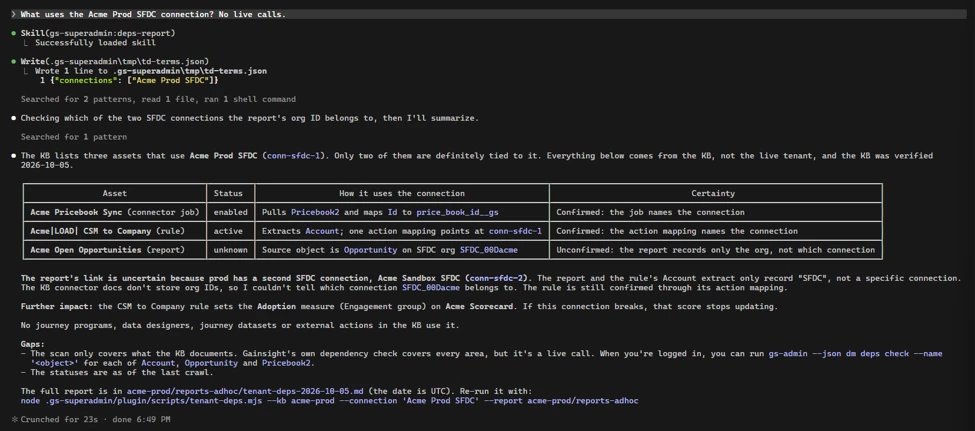
If you spent late 2025 trying to work out everything that touched your Salesforce connection, you already know why this matters. It wouldn't have prevented anything, but it would have turned days of clicking into one report during cleanup. The closest thing in the UI, Analyzer, gives you glimpses. This report also puts Gainsight's own dependency check side by side with its sweep, so you can see what each one caught. It's only as complete as the knowledge base behind it, and every report says what it couldn't see.
2. Search every Journey Orchestrator email for a phrase. Last year's promo, a retired product name, a departed CSM's signature: you get every template that mentions it and the programs that send each one, without opening templates one by one.
3. Bring names in line with your naming convention. It audits every rule name against your standard, proposes fixes, and renames only the exact list you approve.
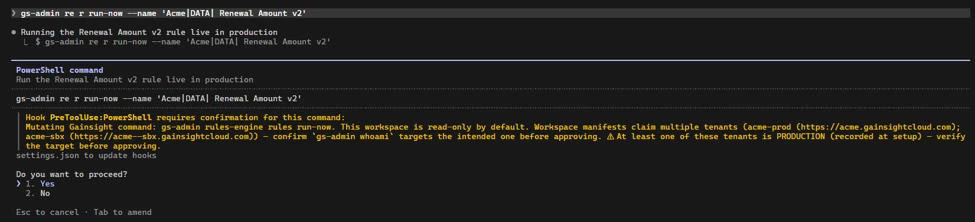
The guardrails. Reads run freely. Anything the CLI marks as a change stops and asks you first, naming the tenant and flagging production, and every approved change is logged to a local journal. It asks; it never blocks, so your judgment at the prompt is the real gate. That matches Gainsight's own advice to start read-only.
Try It!
Once the CLI is logged in, install the plugin from a terminal:
claude plugin marketplace add BradleyDB/gs-admin-cli-docsclaude plugin install gs-superadmin@gs-admin-cli-docs(Using the Claude desktop app? It's a few clicks under + → Plugins; the README has the steps, plus how to turn on auto-update so fixes reach you.)
Then open Claude Code in a new, empty folder and run /gs-superadmin:setup.
Start on a sandbox. Let setup document a batch, then just ask: "What depends on the ARR field on Company?" It's read-only, and it's the quickest way to see what this can do.
If it saves you an afternoon, a ⭐ on the repo helps other admins find it.
Feedback: questions and ideas → the comments here (I'm watching them). Plugin bugs → GitHub Issues. CLI bugs → Gainsight support; /gs-superadmin:report-bug writes one up for you.
Unofficial community project. gs-superadmin and the gs-admin-cli-docs repo are not affiliated with, endorsed by, or supported by Gainsight, Inc. "Gainsight", gs-admin, and @gainsight/gs-admin-cli are products and/or trademarks of Gainsight, Inc., named here only to describe what this project works with. The plugin does nothing on its own: it works through the CLI that you install, license, and authenticate.
Support. One maintainer, built on my own time, best effort, no SLA.
Accuracy. To the best of my knowledge, this post was accurate at the time of writing (Oct 5 2026) against @gainsight/gs-admin-cli 1.0.10 and gs-superadmin v0.43.3. Because this wasn't built or endorsed by Gainsight, a later CLI update could change how the plugin behaves. The repo is kept current. For the latest on the CLI itself, see support.gainsight.com.