

Question

Filter participants operator in New JO programs

  • December 18, 2025
  • 5 replies
  • 95 views

Marion S.
Forum|alt.badge.img

I used to use “greater than “as a parameter to filter the template model that participants in my program would receive.
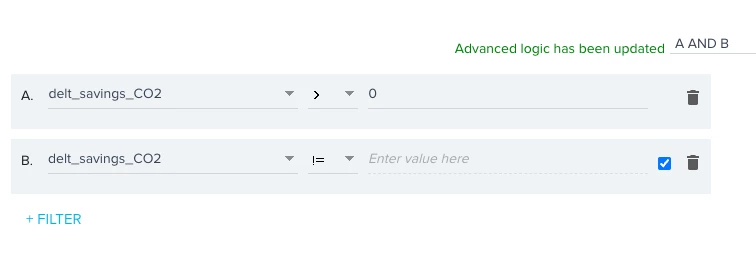

This option is not available in the new editor.
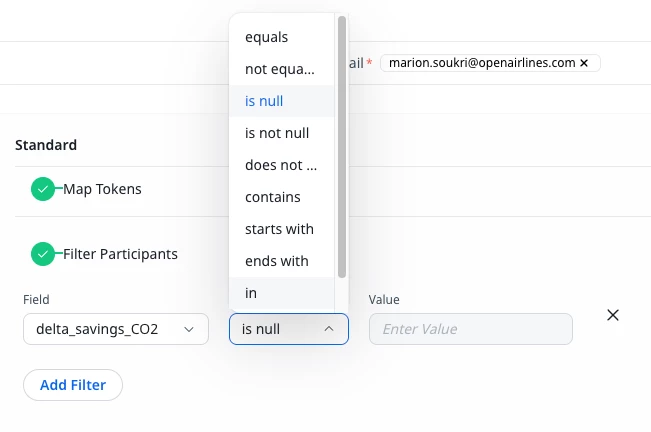
 

Have you encountered the same problem? How do you recommend I proceed?

5 replies

romihache
Forum|alt.badge.img+9
  • VIP ⭐️⭐️⭐️⭐️⭐️
  • December 19, 2025

Hi ​@Marion S. 
I did some tests from my end and looks like this is an issue related to using a CSV as source perhaps?
My gut tells me that as we can’t choose formats, the field is being treated as a String…

If you use Data Designer or Query Builder as source, you can apply filters over Number data types without an issue:


I’d check with support on this one. Meanwhile, you can work around it by uploading the CSV to S3 and using Data Designer as the source instead of the direct upload. When you use S3, you can update the Data Type:


Marion S.
Forum|alt.badge.img
  • Author
  • Contributor ⭐️⭐️⭐️
  • December 19, 2025

Hi, thanks for your reply.

Yes, I use a CSV file. I forgot to mention it!

I don't have this problem with the old program builder, even though my file format hasn't changed. I'll check with the support team y

I'll check out the suggested workaround, but it adds an extra step. I do this at least once a month, so it's not ideal to make the process longer.
Thank you for your help, 


dayn.johnson
Forum|alt.badge.img+7
  • VIP ⭐️⭐️⭐️⭐️⭐️
  • January 5, 2026

Hey ​@Marion S., bit delayed in response here, but ​@romihache inspired me to do some more testing after returning from winter break.

Looks like you can change that data type to a number! 😃

  1. Audience > View Source Fields
  2. Change Data Type

* ❗Important – you’ll need to make sure that the field in question is mapped somewhere in your journey. If it’s not, yet another workaround (#YAW) I’ve found is to add an evaluate step in the JO that checks that the field in question is not null. 🤣

Hope this is helpful!

Audience > View Source Fields
Available Data Types


romihache
Forum|alt.badge.img+9
  • VIP ⭐️⭐️⭐️⭐️⭐️
  • January 5, 2026

Oh thank you ​@dayn.johnson !

I'm not used to CSVs so I tested a bit to find that it was the source, so it's great to know that there is a way to achieve this. TIL 🙂


Marion S.
Forum|alt.badge.img
  • Author
  • Contributor ⭐️⭐️⭐️
  • January 14, 2026

@dayn.johnson 
Thank you for taking the time to investigate. I will try and let you know