

Solved

Group Send - Logging to timeline
  • May 19, 2026
  • 4 replies
  • 103 views

LMAR
  • Contributor ⭐️

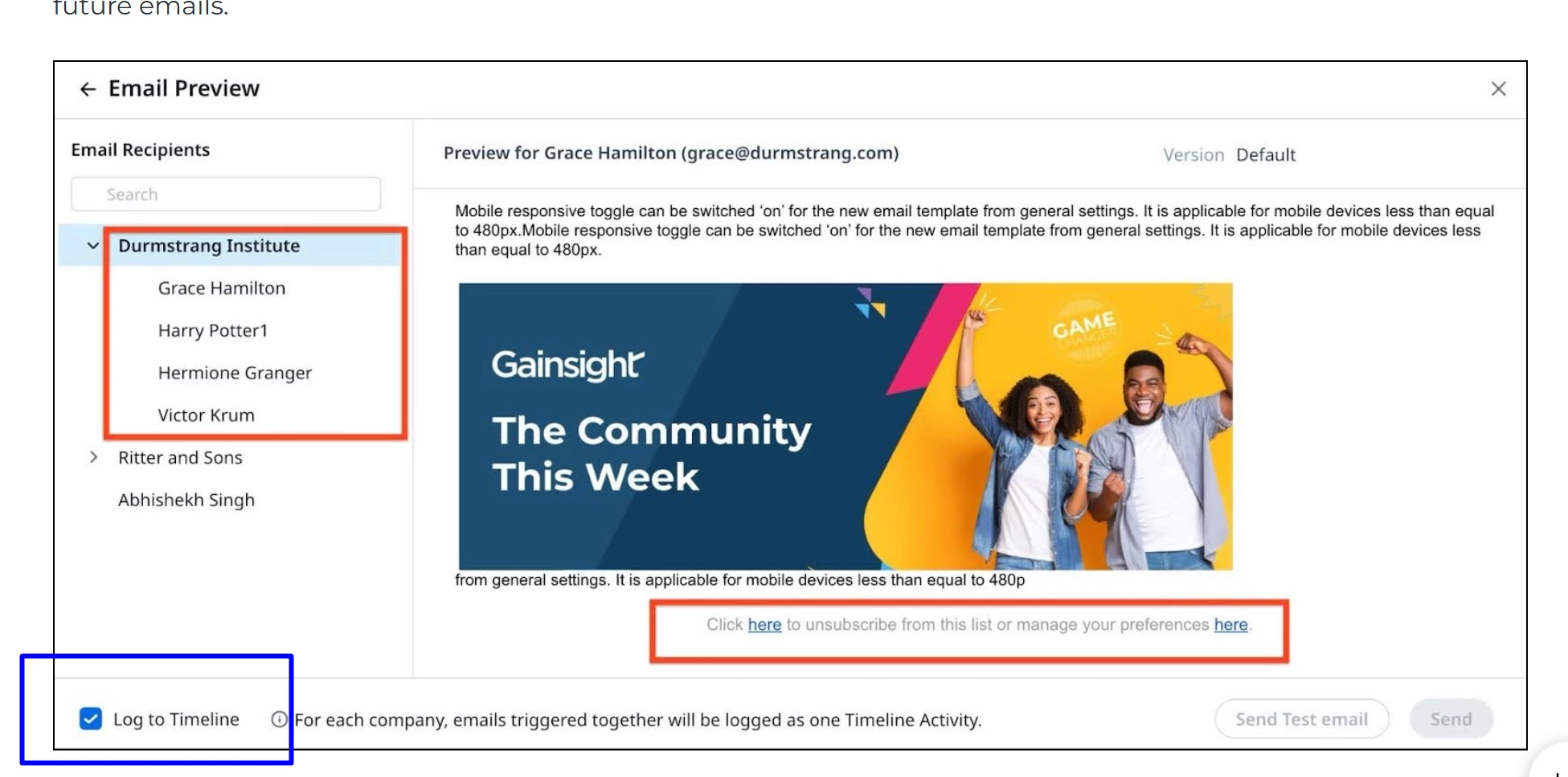
Hi All! I recently became a GS Admin for my company, and this is my first time posting here so forgive me if this has been mentioned or asked. I was a previous CSM so we are gearing up to send mass emails to clients to let them know of my transition. With that, I am learning that we can do “group send” in GS. Looking at the User Guide, I noticed that the email preview shown (see attached) shows log to timeline however when I tested this myself the log to timeline option doesn’t show.


If I do a group send to multiple people across various companies, will it not show in their company timeline? Is there something I am missing?


Any help would be greatly appreciated!

Best answer by Akanksha Kandari

Hi! Great question - the Log to Timeline checkbox is admin-gated, which is maybe why it's not showing for you.

Your admin needs to enable it here: Administration > Communication > Email Configuration > Compliance > GS Home → toggle on Automatically Log Emails in Timeline.

Once that's on, the checkbox will appear in your Email Preview (selected by default, but editable per send).

To your second question - yes, when doing a Group Send across multiple companies, a separate Timeline activity is logged for each respective company/relationship, with that company's recipients appearing in the As Viewed By dropdown on the activity. A few things to note:

  • Timeline activities from Group Send cannot be edited.
  • If all recipients are internal users, no activity is created.
  • Either way, all sends are logged in the Email Log V2 object (Source: GS Home-People Widget) for reporting.

Helpful references:

Hope this helps!

4 replies

Akanksha Kandari
Gainsight Employee ⭐️
Forum|alt.badge.img
  • Gainsight Employee ⭐️
  • Answer
  • May 26, 2026

Hi! Great question - the Log to Timeline checkbox is admin-gated, which is maybe why it's not showing for you.

Your admin needs to enable it here: Administration > Communication > Email Configuration > Compliance > GS Home → toggle on Automatically Log Emails in Timeline.

Once that's on, the checkbox will appear in your Email Preview (selected by default, but editable per send).

To your second question - yes, when doing a Group Send across multiple companies, a separate Timeline activity is logged for each respective company/relationship, with that company's recipients appearing in the As Viewed By dropdown on the activity. A few things to note:

  • Timeline activities from Group Send cannot be edited.
  • If all recipients are internal users, no activity is created.
  • Either way, all sends are logged in the Email Log V2 object (Source: GS Home-People Widget) for reporting.

Helpful references:

Hope this helps!


LMAR
  • Author
  • Contributor ⭐️
  • May 26, 2026

@Akanksha Kandari this worked, thank you! Will logging to timelines also work when you upload a CSV to programs to do a mass email?


Akanksha Kandari
Gainsight Employee ⭐️
Forum|alt.badge.img

Hi,
Glad it worked!

Yes, it works the same way! When you upload a CSV as the audience source in a Journey Orchestrator Program, emails sent through that program can be logged to Timeline - as long as the Log to Timeline checkbox is selected by the admin while configuring the program (under the Configure Emails step).

A couple of things to keep in mind for JO programs (slightly different from Group Send):

  • The activity type will be Automated Program (out-of-the-box, not editable).
  • All emails sent from a program for a company/relationship on a particular day are logged as one Activity - i.e., daily aggregation per company, not one activity per email. Gainsight
  • Emails will be visible in Activities after the next sync with Journey Orchestrator, which occurs every 4 hours - so there's a slight delay vs. Group Send. Gainsight
  • Make sure your CSV includes Account ID and Email at minimum, since those are required for JO to associate each participant to the correct company timeline.

Reference: Access Journey Orchestrator Emails in Timeline

Hope this helps!


LMAR
  • Author
  • Contributor ⭐️
  • May 26, 2026

@Akanksha Kandari Thanks so much! So helpful!