meenal_shukla
Gainsight Employee ⭐️⭐️
November 20, 2018

How to send emails in the JO only on weekdays and skip weekends?

  • November 20, 2018
  • 18 replies
  • 2606 views

Answer: I have seen this use case and have wrongly used Continue function for this use case, so I want to make sure that others learn from my mistakes 🙂.

Here is how you can create a program so that you can send it out only on the weekdays:

1. Create a Salesforce formula field in the Customer Info/Company/Account object that determines the day of the week.

Formula can be cut and pasted from here:

CASE( MOD( TODAY() - DATE(1900, 1, 7), 7), 0, "Sunday", 1, "Monday", 2, "Tuesday", 3,

"Wednesday", 4, "Thursday", 5, "Friday", 6, "Saturday","Error")

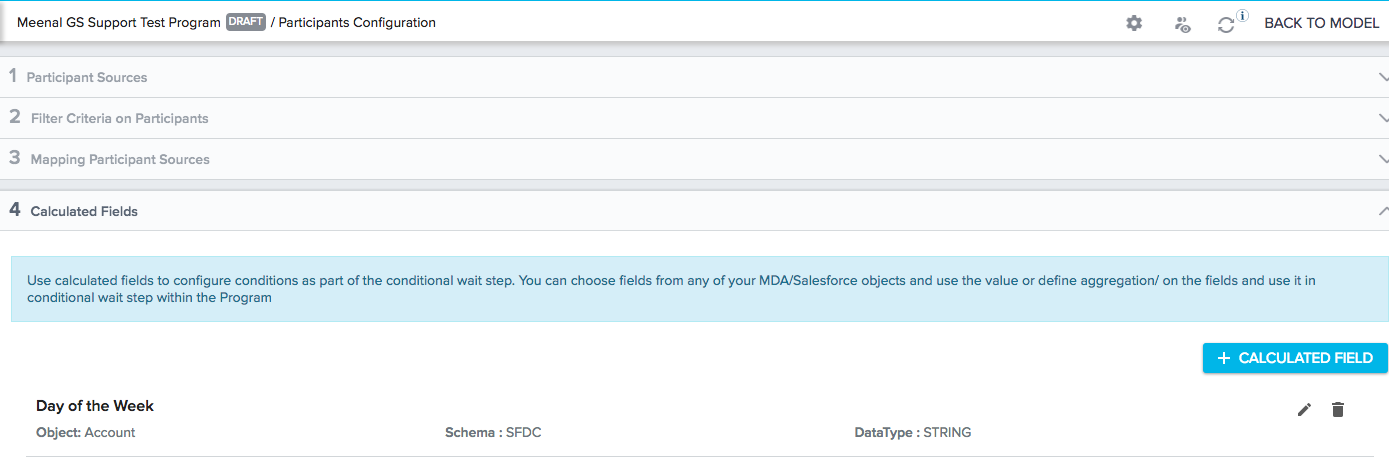
2. In the participant configuration, add this calculated field:
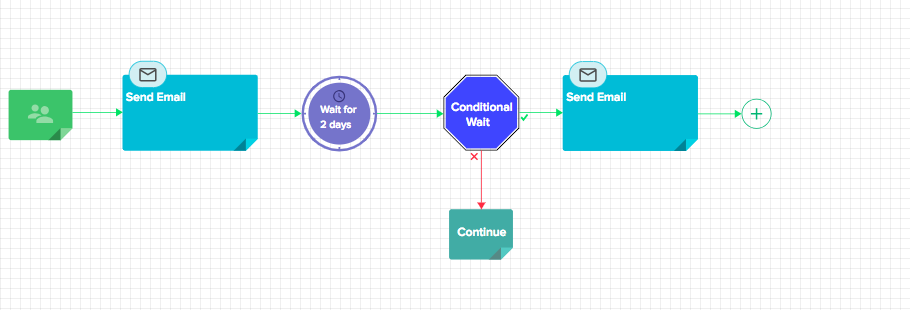
3. Your handy helper is the Conditional Wait. Say your program looks like this. The first email is sent out as soon as the program becomes active or it can be scheduled to run on a certain date. Point is you can skip weekends in the first step. But once you wait for 2 days, there is no guarantee if that day is a weekend. Either ways, you can have ConditIonal wait at any point during this program to check if today is a weekday or a weekend day.
 

Your conditional wait looks like this:
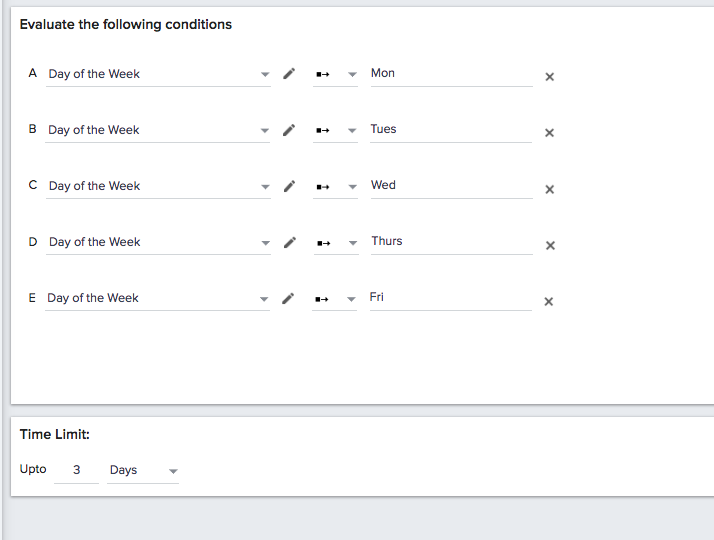
 

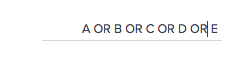
4. Note the logic above(this is on the right hand corner) is A OR B OR C....It defaults to AND and therefore you need to change that.

5. Also note the Time Limit as 3 days which means Wait up to 3 days in the conditional wait. This is telling the system to wait until one of the above conditions is true (because of the OR logic) for 3 days.

When it is in Wait, the program check until wait period (i.e for the next 3 days) for every 11 hours. So, let's say if the participant is added on Saturday then:
 

  1. For the 1st 11 hrs, it is Saturday, so no email will be sent.
  2. It checks again in next 11 hrs and it is still Saturday, so no email will be sent.
  3. Then after next 11 hours it will be Sunday, so no email will be sent.
  4. After 11 hours it will be Sunday, so no email will be sent
  5. Then after 11 hours, it will be Monday, and according to the journey diagram above, the email will be sent.


18 replies

dan_ahrens
Expert ⭐️⭐️⭐️
October 9, 2020

Meenal to the rescue!

VP of Customer Success at Forcepoint
davebrown2242
Helper ⭐️
February 1, 2021

This really needs to be an out of the box configuration option. +1

DB
anna-whitehouse
Contributor ⭐️⭐️⭐️⭐️
February 5, 2021

I want to skip weekends for the first email in a scheduled email chain program and send to participants who would’ve received the email on a weekend day on Mondays. 


If I schedule the query to run M-F, will the filters and logic below work? 

(Contract End Date is the field name that’s cut off.) 


ml2019
Contributor ⭐️⭐️⭐️⭐️⭐️
June 30, 2022

I have created an mda side formula field using similar logic and followed the strategy. This is not ideal though because the 11 hour evaluation delay is causing our sends to occur outside of business hours (which is the whole issue we are trying to avoid with not sending on weekends). If a participant enters a cw on Saturday at 9am and we have a timer of 66 hours, evaluations occur at Saturday 8pm, Sunday 7am, 6pm, and then 5am Monday, and the email is sent 5am Monday, which is too early.

Additionally, while the 11 hour cadence IS documented, the fact that the first evaluation does not occur when the participant enters the CW, but instead 11 hours after that point, is not. Participant enters at 1am saturday evaluations occur at Saturday 12pm, 11pm saturday, Sunday 10am, 9pm, and then it would be 8am Monday but the Timer ends at 1am Monday and so the last evaluation was 9pm on sunday and so the participants were knocked off.

Because this was not in the documentation, we did not build programs with this in mind and have had to clone our programs to make up for this, which of course impacts our ability to report on the programs. More importantly though, the initial timer set was too short and so a large chunk of our participants were knocked off because it was still sunday when the timer ran out. To resolve this we had to clone the program and add the drop outs to start on a truncated version of the program. And then we run into the same issues with reporting here as well. 

End result is that what should have been 4 programs total has become 12.


gunjanm
Expert ⭐️
June 30, 2022

I have created an mda side formula field using similar logic and followed the strategy. This is not ideal though because the 11 hour evaluation delay is causing our sends to occur outside of business hours (which is the whole issue we are trying to avoid with not sending on weekends). If a participant enters a cw on Saturday at 9am and we have a timer of 66 hours, evaluations occur at Saturday 8pm, Sunday 7am, 6pm, and then 5am Monday, and the email is sent 5am Monday, which is too early.

Additionally, while the 11 hour cadence IS documented, the fact that the first evaluation does not occur when the participant enters the CW, but instead 11 hours after that point, is not. Participant enters at 1am saturday evaluations occur at Saturday 12pm, 11pm saturday, Sunday 10am, 9pm, and then it would be 8am Monday but the Timer ends at 1am Monday and so the last evaluation was 9pm on sunday and so the participants were knocked off.

Because this was not in the documentation, we did not build programs with this in mind and have had to clone our programs to make up for this, which of course impacts our ability to report on the programs. More importantly though, the initial timer set was too short and so a large chunk of our participants were knocked off because it was still sunday when the timer ran out. To resolve this we had to clone the program and add the drop outs to start on a truncated version of the program. And then we run into the same issues with reporting here as well. 

End result is that what should have been 4 programs total has become 12.


I can attest to this being a PITA. We’ve had to push several items in order to resolve issues caused by this.

Gunjan
alizee
VIP ⭐️⭐️⭐️⭐️⭐️
September 15, 2022

Any news on this being built into the product so that it would skip weekends and only re-evaluate the condition every 24 hours from the initial send time so we don’t end up with emails being sent outside business hours which is super awkward. 

The most expensive part of building is the mistakes. That's true in construction. Not so much in CSOps. So ask questions, make mistakes and learn. All views expressed here are my own.
Contributor ⭐️⭐️⭐️
September 5, 2023

Just brainstorming here but if you take an example of wanting to send an email 75 days before renewal and don’t want to send email over the weekend, I think the following might work…

Sources Filters 

Renewal Date <= Add N Days to Rule Date, 77

Renewal Date >= Add N Days to Rule Date, 75 

Schedule this to run on Weekdays Only so on a Friday it captures renewal dates 77 days in the future but it also captures the renewal date 76 and 75 days in the future.

This rolling 3 day window will account for not running the Sources data on the weekend. 

Rely on the Uniqueness Criteria in the Filter Criteria on Participants to only allow your recipient into the program once even though they will meet the Participant Sources criteria in 3 consecutive days.  


Anybody think this would work?

matthew_lind
VIP ⭐️⭐️⭐️⭐️⭐️
September 5, 2023

That should work @Todd Dowell, with one possible caveat.

Your program will send more emails at 77 days in the future and fewer at 75 days in the future. If you run this every weekday, your customers who are renewing 77 days in the future will be in scope. Then the next two days (days 76 and 75) they would be excluded based on uniqueness criteria.

On a Monday, you would send 3x worth of emails, because on Mondays you would be sending for days 77, 76 and 75. 

If you really want it to land on 75 days prior to renewal most often, then use your plan, but use 75, 74 and 73. Your message will arrive 1 or 2 later than planned, if that 75th day is a weekend day.

Making people their best....currently disguised as a CS Ops Architect. How can I contribute to your success?