Solved
kunal_bhatAnswer
Helper ⭐️⭐️⭐️
July 18, 2018
Hi Neftali,
If you wanted to see the Company object's fields when you create a report on your custom object you would actually need to go about it the other way and enable the lookup on a custom object field.
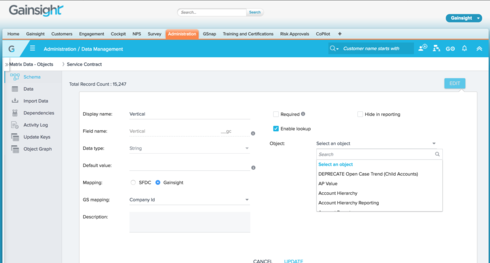
Go the Edit view for the field in your custom object that you want the join to be based on.
Then similar to what you've done above, "Enable Lookup" and then look for the Company object.
You can then select the field to join on (in your case the Vertical field in the Company object).
This will then give you the option to select fields from Company in your report based on the field that your join is based on.
Hope this helps!
Thanks,
Kunal
If you wanted to see the Company object's fields when you create a report on your custom object you would actually need to go about it the other way and enable the lookup on a custom object field.
Go the Edit view for the field in your custom object that you want the join to be based on.
Then similar to what you've done above, "Enable Lookup" and then look for the Company object.
You can then select the field to join on (in your case the Vertical field in the Company object).
This will then give you the option to select fields from Company in your report based on the field that your join is based on.
Hope this helps!
Thanks,
Kunal