Hi everyone, new GS learner here. I am trying to log a manual timeline activity and it shows there after I hit ‘Log Activity’, but then when I refresh the record, or close out of it and come back in, the activity is gone. I tried it on different accounts and same thing. Any idea?
When you use the associated records feature: · In a report from Activity Timeline, you’ll find the record ONLY in the Company that you created the entry (I just have the user who created the entry and date as filters)
How the entry looks like in Report Builder
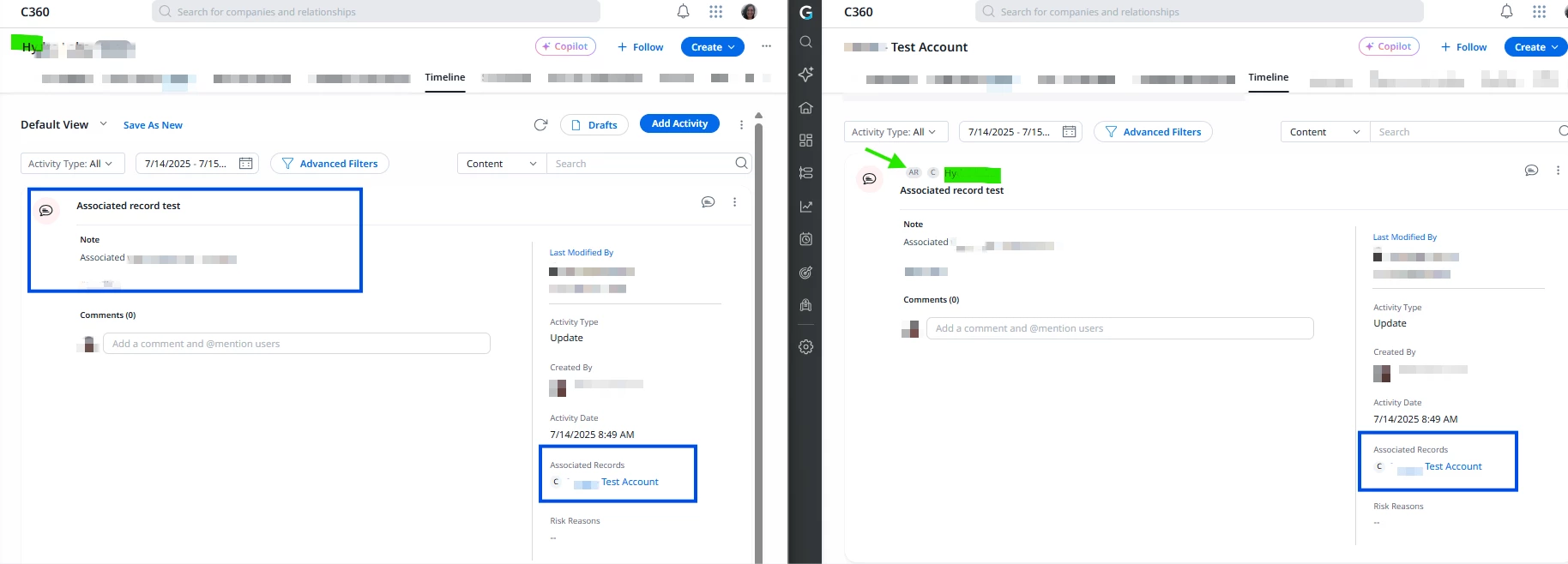
· But, you should see it in both Timelines. At left, the account “Hy...” where the entry was created. At right “...Test Account”. The Notes, title, and associated record box look exactly the same, but in “...Test Account” you can see at the top two circles: AR and C (Associated Record and Company respectively) that shows the source of that entry
How an associated record looks like in Timeline’s UI
I wanted to confirm if you are filling out the mandatory fields while logging a Timeline activity and if you refresh the entire page and navigate to Timeline section once again, does it not show the timeline entry you made at all?
Hi @fwdthink Have you tried clearing your cache yet? That often resolves some UI glitches. It might also be worth checking with your Admin to see if the record appears in a report (Activity Timeline GSID).
If the issue persists, I’d recommend to capture a screen recording and a HAR file and submit a ticket to support.
Continuous improvement is better than delayed perfection
Hi @Sanchita and @romihache, thanks for your replies. I am filling out the mandatory fields, and I have tried clearing cache. They do show up when I run an Activity Timeline report. I am also a Super Admin so I have full access to see everything, and there are no filters on the Timeline area. I was trying to see if there’s something I am doing wrong before thinking the system is glitching. Here’s a screen shot of what I see. Thanks again.
At least you are an admin so troubleshooting is a bit more straightforward @fwdthink. I didn't want to assume your permissions earlier since your profile is pretty lean 😅
Honestly, if you’ve already ruled out filters, and I can see in your screenshot that the Default View is applied, I’m stumped. I can’t think of a specific permission that allows you to create an entry but then hides it from you. My last shot in the dark suggestion: try clicking Refresh Activities (next to Drafts)
Continuous improvement is better than delayed perfection
@romihache Oh.. yes, I am actually a Gainsight learner, hence the lean profile 😀 attempting the exercises that Gainsight recommends, and I’ve been stumbling across multiple issues that I can’t tell if they are glitches or if I am doing something wrong.
I have clicked on Refresh Activities next to Drafts any times, and that doesn’t do anything. The number in Drafts still persists. Quick question - and I think it may be part of glitch now - when I create an activity with associated record between two companies, I am supposed to see that timeline activity in both company’s timeline activity area, correct? When I run a timeline activity report, I only see that activity record show up on the company that I created it on. Should it also list the associated record that I associated as well? See attached pic. I created two samples on Abbvie, but if I attached the associated record to PayPal, shouldn’t I see it listed for PayPal as well, so essentially, two of the same records but different company? (These don’t show up under Timeline either.) Thanks!
When you use the associated records feature: · In a report from Activity Timeline, you’ll find the record ONLY in the Company that you created the entry (I just have the user who created the entry and date as filters)
How the entry looks like in Report Builder
· But, you should see it in both Timelines. At left, the account “Hy...” where the entry was created. At right “...Test Account”. The Notes, title, and associated record box look exactly the same, but in “...Test Account” you can see at the top two circles: AR and C (Associated Record and Company respectively) that shows the source of that entry
How an associated record looks like in Timeline’s UI
Hope this helps!
Continuous improvement is better than delayed perfection
If you ever had a profile with us, there's no need to create another one. Don't worry if your email address has since changed, or you can't remember your login, just let us know at community@gainsight.com and we'll help you get started from where you left.
Else, please continue with the registration below.