Contributor ⭐️⭐️
October 29, 2020
Solved

Populating multi-select picklist through a rule

  • October 29, 2020
  • 18 replies
  • 1266 views

Hi Gainsight community,

I am trying to populate the list of systems installed on an account through a “Systems installed” multi select picklist which i have created. How do i create a rule to populate multiple items for the same account. The rule takes once record at a time and only populates the last item. 

For eg Account 123 has install base serial numbers abc, def, ghi, jkl

I want to populate for all accounts their unique serial numbers in a multi-select dropdown. 

I created a multi-select dropdown and called it “Systems installed”, it wanted me to add one value atleast so added a default value while creating the field in the company object. But when i ran the rule for the account which has 17 such serial numbers it errored out.


Thanks

Anil


2020-10-29T00-49-57_UTC - GSOBJ_1012 : Invalid/Inactive value provided for picklist. [Field Name: Installed_Systems__gc] at row number 1

2020-10-29T00-49-57_UTC - GSOBJ_1012 : Invalid/Inactive value provided for picklist. [Field Name: Installed_Systems__gc] at row number 2

2020-10-29T00-49-57_UTC - GSOBJ_1012 : Invalid/Inactive value provided for picklist. [Field Name: Installed_Systems__gc] at row number 9

2020-10-29T00-49-57_UTC - GSOBJ_1012 : Invalid/Inactive value provided for picklist. [Field Name: Installed_Systems__gc] at row number 12

2020-10-29T00-49-57_UTC - GSOBJ_1012 : Invalid/Inactive value provided for picklist. [Field Name: Installed_Systems__gc] at row number 13

2020-10-29T00-49-57_UTC - GSOBJ_1012 : Invalid/Inactive value provided for picklist. [Field Name: Installed_Systems__gc] at row number 7

2020-10-29T00-49-57_UTC - GSOBJ_1012 : Invalid/Inactive value provided for picklist. [Field Name: Installed_Systems__gc] at row number 14

2020-10-29T00-49-57_UTC - GSOBJ_1012 : Invalid/Inactive value provided for picklist. [Field Name: Installed_Systems__gc] at row number 8

2020-10-29T00-49-57_UTC - GSOBJ_1012 : Invalid/Inactive value provided for picklist. [Field Name: Installed_Systems__gc] at row number 15

2020-10-29T00-49-57_UTC - GSOBJ_1012 : Invalid/Inactive value provided for picklist. [Field Name: Installed_Systems__gc] at row number 5

2020-10-29T00-49-57_UTC - GSOBJ_1012 : Invalid/Inactive value provided for picklist. [Field Name: Installed_Systems__gc] at row number 6

2020-10-29T00-49-57_UTC - GSOBJ_1012 : Invalid/Inactive value provided for picklist. [Field Name: Installed_Systems__gc] at row number 3

2020-10-29T00-49-57_UTC - GSOBJ_1012 : Invalid/Inactive value provided for picklist. [Field Name: Installed_Systems__gc] at row number 10

2020-10-29T00-49-57_UTC - GSOBJ_1012 : Invalid/Inactive value provided for picklist. [Field Name: Installed_Systems__gc] at row number 4

2020-10-29T00-49-57_UTC - GSOBJ_1012 : Invalid/Inactive value provided for picklist. [Field Name: Installed_Systems__gc] at row number 11

2020-10-29T00-49-57_UTC - GSOBJ_1012 : Invalid/Inactive value provided for picklist. [Field Name: Installed_Systems__gc] at row number 16

2020-10-29T00-49-57_UTC - GSOBJ_1012 : Invalid/Inactive value provided for picklist. [Field Name: Installed_Systems__gc] at row number 17


Best answer by phani_kumar

Hi All,

The below-mentioned steps help us to load Data to Multipick List Field.

Recently when I am working with a customer I had this scenario and implemented this via Rules. 


Example of your Input Data.


The target object has a Multi Picklist Data Type field whose values are like below.

Rules

Reports

JO


We need to load and map the data to the respective values in the target field where ever the Account responded as “Yes”  to the Question.


We could simply achieve this via rules.

Step 1: Fetch the Input data

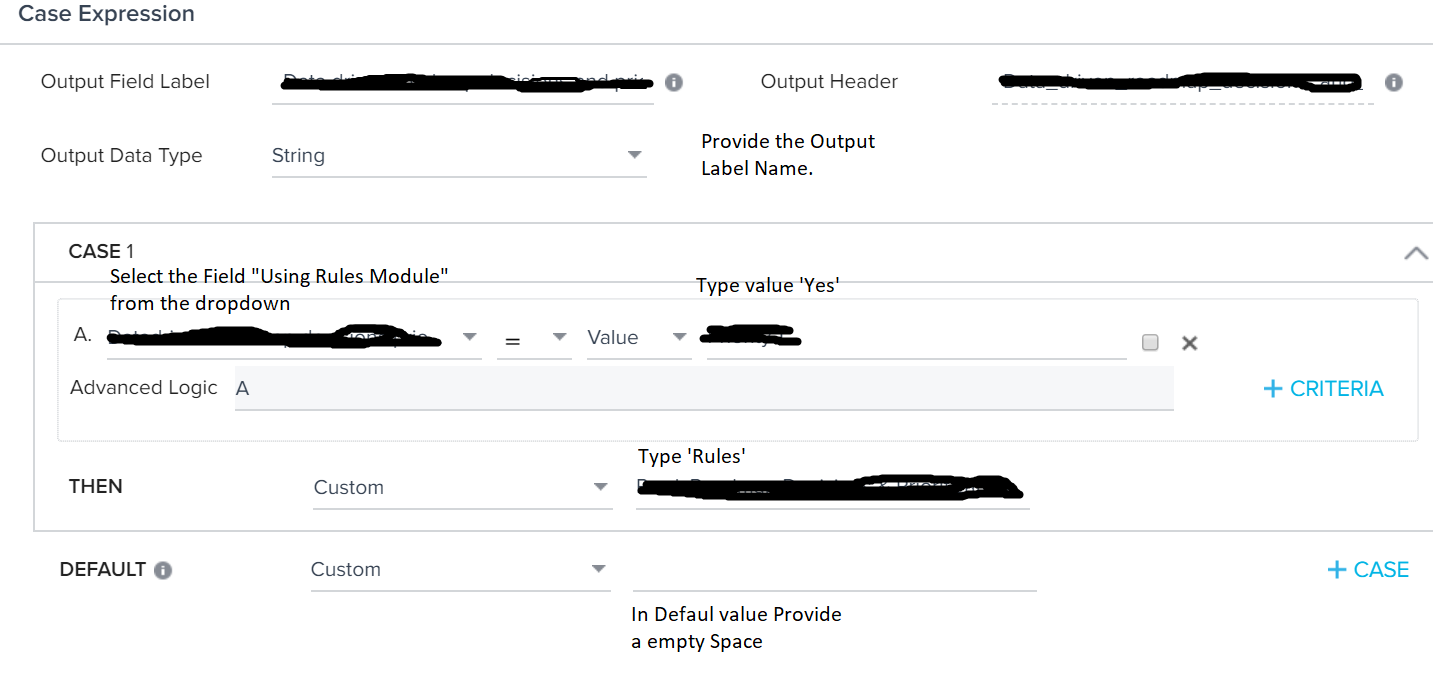
Step 2: Choose Transform Task and Create a Case Expression like below.

Provide all the values which are mentioned in the above pic.

The trick we need to apply in the “Then” Section was to append the semicolon to the value. i.e. like ‘Rules;’, ‘Reports;’, and ‘JO;’(without Single Quotes)

In a similar way create two more case expressions for the fields “Using Reports Module” and “Using JO Module” in the same way.


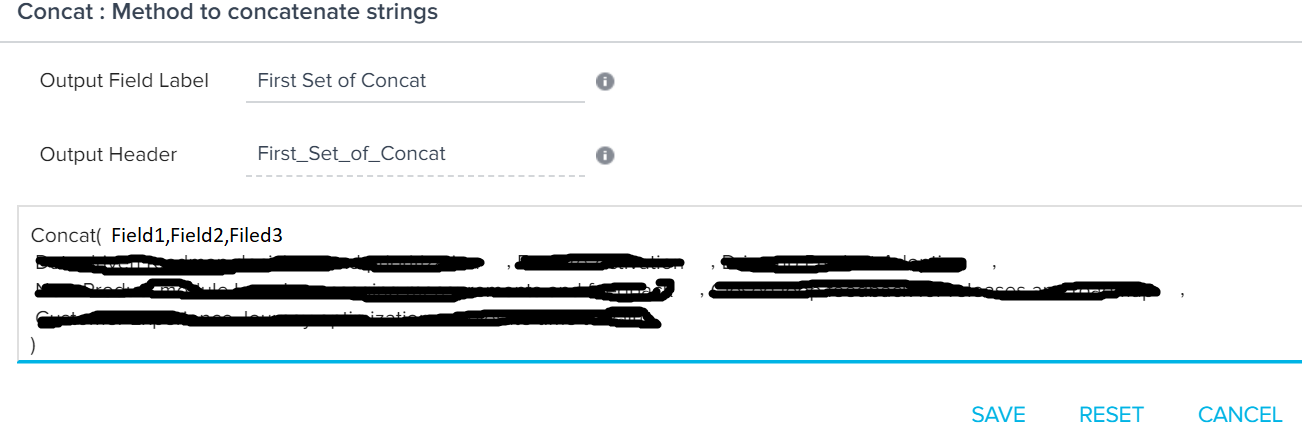
Step 3: In the next transformation, Concat the fields created in step2 to load the target field.


Finally, create the Action and select the object and map the Concated field with MultiPicklist filed.


Thanks!!!

18 replies

phani_kumar
Gainsight Employee ⭐️⭐️
April 20, 2022

Hi @jkolle 

Yes, you have to create 29 separate case expressions and then concat all.


Helper ⭐️
April 20, 2022

@phani_kumar Okay, I tried that workaround and formula and case fields are limited to 10. I suppose I can create three separate transform tasks with 10, 10 and 9 case expressions and then merge them back together to accomplish this. I’ll try that.

phani_kumar
Gainsight Employee ⭐️⭐️
April 20, 2022

Absolutely correct. We have a limit of 10 formula fields creation in Transformation. So as you said have to create 3 Separate transforms and merge.

Helper ⭐️
April 20, 2022

@phani_kumar Actually, isn’t Concat limited to 10 as well. So you can really only populate a Multi-Select list if your values are 10 or less. Is that correct?

Edit: See below post for solution if you have more than 10 values in your multi-select list.

Helper ⭐️
April 20, 2022

Okay, figured it out. In case anyone else has a multi-select list with more than 10 values. You will need to do separate transform tasks for every 10, then separate concats for each transform, merge those all together, then one final concat to put it all together. Below is what I built for a multi-select list with 29 values.


phani_kumar
Gainsight Employee ⭐️⭐️
April 21, 2022

Okay, figured it out. In case anyone else has a multi-select list with more than 10 values. You will need to do separate transform tasks for every 10, then separate concats for each transform, merge those all together, then one final concat to put it all together. Below is what I built for a multi-select list with 29 values.


Yes, that’s correct @jkolle 

benwanlessmenlo
Contributor ⭐️⭐️⭐️⭐️⭐️
June 8, 2022

Would you be able to load this data if your initial data looked slightly different and pre-concatenated?

GSID | listed;values;separated;by_semicolons

alizee
VIP ⭐️⭐️⭐️⭐️⭐️
February 8, 2023

We really need something less extreme. It’s not viable to come up with all possible combinations through transform tasks. Used to be able to concat the picklist with a manual value and it won’t work in the new RE. 

The most expensive part of building is the mistakes. That's true in construction. Not so much in CSOps. So ask questions, make mistakes and learn. All views expressed here are my own.