
Solved

Salesforce Sync (Event) to Gainsight Timeline, then sync back to Salesforce (Task)?

  • July 9, 2026
  • 2 replies
  • 87 views

aiken
  • Helper ⭐️⭐️⭐️

Hello,
I have a question related to Timeline integration with Salesforce.

Now, I have an Activity Sync Job setting as following:
    Sync to [Salesforce Tasks].
    Sync Frequency [Real-time Sync].
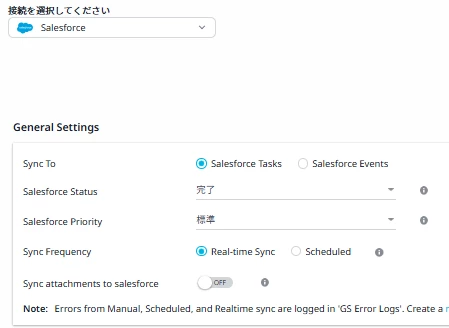


So, once CSM creates a Activity Timeline record with related to Company, then it will be synced to Salesforce Task as following current setting.

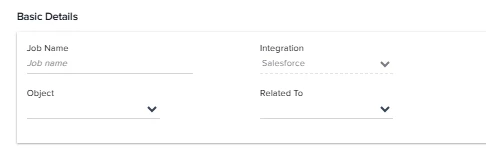
In this situation, if I enable Timeline Integration setting with having the following setting, what will happen??
    Object [Event]
    Integration [Salesforce]
    Related to [Account]


I am afraid of the situation like this:

1. Create a Event related to Account in Salesforce
2. The event is synced to Gainsight ActivityTimeline
3. The Activity will be synced back to Salesforce Task automatically
4. Finally, two records will be exist in Salesforce (One record in Event, the other record in Task...)

Is this happening? or not happening?
If not, which mechanism will prevent from this situation?


Best answer by Venkat Sai

Hello ​@aiken 

Thank you for raising this — it's a great question.

To address your concern directly: the scenario you described will not result in an infinite loop or unexpected duplicates.

Here's what will actually happen:

1. A Salesforce Event is created and linked to an Account.
2. The Timeline Integration syncs it into Gainsight as an Activity.
3. The Activity Sync Job does NOT push it back to Salesforce as a Task — because Gainsight tags the activity with its origin (Salesforce), and the sync job is designed to only push activities that were created natively in Gainsight.

So in Salesforce, you will only ever see the original Event record. No duplicate Task is created from it.

The one scenario to be mindful of: if a CSM manually logs the same activity directly in Gainsight (separate from the integration), that would create a Task in Salesforce via the Activity Sync Job — resulting in both an Event and a Task for the same meeting. This would be a user action, not an automatic loop.

Please let us know if you have any further questions

Regards,

Venkat

2 replies

Forum|alt.badge.img
  • Gainsight Employee ⭐️
  • Answer
  • July 10, 2026

Hello ​@aiken 

Thank you for raising this — it's a great question.

To address your concern directly: the scenario you described will not result in an infinite loop or unexpected duplicates.

Here's what will actually happen:

1. A Salesforce Event is created and linked to an Account.
2. The Timeline Integration syncs it into Gainsight as an Activity.
3. The Activity Sync Job does NOT push it back to Salesforce as a Task — because Gainsight tags the activity with its origin (Salesforce), and the sync job is designed to only push activities that were created natively in Gainsight.

So in Salesforce, you will only ever see the original Event record. No duplicate Task is created from it.

The one scenario to be mindful of: if a CSM manually logs the same activity directly in Gainsight (separate from the integration), that would create a Task in Salesforce via the Activity Sync Job — resulting in both an Event and a Task for the same meeting. This would be a user action, not an automatic loop.

Please let us know if you have any further questions

Regards,

Venkat


aiken
  • Author
  • Helper ⭐️⭐️⭐️
  • July 12, 2026

Hi ​@Venkat Sai ,
Thanks for providing a detailed answer!

> Gainsight tags the activity with its origin (Salesforce), and the sync job is designed to only push activities that were created natively in Gainsight.


I got understood that no duplicated activity( Task and Event ) will be appeared because Gainsight integration system is able to control by using Tag assigned to the activity :-)

As you mentioned,  if CSM log a same activity in Gainsight after logged an Event in Salesforce side, yes, the same contents will be shown in both Task and Event. 
It needs to make an attention to CSM, thanks!