

Moderation Dashboard
This article helps admins and community managers monitor and understand moderation activity in Gainsight Customer Communities.
Overview
The Moderation Dashboard gives admins and community managers a consolidated view of moderation activity across their community. It brings together data from both human moderators and the AI Moderation Agent, so you can see how content decisions are being made without having to cross-reference individual queues or logs.
The dashboard surfaces two categories of data: AI agent outcomes filtered by a date range you select, and all-time cumulative totals across every moderator, human and AI, since your community launched.
Use the Moderation Dashboard to:
- Monitor the volume of content reviewed and the decisions made within a specific period.
- Evaluate how the AI Moderation Agent is performing relative to your moderation goals.
- Track cumulative moderation health across your community over time.
IMPORTANT: The Moderation AI Agent must be enabled to see AI outcome data on the dashboard. For more information on the Moderation AI Agent, refer to the How to Use the Moderation AI Agent article.
Access the Moderation Dashboard
The Moderation Dashboard is available from the Analytics page in Control.
To view the Dashboard:
- Log in to Control.
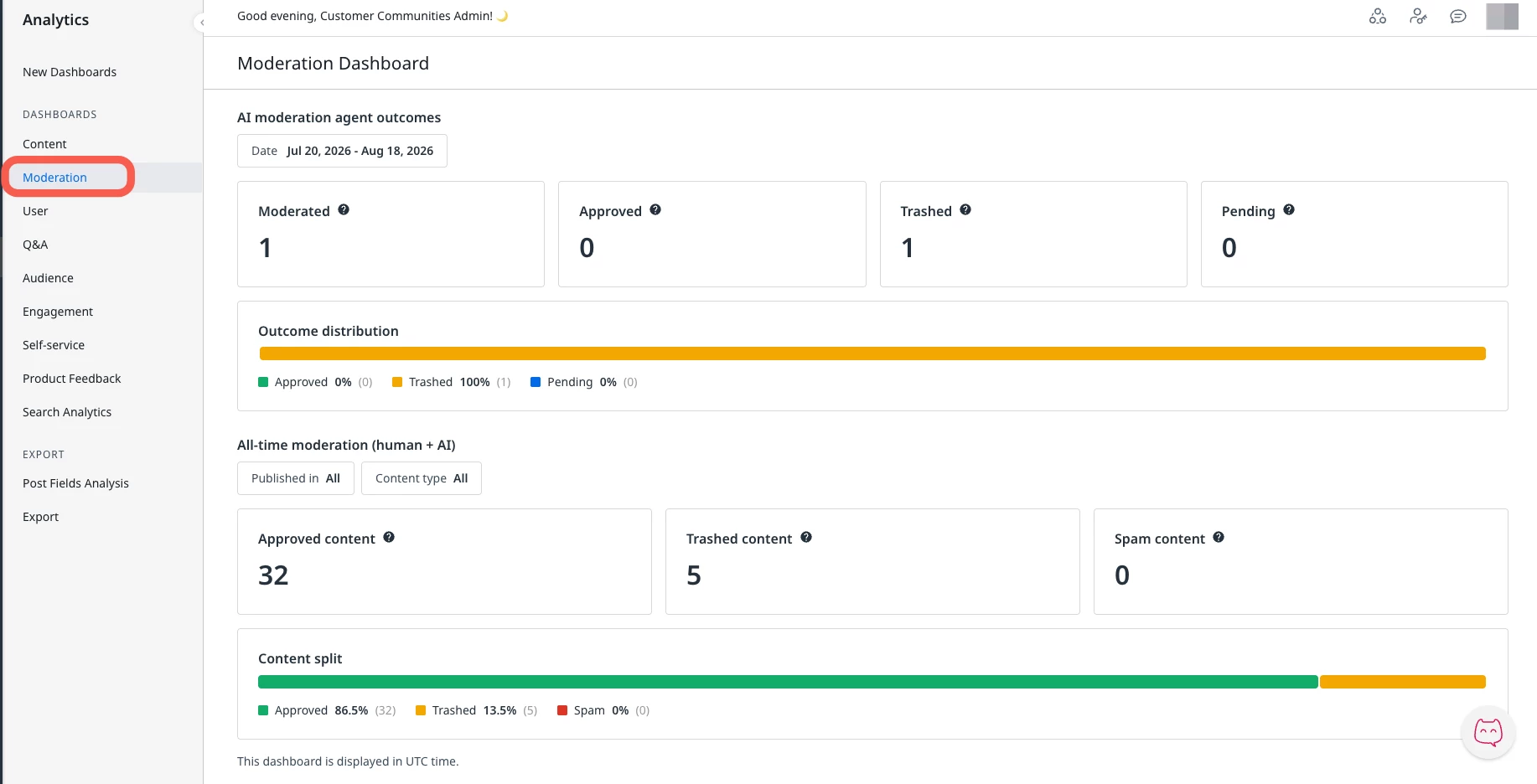
- Navigate to Analytics > Moderation Dashboard. The Moderation Dashboard appears.
Understand the Key Performance Indicators
The Moderation Dashboard tracks two sets of metrics: AI agent outcomes for the selected date range, and all-time moderation totals across your community. Understanding the distinction between these two sets helps you interpret the data accurately.
AI Moderation Agent Outcomes
These metrics reflect decisions made by the Moderation AI Agent within the date range you select using the date filter. The following table describes each metric:
| Metric | Description |
| Moderated | The total number of pieces of content processed by the Moderation AI Agent in the selected date range. |
| Approved | The total number of pieces of content the Moderation AI Agent approved for publication in the selected date range. |
| Trashed | The total number of pieces of content the Moderation AI Agent moved to trash in the selected date range. |
| Pending | The total number of pieces of content that are still awaiting a decision from the Moderation AI Agent at the time of viewing. |
All-Time Moderation Totals
These metrics represent cumulative counts since your community launched, covering all moderation activity across every moderator, both human and AI. They are not affected by the date range filter.
The following table describes each all-time metric:
| Metric | Description |
| Approved Content | Total topics and replies approved by moderation across all moderators, all time. |
| Trashed Content | Total topics and replies moved to trash by moderation across all moderators, all time. |
| Spam Content | Total topics and replies marked as spam across all moderators, all time. |