
Conversational Widget: FAQ
In this topic you'll find answers to common questions about the conversational widget.
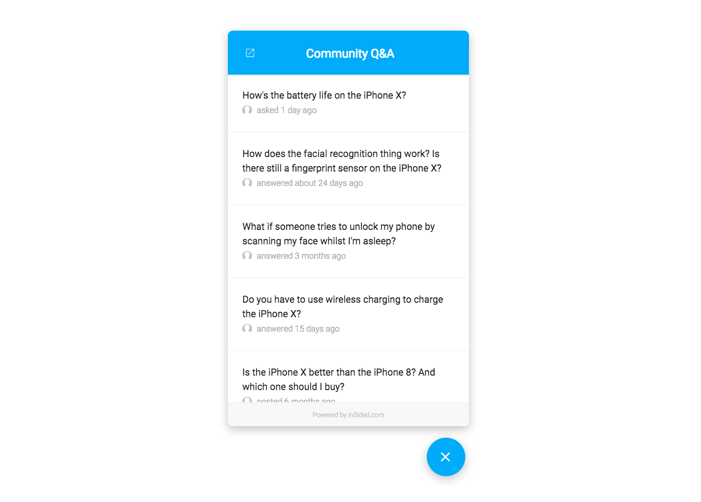
The conversational widget consists of a trigger (a button to open the widget) and a pop-up modal used to display community content on pages of your website.
About half an hour of implementation time. The conversational widget only requires you to add a snippet of JavaScript to your webpages. See How To Install The Conversational Widget.
For each topic, the widget shows the topic title, the relative time since the topic was last active, and the avatar of the user who last posted in the topic.
For the trigger, you can customize whether to use a button that appears on the side of the page or a floating button at the bottom of the page, whether the trigger should display on the left/right side, as well as the colors and text.
For the pop-up modal, you can customize the colors and text, as well as basic styling of the cards that represent each topic. See How To Customize The Look And Feel Of The Embeddable Widgets for instructions and a more detailed description of the available options.
Up to twenty five topics can be shown in the conversational widget. This isn’t configurable.
The user will see the details of the topic directly within the widget itself. Exactly what the user sees depends on the topic type:
Questions:
The user sees the first post and the best answer.
Articles/Conversations:
The user sees the first five posts.
At the bottom of all topics, there’s currently a link that takes the user to the topic on the community.
Yes, the conversational widget is fully responsive; it looks great on mobile, tablet, and desktop screens - on mobile, the widget will open in full screen.
The button on the top left takes you to the home page of your community (you can customise this to be any URL you'd like).
What is the conversational widget?
The conversational widget consists of a trigger (a button to open the widget) and a pop-up modal used to display community content on pages of your website.
🛠 Questions about installation
How much effort does it take to install the conversational widget on my webpages?
About half an hour of implementation time. The conversational widget only requires you to add a snippet of JavaScript to your webpages. See How To Install The Conversational Widget.
🎮 Questions about look and feel / behavior
What information about each topic is shown in the conversational widget?
For each topic, the widget shows the topic title, the relative time since the topic was last active, and the avatar of the user who last posted in the topic.
What aspects of the conversational widget can I customize?
For the trigger, you can customize whether to use a button that appears on the side of the page or a floating button at the bottom of the page, whether the trigger should display on the left/right side, as well as the colors and text.
For the pop-up modal, you can customize the colors and text, as well as basic styling of the cards that represent each topic. See How To Customize The Look And Feel Of The Embeddable Widgets for instructions and a more detailed description of the available options.
How many topics are shown in the conversational widget?
Up to twenty five topics can be shown in the conversational widget. This isn’t configurable.
What happens when a user clicks a topic in the conversational widget?
The user will see the details of the topic directly within the widget itself. Exactly what the user sees depends on the topic type:
Questions:
The user sees the first post and the best answer.
Articles/Conversations:
The user sees the first five posts.
At the bottom of all topics, there’s currently a link that takes the user to the topic on the community.
Does the conversational widget automatically adjust to various screen sizes?
Yes, the conversational widget is fully responsive; it looks great on mobile, tablet, and desktop screens - on mobile, the widget will open in full screen.
What does that button on the top left of the conversational widget do?
The button on the top left takes you to the home page of your community (you can customise this to be any URL you'd like).