

mdfahd
Gainsight Employee ⭐️⭐️
June 7, 2024

Change Document for Enhanced Search Experience in Community

  • June 7, 2024
  • 19 replies
  • 735 views

Last Updated On: August 06, 2025

This article helps community users learn about the changes in the search functionality in Community.

Overview

Community is where customers collaborate, learn, and share product or service experiences. They heavily rely on search capabilities to navigate through all available information and access information that is most useful.

Overview of Key Changes

The following table lists an overview of changes that are brought to the search experience for the community users.

Area of Change Improvement Current Experience
Display of search results Search results are now shown in a single, combined list, instead of grouping results by source (such as community or external content). Search results from the community are displayed first above any external content
Simplified search results layout

The search result page reduces visual clutter to highlight content, introduces clear icons to quickly identify content types, and features an improved sidebar with smarter, easier-to-use filters.

Note: Only available when you have enabled the Enhanced Search Experience beta.

The search page displayed less useful data, such as avatars and statistics. Moreover, different content types were hard to distinguish.


Note: The new Search experience is available as the default search bar to all community members.

Functional Improvements

These improvements focus on how search behaves behind the scenes. The goal is to surface the most relevant content regardless of its source or type, ensuring users spend less time finding information quickly so they can focus on engagement.


What's New in Search

Recent updates to our search functionality provide better precision, control, and clarity:

  • New Filter Options: Narrow results by source, content type (article, discussion, solved question), product area, tags, and categories.
  • Improved Relevance Ranking: Updated algorithm prioritizes content based on recency and user engagement.

Enhanced Visual Cues: Content types are now more clearly marked in search results, helping you identify what you are viewing at a glance.

Unified Relevance-Based Search Results

Search results from the community and external sources are shown in a single, combined list. Instead of grouping results by source or category (such as community or external content), everything is ranked together based on relevance to your search. This makes it easier to find the most helpful information right away, without needing to switch between tabs or sections.
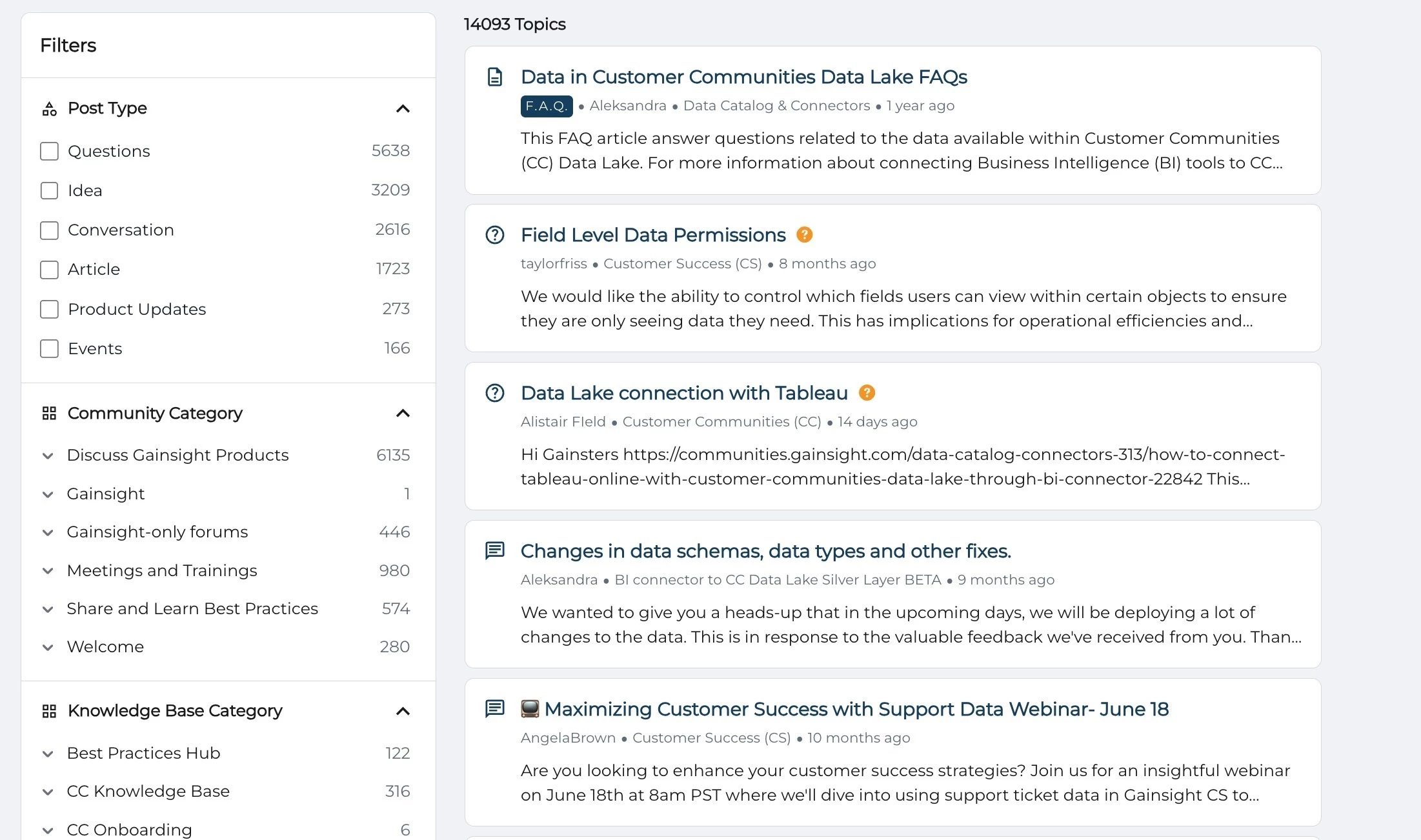
Community forum search results showing topics on data lake FAQs, Tableau connection, and data schema changes.

UI and UX Improvements

In addition to functionality upgrades, there is a significant improvement in the look and feel of the search results page. These updates help users process information faster and interact with content more intuitively.

Clear and Condensed Layout

The new design minimizes clutter and distraction. By removing less useful data such as avatars and social stats, the search page now focuses on what matters: the content itself.
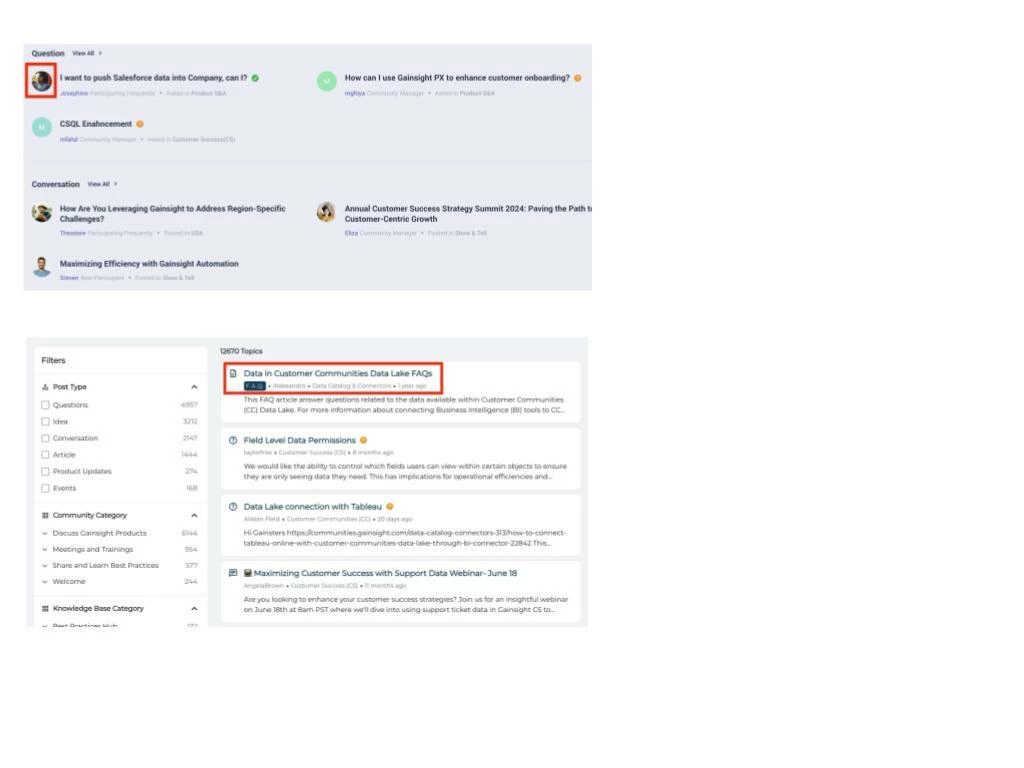
Search interface showing a highlighted FAQ topic about data in Customer Communities Data Lake with filters on the left.

Visual Clarity Through Content-Type Icons

Each search result includes an icon that shows what type of content it is, such as a question, article, discussion, product update, idea, or event. External content is marked with an icon to indicate that it opens outside the community.
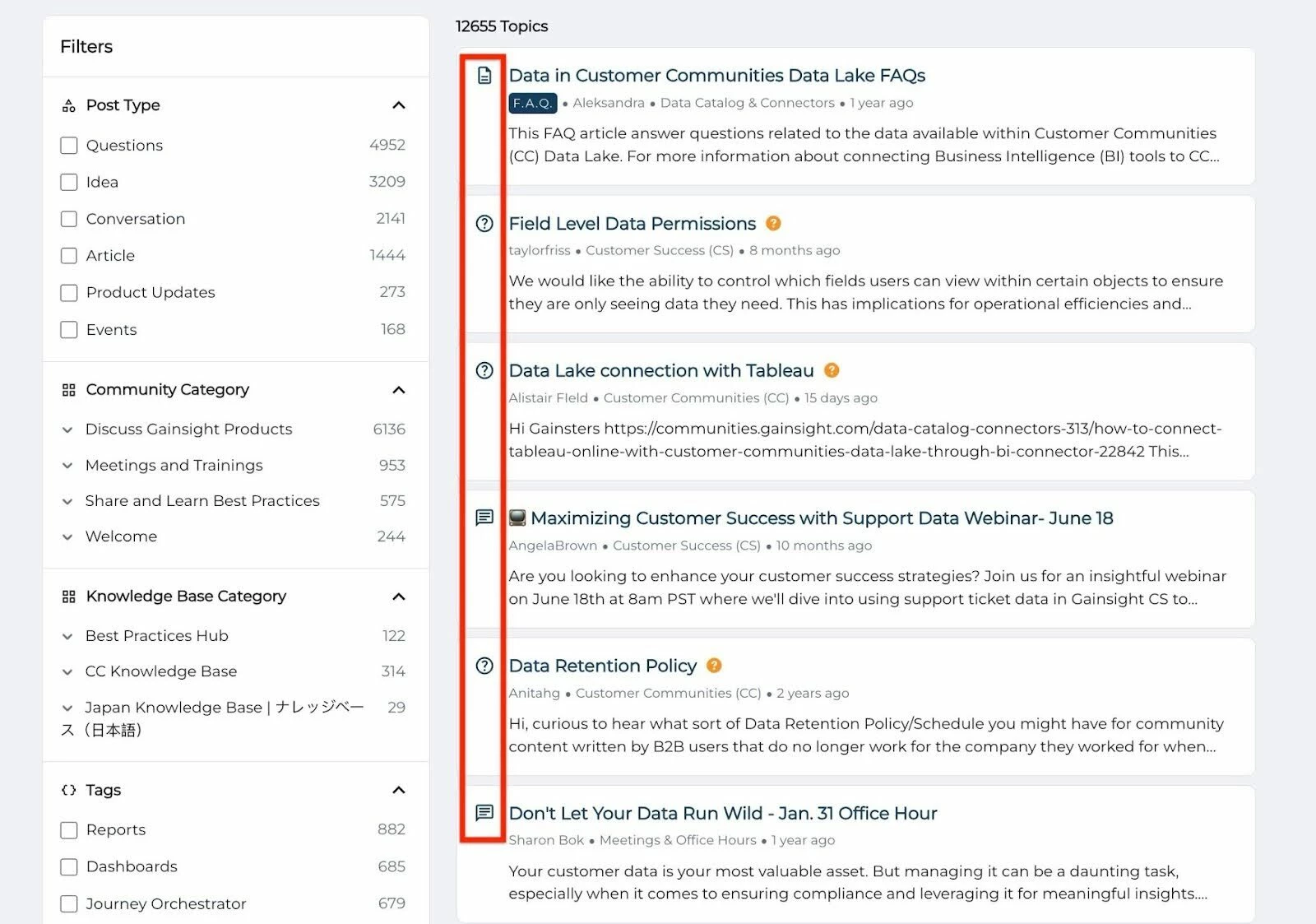
Filtered topic list on a community forum showing articles, questions, and webinars about data management and permissions

Sidebar Filter Improvements

Finding the right filter is easier than ever. The redesigned sidebar offers better contrast, categorizes options more clearly, and dynamically adapts based on your current search.
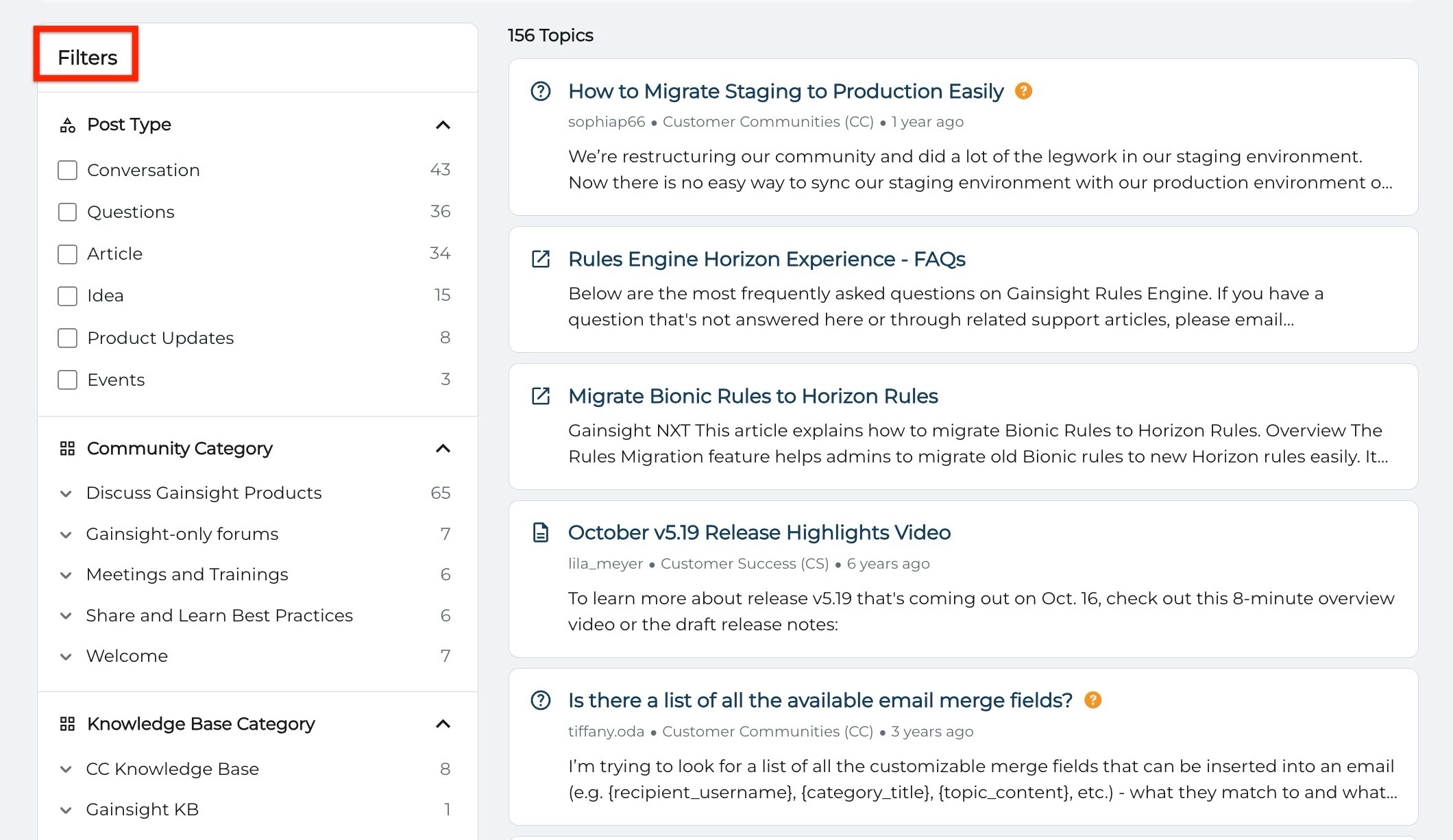
Community forum with filters for post type and category, showing topics on staging migration, Horizon Rules, and email merge fields.


If you have any queries or feedback, please feel free to drop an email to docs@gainsight.com or post a reply to this article.


19 replies

Contributor ⭐️⭐️⭐️⭐️
November 20, 2024

Hello,

Following up on my previous comment, I've noticed that not only are groups not displaying, but also the categories containing the same keywords as the searched terms.

Some of our members have pointed out that new questions are often posted in categories they are not subscribed to. To stay up to date, they use the search feature for specific tags or terms. However, they find it difficult to locate the most recent posts because there is no way to filter by post age. Would it be possible to include sort by age within content type?

Dheepak G
November 21, 2024

@mbuuck1 , Thanks for your query we have received similar feedback and we are moving away from a Group based listing of results to relevance based listing of results in the “All Results” tab when we go GA.  This means all federated and community content will now have equal weightage in the “All results” page and hence the results listed will be by order of relevance across all sources (community and federated)

Dheepak G
November 21, 2024

@GabrielDocuSign  Thanks for your question, Please find my response below
1) For the first query we have not supported filtering by groups even with our older search experience, we will take this as a roadmap item.

2) Mismatch in the number of results in filters and total results : The count you see on the result page (46 in your case) is the total number of results that matched your search query (including community categories and Tags). The count you see for the filter (IFS Solution) is the the number of results that can be filtered for that category alone and is possible that there are other questions that matched and has different tags. To debug this, we would have to investigate it further to give you the exact reason. I would appreciate if you could open an support ticket for this. 
 
3) We are working on adding Sortable filters, which would sort all results by either relevance or by time (oldest to latest and vice versa). 

Contributor ⭐️⭐️⭐️⭐️
April 27, 2025

So I have turned this beta on but do not have the side filters anymore, just the ones across the top when I am in all results. Any thoughts on adding them before having to click across the top. This does not feel very intuitive for our users.  

Kenneth R
Expert ⭐️⭐️
May 8, 2025

Hi ​@KathrynMCarter - apologies for the radio silence here, we are looking into this for you. Will circle back asap!

Kenneth R
Expert ⭐️⭐️
May 8, 2025

Hi ​@KathrynMCarter - I finally have clarity on this.  :) So, what you’re seeing in your community as part of that open beta is as designed. However, there are further new updates and improvements to search on the way very very soon - that’s what you see here in this community (where, among other things, the filters are available on the left-hand side immediately).

mdfahd
mdfahdAuthor
Gainsight Employee ⭐️⭐️
May 13, 2025

Hey community! 

We have updated this article with information on Improvements to the Community Search Experience. Dive into the updates that will help you get the most out of your community experience.

➡️ Most important of all -- don't forget to subscribe to this article!

Mohammed Fahd - Sr. Technical Writer
mdfahd
mdfahdAuthor
Gainsight Employee ⭐️⭐️
August 6, 2025

Hey Community!

We have just enhanced your search experience! 🧭✨

This article has been updated to reflect exciting improvements to our search functionality:

  • New Filters let you refine results by source, content type, tags, and more.

  • Smarter Ranking means the most relevant and timely content rises to the top.

  • Clearer Visuals help you instantly recognize articles, discussions, and solved questions

Mohammed Fahd - Sr. Technical Writer
DannyPancratz
VIP ⭐️⭐️⭐️⭐️⭐️
August 6, 2025

Thanks for updating this article!

One piece of feedback: The image below shows the original beta UI and the current state. Most customers never saw that beta UI. The description of the new state vs previous state is accurate though… it is clearer and more condensed due to to the removal of avatars and social stats, etc. 
 

Clear and Condensed Layout

The new design minimizes clutter and distraction. By removing less useful data such as avatars and social stats, the search page now focuses on what matters: the content itself.

Search interface showing a highlighted FAQ topic about data in Customer Communities Data Lake with filters on the left.


FYI: I am no longer active in this community