davebrown2242
Helper ⭐️
September 3, 2021
New Idea

Ability to disable the aggregation and set expand/collapse default using Row Grouping in HA reports

  • September 3, 2021
  • 25 replies
  • 297 views

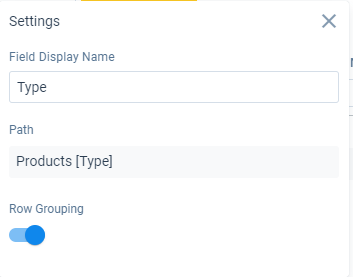
Two things on Row Grouping settings:

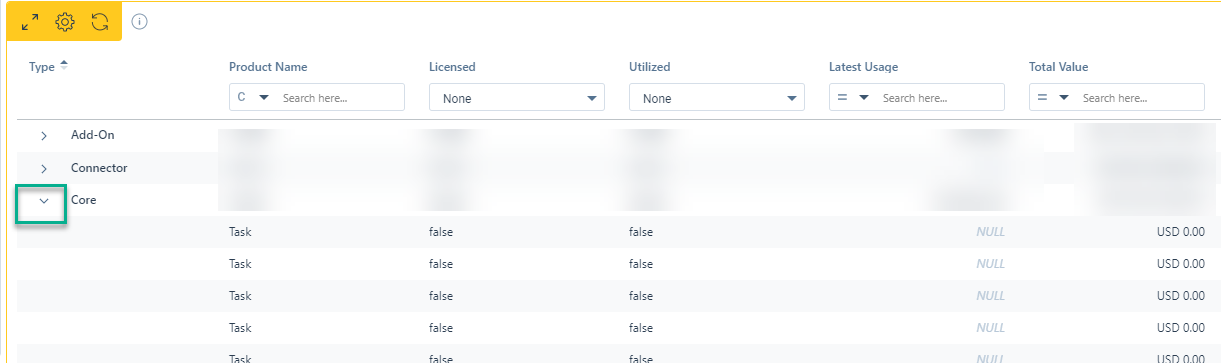
1st - When using Row Grouping on a field to have the ability to disable the aggregation/totals on the group row. As an example the data is pointless and confusing as we use Booleans - 3 true and 4 false always shows 7… very misleading

 

2nd - As an admin I would like the option to default if a Row Grouping report is expanded or collapsed by default. It would be my guess that others would like this feature as well for reports that list items (think Whitespace)
Thanks,

DB

25 replies

rakesh
Gainsight Employee ⭐️
Lets put your data to work!
September 5, 2021

Hi @davebrown2242 

Thanks for the post! I do have some follow up questions:

  1. Will there be scenarios where you would want aggregations for some fields but not for others? 
  2. Imagine a scenario where we only show the summarizations if the summarizations were turned on in field settings (Column calculations setting). Would the work perfectly? 


and on the 2nd one, there is one challenge I see with such a setting. If the report were on large data, always expanding all groups by default would significantly slow down the overall dashboard experience.


davebrown2242
Helper ⭐️
September 7, 2021

Hi @rakesh -

  1. I would call that level of flexibility a nice to have if possible. I can see the value in a report that has string/boolean fields alongside value fields.
  2. I don’t know what the cost would be to the overall performance when using things like Activity or CTA (where there can be a lot of data), but it is incredibly powerful as an admin to provide dynamic solutions for our users.

All the best,

DB

DB
iainr
Contributor ⭐️⭐️⭐️⭐️
October 6, 2021

Big plus one to this request!


I’m really not a fan of the default collapsed behaviour for row grouped tables in Horizon Analytics, I’ve not come across any situations yet where I want the table to be collapsed by default so having a way to turn this off as well as disable the aggregation where it is irrelevant would be a great improvement

davebrown2242
Helper ⭐️
October 6, 2021

Bring back the old format :) It worked perfectly.

DB
gunjanm
Expert ⭐️
October 6, 2021

Bring back the old format :) It worked perfectly.

THIS

Gunjan
davebrown2242
Helper ⭐️
October 6, 2021

@Cornelia - Hi! :eyes:

DB
Cornelia
Contributor ⭐️⭐️⭐️⭐️⭐️
October 7, 2021

Hello @davebrown2242! 

Just checking if you are looking for an update on your initial post? 

rakesh
Gainsight Employee ⭐️
Lets put your data to work!
October 7, 2021

Bring back the old format :) It worked perfectly.


Hi Dave,

Old feels better in the min all and max all aspect but we did hear a lot of complains from customers about the overall behavior. Particularly how old row grouping only worked for first 100 rows in page 1, 2nd 100 in page 2 etc. even when collapsed. How row grouping was unusable because when its collapsed people only get part of the data if they dont remember to click next page, etc.


Based on this feedback, we have moved row grouping back to the data than in the UI grid on 100 rows so that we get an accurate view always. 

@Azad for some feedback on Row Grouped reports.

Contributor ⭐️⭐️
October 19, 2021

Is there a way to expand all on these reports showing on the dashboard?  Since they are all auto collapsed, it takes forever to see my data since I have to expand each one individually and wait for them to load before moving on to the next?


It’s making this feature unusable.

Azad
Gainsight Employee ⭐️
November 3, 2021

@michellebisping  - We have to add this and it’s on the roadmap to allow users to do this. I do understand that it is cumbersome to expand each row inividually.  

PM- GS Home and Analytics