

Ability to use numeric fields as variables in a substring formula
Common use case: split a string. Let’s say I want to infer the Last Name and Name of my customer, Doe John Joseph (or at least an approximation of it, he can have multiple last names).
I could do
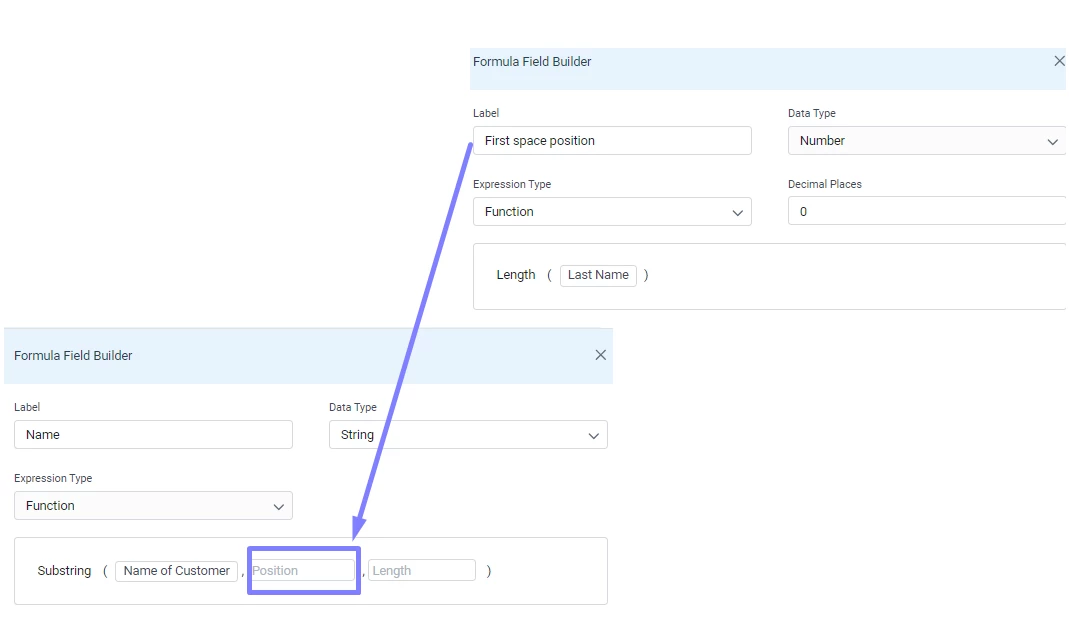
1: Transform → Left of Name of Customer, using the space as string to match
2: Transform → Length of that field, to get the position (one left) of the substring I need
3: Transform → If the Position was a dynamic variable like a numeric field instead of a fixed number, I could use my value 2 to do that.
And we are done! (well, a trim will be needed but you get the gist...)
This is how simple is to achieve the same in Sheets with even extra steps like not nesting the find within the left (by the way, the find fx would be something great to have).

Honestly, if you ask me how I would do this same split to do this and using it in Gainsight… I think I would go the route of a rule/dd, exporting the GSID and the name to the S3 bucket. Work it like this in Sheets/Excel and re-ingest via S3 again... And this will take me less time than trying to do the same with GS alone.
Here we have several opportunities for improvement, from awesome to awesomer:
· Use another field as a variable
· Use a combination of a field plus a fixed value
· Nesting formulas