

mobrien14
Helper ⭐️
January 27, 2026
New Idea

Allow Date fields in C360 Layout Filters

Related products:CS C360 & R360 & P360
  • January 27, 2026
  • 5 replies
  • 85 views

As an admin, we’re looking to set up a new customer C360 view that is assigned to any customer in our instance with a type of Prospect or a New Customer created in the last 30 days. Our hope is that, for these customers, they have a much simpler layout that focuses on their onboarding & the handoff between Sales & CS before we introduce additional C360 items.

However, it doesn’t appear that Created Date (or any date field) is available as a filter on the layout.
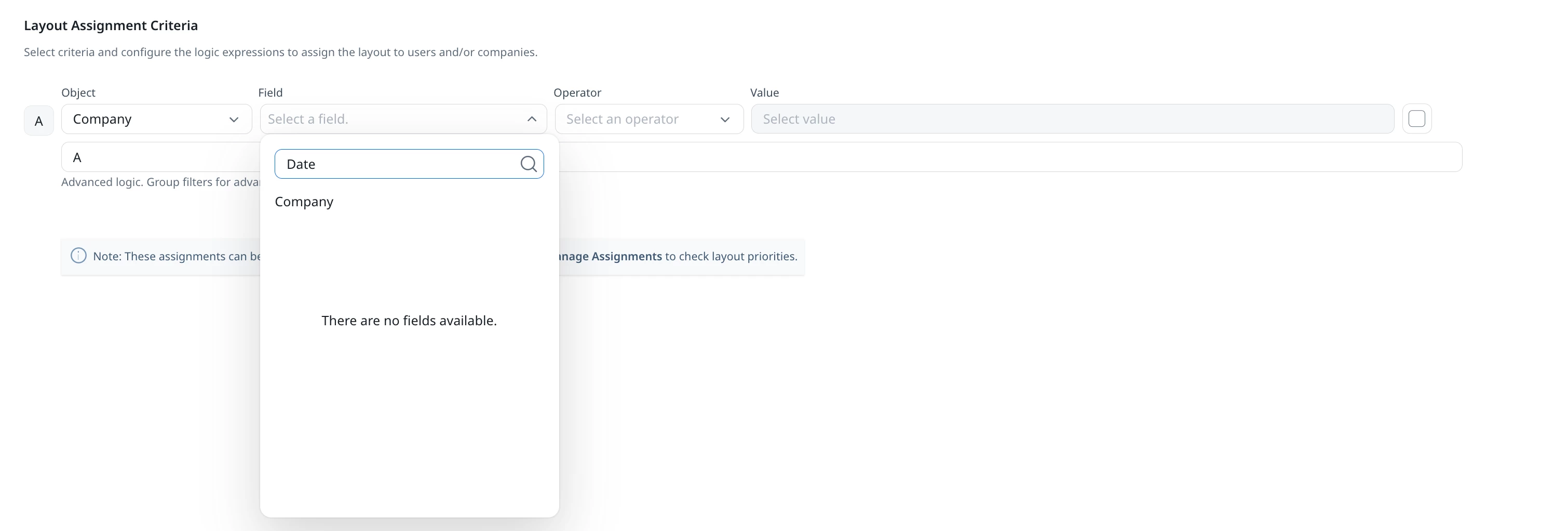
This means that, to accomplish what we wish, we’re going to use some other field type (either Stage functionality for standard or a custom field we load to) with rules handing that load. It ultimately adds to the complexity for something that should really be more seamless.

Please allow us to use date fields as filterable criteria for C360 layouts to streamline this.

5 replies

romihache
VIP ⭐️⭐️⭐️⭐️⭐️
January 28, 2026

Good Idea ​@mobrien14 !

Another possible workaround could be a Number data type calculated field in Company using the datediff fx; that should spare you the rule


Continuous improvement is better than delayed perfection
alizee
VIP ⭐️⭐️⭐️⭐️⭐️
January 28, 2026

All data types need to be available as filters and with consistent filtering options between features (Rich Text excluded...)...

The most expensive part of building is the mistakes. That's true in construction. Not so much in CSOps. So ask questions, make mistakes and learn. All views expressed here are my own.
brlayman2583
Helper ⭐️
January 28, 2026

Agreed with all of the above!  


To ​@mobrien14’s original point, there’s a rules heavy workaround if you were to create a custom field, set a rule up to check a box for instance during the date window, but then a secondary action or separate rule to uncheck when the date expires. It’s not ideal if date fields could be implemented with standard filtering logic 

mobrien14
mobrien14Author
Helper ⭐️
January 28, 2026

Good Idea ​@mobrien14 !

Another possible workaround could be a Number data type calculated field in Company using the datediff fx; that should spare you the rule


Loved this idea and it worked for C360 -- and then come to find out that it appears Calculated Fields can’t be used in the scorecard assignment criteria so we run back into the starting issue (and another call out for product parity please!)

So might have to do that, create a boolean and then just load to it/remove it based on the new calculated field. Still more simple than the whole stage route but not ideal.

romihache
VIP ⭐️⭐️⭐️⭐️⭐️
January 29, 2026

Loved this idea and it worked for C360 -- and then come to find out that it appears Calculated Fields can’t be used in the scorecard assignment criteria so we run back into the starting issue (and another call out for product parity please!)

So might have to do that, create a boolean and then just load to it/remove it based on the new calculated field. Still more simple than the whole stage route but not ideal.

Booo… damn lack of parity 😫. Currency fields have that same limitation:


And well… Milestones work for Currrency but not for Booleans, Dates...


#parity

Continuous improvement is better than delayed perfection