

kelly
Helper ⭐️⭐️⭐️
September 25, 2025
New Idea

Allow Dynamic JO Schedule changes without having to Edit

Related products:CS Journey Orchestrator
  • September 25, 2025
  • 3 replies
  • 65 views

After the enhancement for the dynamic program edit functionality was released, the ability to edit the program schedule has gotten significantly worse. In standard JO, you can edit the schedule without having to edit the program. You used to be able to do this in dynamic JO too.

Now, you have to wait for the cloned program to be created, then counterintuitively proceed with Publish to even be presented with the schedule after a bunch of warnings of the impact of publishing an edited program. You can access the schedule from within an active program - why was this function removed?
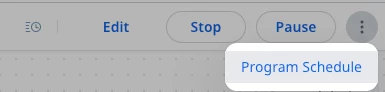


I’m trying to prevent the schedule from running, I can’t change it to One Time (like you can in standard JO), and I can’t set the scheduled end date to the past, so I’m not able to actually stop the schedule when I want to and have to let it run one last time, unless I want to stop the program entirely (which I don’t, it has active participants in various steps). 
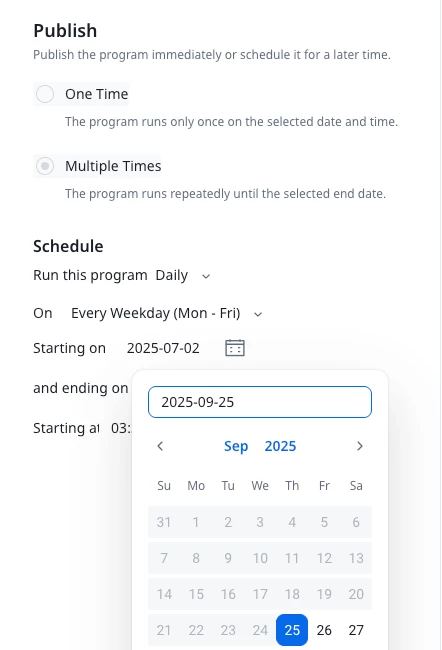
Can’t change to One Time, can’t choose a past date


    3 replies

    dayn.johnson
    VIP ⭐️⭐️⭐️⭐️⭐️
    September 25, 2025

    Ugh, this is the uncool. We should be able to see these schedules and be able to edit them without having to edit the entire program and re-publish.

    This functionality in advanced JO has always been a fantastic way of stopping a program from bringing in any new users while allowing users already in the journey to keep flowing through.

    Staff CS Content & Comms Manager, 2x Gainsight CS Ops Product Council Member
    bradley
    Expert ⭐️
    March 20, 2026

    This was very confusing when it first rolled out, to the point I thought schedule editing wasn’t even included in the ability to edit. I don’t even remember seeing documentation explain how to do it properly.

    dayn.johnson
    VIP ⭐️⭐️⭐️⭐️⭐️
    June 8, 2026

    @revathimenon Can we get some eyes on this one? Curious whether we’re able to change a program from an ongoing schedule to one-time so we can stop the schedule while allowing users already flowing through the action steps to finish the journey. Sometimes we need to stop anyone new from joining but still want existing participants to continue the journey (and launch a new, cloned program).

    Staff CS Content & Comms Manager, 2x Gainsight CS Ops Product Council Member