

HollySimmons
Helper ⭐️
February 7, 2022
New Idea

Arrange Dashboards by Folder not Sharing Group

  • February 7, 2022
  • 3 replies
  • 84 views

Currently, in HA, dashboards are arranged in an end-user’s view based on the Sharing Group(s) that have been given permission to view/edit etc. This means that if someone is in two groups then they will see the dashboard under both sections.E.g.
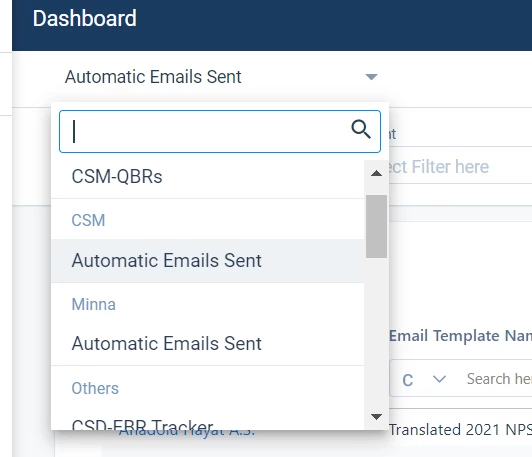
It also means we have to be careful with how we name our sharing groups as the names become end-user visible and might end up confusing further. For example we have a “Partners” dashboard, which is actually useable by 4 or 5 groups, and for Pre-Sale’s they have the header pre-sales, then dashboard name Partners. Which just doesn’t make any sense. 

What would be preferable is to arrange the dashboards by the folders they are in instead, and keep the group names for us in the back-end. 

3 replies

HollySimmons
Helper ⭐️
February 9, 2022

I’d just add to this that I appreciate for others it works perfectly well to sort by User Group, so actually the better ask here is to let us as Admins choose which way we want to display things (e.g. via a toggle in the settings area of Dashboard Builder), then everyone’s needs are met. 

Also side note but there is 0 reference in your documentation that the sharing permissions changes the UI for the end-user, and if you’re a super admin you don’t see any change yourself so you have no idea anything is impacted. 

anirbandutta
Expert ⭐️
February 10, 2022

...
Also side note but there is 0 reference in your documentation that the sharing permissions changes the UI for the end-user, and if you’re a super admin you don’t see any change yourself so you have no idea anything is impacted. 

Thank you @HollySimmons for closing the loop here. cc @rakesh 

@neelam_mukherjee for the observation on the documentation bit

It's an opportunity for engagement
rakesh
Gainsight Employee ⭐️
Lets put your data to work!
February 10, 2022

Hi Holly,

Reposting our conversation here - 

Folders vs Groups - we currently show the group that a dashboard is shared with. It was a hard decision but by analyzing our existing customer folders and user groups, we have chosen the later since they were more functional. So there is a higher chance that user group will work out of the box for more customers.If a single dashboard is shared with a user via 2 groups, they see it twice. Because a CS Manager might scroll to manager section to see dashboards shared with manager group and might be confused if they dont see it there. 

Understood, I believe that I over-rotated on the favourite dashboard feature and did not cover the groups part. Will work with @neelam_mukherjee and the team to improve it.