

dave_wu_74b11e
Gainsight Employee ⭐️
May 4, 2016
New Idea

Attributes & C360 Left-hand Nav Bar: White space between fields

  • May 4, 2016
  • 4 replies
  • 120 views
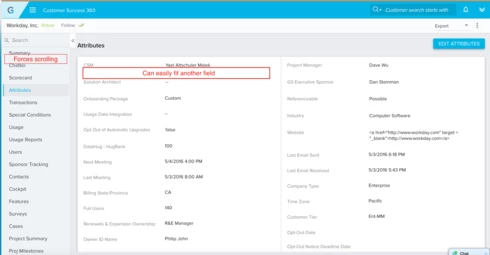
White space between navigation options (C360) as well as fields (Attributes section) can be shrunk so that more values can be seen on a single page as well as prevent the need for scrolling.
    4 replies

    benwanlessmenlo
    Contributor ⭐️⭐️⭐️⭐️⭐️
    December 8, 2022

    Hello! Sorry for adding to such an old post (6 years!) but I’ve noticed that the amount of whitespace in Attributes sections appears to be increasing with the new C360 Layouts

    My Product Idea would be to reduce the amount of unused whitespace. This will allow me as an admin to fit more field on a single screen without scrolling making information easier to find. If the extra unused space is necessary, perhaps implement something like Gmail where there are three options for email display “Density”: Default, Comfy, Compact.

    I’ve included an image from Salesforce attributes as well for reference:

    increasing whitespace?


    bradley
    Expert ⭐️
    December 8, 2022

    @benwanlessmenlo Amen. These might not be visible to everyone if you weren’t in the beta for the ‘new’ 360 experience, but I made a few whitespace related observations there as well:


    Separation between elements is fine, but at the expense of utility and functionality is where it becomes a hinderance. 

    davebrown2242
    Helper ⭐️
    December 14, 2022

    Take my Vote on this one. 

    Also - Don’t Collapse Search Bars!!! They are actually helpful. Just sayin. Guess I don’t get whitespace UI in general. 

    DB
    benwanlessmenlo
    Contributor ⭐️⭐️⭐️⭐️⭐️
    December 14, 2022

    @ophirsw @gopal_rao_kallepu 

    I know that this may seem like a subjective UX issue, but I think @bradley is right. The hope here is that functionality is prioritized over form.

    PS. I found a fun website that lets you play around with different densities web components: https://www.material.io/design/layout/applying-density.html

    Best,

    Ben Wanless