

alizee
VIP ⭐️⭐️⭐️⭐️⭐️
January 22, 2024
New Idea

Avoid remapping fields in versions/filters when updating Data Design source in Dynamic JO

Related products:CS Journey Orchestrator
  • January 22, 2024
  • 8 replies
  • 181 views

Hi all,

I’m working on the transition of one of our programs to Dynamic JO while at the same time reworking the program’s reach / capabilities with the new features.

Since at the date of posting, query builder isn’t back, I’m using data designer as a source and I’ve noticed that whenever I modify my data designer (because I face difficulties with some aspects of calculated fields) to add new fields (i.e. I converted my multi-select picklist “Roles” into a boolean as multi-select isn’t supported in calculated fields), Dynamic JO doesn’t notice / pick up the new fields I’ve added to the design. 

I have to delete the source, and re-add it for the fields to be picked up and available as tokens or filters in email versions. Even re-syncing the source doesn’t do the trick. The fields don’t show up automatically, which is causing several problems: 

  1. All the pre-sets evaluate stages and calculated fields have to be updated
  2. All tokens in emails have to be updated
  3. All filters for email versions have to be updated
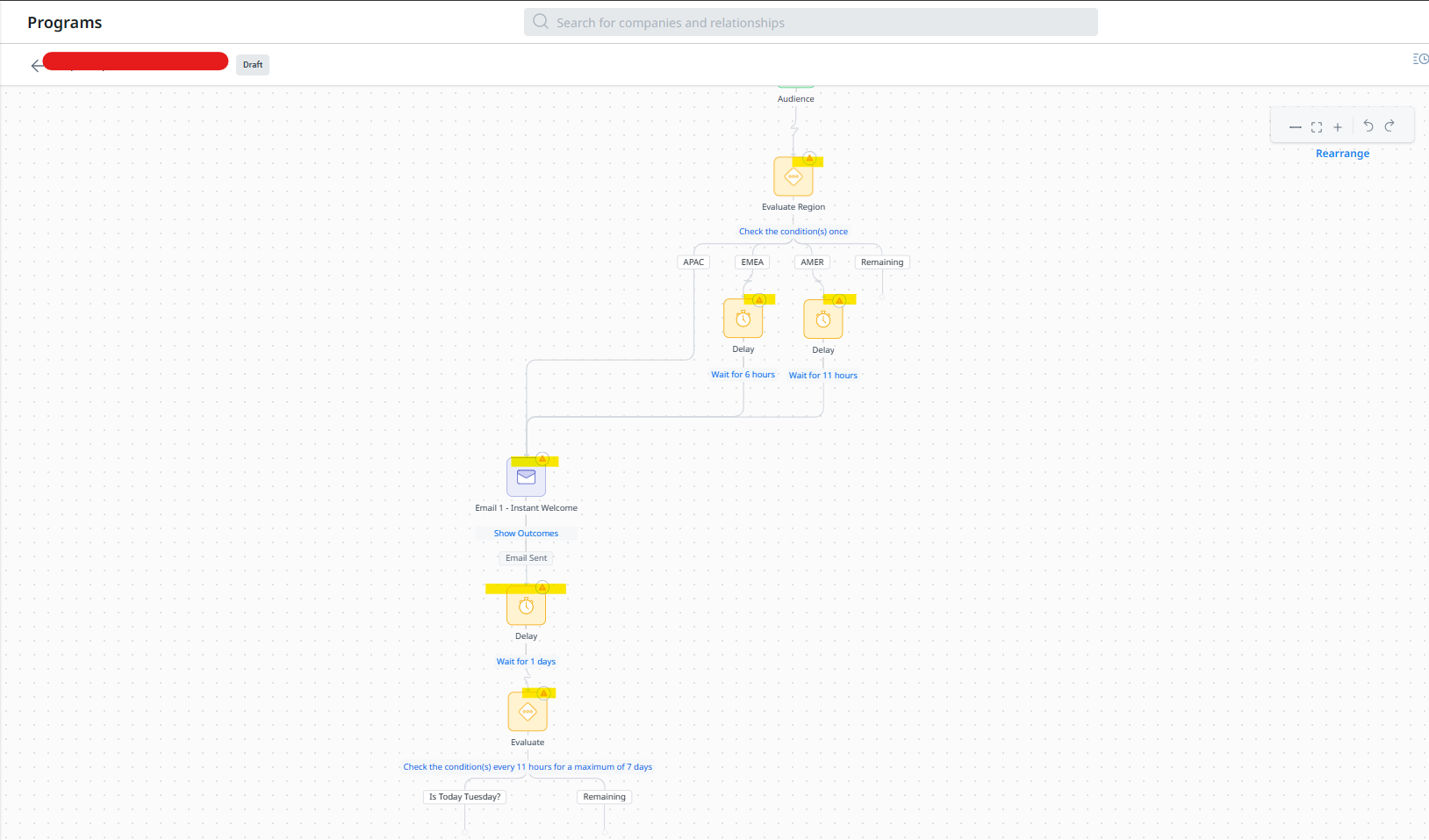
This is quite a big waste of time when the design changes are to make up for the issue with multi-select picklists. Even in cases where it’s to accommodate something one’s forgotten as a field of importance, it creates a lot of extra work.

I believe the change in behavior is also because we’re no longer mapping fields like we did in Advanced JO, but I believe a bit of an improvement is necessary here (even if it’s not necessary so straight forward). 

I’d like to make sure that fields available in the data design appear as you add them to the data design / space, provided said design has been re-run in DD. 

This would save a ton of time. 

Thanks!

A

8 replies

zach_davis
Helper ⭐️
January 22, 2024

+10000

alizee
alizeeAuthor
VIP ⭐️⭐️⭐️⭐️⭐️
January 23, 2024

Update: I am now in the process of remapping the values, and it turns out that my Participant Field (Region), which is a single select picklist, doesn’t have any of the picklist values loading when trying to remap them. Meaning I have to completely remove my evaluate stage and rebuild it completely, which adds to the time required whenever you’re adding fields.


The most expensive part of building is the mistakes. That's true in construction. Not so much in CSOps. So ask questions, make mistakes and learn. All views expressed here are my own.
alizee
alizeeAuthor
VIP ⭐️⭐️⭐️⭐️⭐️
January 24, 2024

I’ll add one clarification point after further testing this morning: 

  1. The new fields show up when clicking on Source Fields > View
  1. They do not anywhere else in evaluate stages and email versions, which is where the need to remove the source and re-add it and then remap comes in
The most expensive part of building is the mistakes. That's true in construction. Not so much in CSOps. So ask questions, make mistakes and learn. All views expressed here are my own.
alizee
alizeeAuthor
VIP ⭐️⭐️⭐️⭐️⭐️
January 24, 2024

@vmallya CC’ing you for visibility as this caching issue resolution would really, really change things for us JO builders. Thank you!

The most expensive part of building is the mistakes. That's true in construction. Not so much in CSOps. So ask questions, make mistakes and learn. All views expressed here are my own.
vmallya
Gainsight Employee ⭐️
January 25, 2024

@alizee - we have identified this and fixed the experience. when new fields are added in sources, they will be updated and available in JO programs (once the program page is refreshed) and those fields can be used for tokens or any conditions/filters. This should be available on or before feb 10th. 

Thanks for the callout 👍🏻

Vijay | PM | JO | Gainsight
alizee
alizeeAuthor
VIP ⭐️⭐️⭐️⭐️⭐️
January 25, 2024

@vmallya Excellent, that’s great news and I can’t wait for it.

The most expensive part of building is the mistakes. That's true in construction. Not so much in CSOps. So ask questions, make mistakes and learn. All views expressed here are my own.
corey.henningsen
Helper ⭐️
February 11, 2024

Hello @vmallya , I wanted to follow up to see if this has been fixed. Thanks!

dayn.johnson
VIP ⭐️⭐️⭐️⭐️⭐️
June 4, 2025
  1. All the pre-sets evaluate stages and calculated fields have to be updated 👈
  2. All tokens in emails have to be updated 
  3. All filters for email versions have to be updated

This caught me today. After an initial failed launch of a dynamic JO with an event source (some participants received the first email in the flow, most didn’t, none made it past the first email), I successfully launched an updated version.

While testing the “catch-up” programs, I realized that when you delete the source, even though your calculated fields are still “there” – they don’t actually have any filters applied to them. Stumped me until I finally clicked into them.

The ask

There are ⚠ warning signs on every other step throughout programs when a source is removed. Can a warning sign also be added to the audience if our calculated fields need to have a filter applied again?

Staff CS Content & Comms Manager, 2x Gainsight CS Ops Product Council Member