
cameron_wright
Gainsight Employee ⭐️⭐️
November 8, 2019
New Idea

Cockpit Column name handling

  • November 8, 2019
  • 2 replies
  • 59 views

We are finding different functionality in NXT vs SFDC when it comes to Cockpit columns, 


In SFDC if we go to add “priority name” we get the column header to show “priority name“ as expected. 

 

In NXT when we go to add the same it shows in the config Priority > Name and then only shows the name:
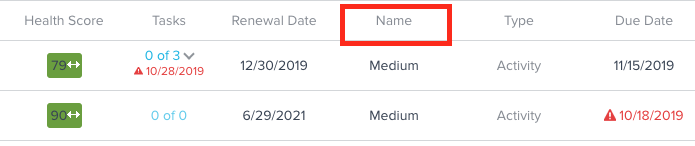


For ease of use, we would like the ability to either add an alias or both names in the field.

2 replies

sarahmiracle
VIP ⭐️⭐️⭐️⭐️⭐️
May 19, 2022

So, I’m just experiencing this same issue now but not in relation to SFDC vs NXT, moreso just the limitation of not being able to provide column aliases in NXT Horizon Cockpit.


The big issue I’m seeing is if two columns have the same header name, the export doesn’t include both and chooses one. My use case is wanting to see CSM Name and CTA Owner Name in Cockpit (managers like to see this too). When exporting the CTA data, the column appears as “Name” for the owner, so when you have two “Name” columns, only one appears in the export.

Customer Success Systems Admin @ Amplitude, 3x Gainsight CS Ops Product Council Member
Molly.McQ
Helper ⭐️
July 11, 2022

+1. We have multiple “NAME” columns utilized in Cockpit that we cannot rename, and although users can hover to view the source, this isn’t the most user friendly approach, can be confusing for some users, and results in messy reports when exported. Enabling the functionality to rename these fields in Cockpit, like we can in other areas of the product, would be very helpful. 

Scientia potentia est