

Consistency with "Created Date" and "Closed Date" on Call to Action Object
I was doing some reporting on CTAs today and noticed that “Closed Date” on the Call to Action object always shows the same time (in my case, 6:30 a.m. CT) no matter when the CTA is actually closed. This seems weird, considering “Created Date” is also a date/time field and works properly, resulting in things like this:
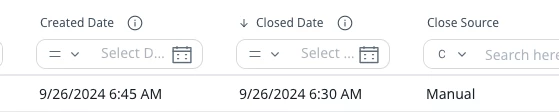
I opened a ticket with support and was referred to this documentation, which says “Close Date”, “Due Date”, and “Original Due Date” must be ignored. The phrasing is weird, but essentially it means that those fields’ time component are worthless, despite being date/time fields.

I can accept Due Date and Original Due Date being generic dates (although why have them be date/time fields then??), but Closed Date should absolutely be populated with the accurate time if Created Date is. It’s just silly otherwise. Please consider this enhancement.