
Expert ⭐️
May 11, 2021
New Idea

Data Designer - Default values to 0

  • May 11, 2021
  • 7 replies
  • 111 views

Issue: I have a Massive DD, like 40 different tasks, built out and when it runs I am getting zeros and blanks/nulls in the same columns. The blanks are occurring because there is no data in a particular column when aggregating in a transformation.
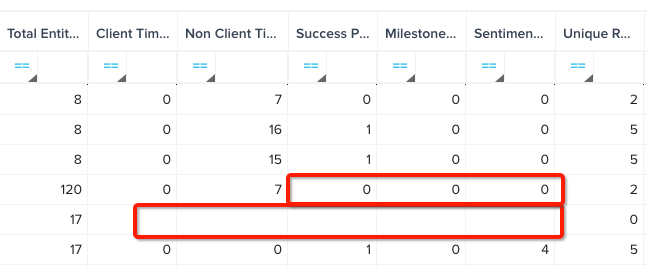
 

Idea: Give the ability when aggregating in DD and Rules to give the ability to have a default value if there is no data in that column to aggregate.
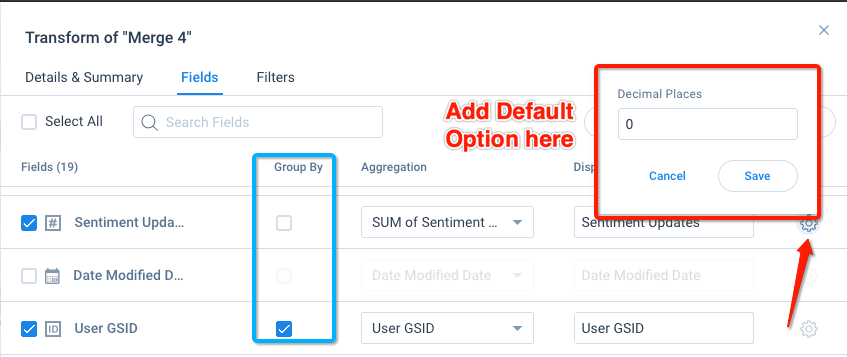
 

My current work around: I can get around this by adding formula or case statements in an additional transformation. However, I am only able to add 10 per a transformation forcing me to add x number of tasks to get an end result. Additionally this creates the need for additional tasks that are unwanted/unneeded. 

7 replies

sai_ram
Expert ⭐️⭐️
May 12, 2021

@Wayne sorry for the inconvenience. I will redirect this to the product team for more visibility.

That’s great you found the workaround and shared here. Thanks.

rakesh
Gainsight Employee ⭐️
Lets put your data to work!
May 19, 2021

I like this idea @Wayne. Basically during data preparation, if there is no data for some aggregation, you want to fill in 0’s instead of blanks. 

What all aggregations do you face this challenge in? Is when you Group By or Pivot?


I suspect in some it makes sense to add the above capability, in others, it might impact the performance of our processing a lot. 

WayneAuthor
Expert ⭐️
May 19, 2021

It is for Group By only. Pivot already has this capability. Which was shocking to have it in one spot but not both.


I would have thought it would have been in the Group By more than Pivot.


rakesh
Gainsight Employee ⭐️
Lets put your data to work!
May 26, 2021

Hi @Wayne 

Group By is a default database behavior and there are heavy performance cons if we want to change the way it works from only aggregating data to showing values with no data. Think around 30-100 times slower. Because of this we will not b going ahead with this.

WayneAuthor
Expert ⭐️
May 26, 2021

Interesting, guess I’ll have to stick with my work around then. But, out of curiosity, aren’t you doing a group by in pivots?

rakesh
Gainsight Employee ⭐️
Lets put your data to work!
June 1, 2021

Pivoting in Data Designer and Rules is kind of like a Case statement behind the scenes. 

WayneAuthor
Expert ⭐️
June 1, 2021

Right, but you are doing a case statement to determine if a row meets a certain criteria and then if so performing a group by/aggregation on if it does or doesn’t.