

Gainsight Employee ⭐️
January 6, 2025
Closed (Duplicate)

Dynamic JO: Display only User GSID (or User Groups) , GSID & External ID field datatypes in CTA Owner dropdown for create CTA step in Dynamic Programs

Related products:CS Journey Orchestrator
  • January 6, 2025
  • 5 replies
  • 87 views

Hello All,

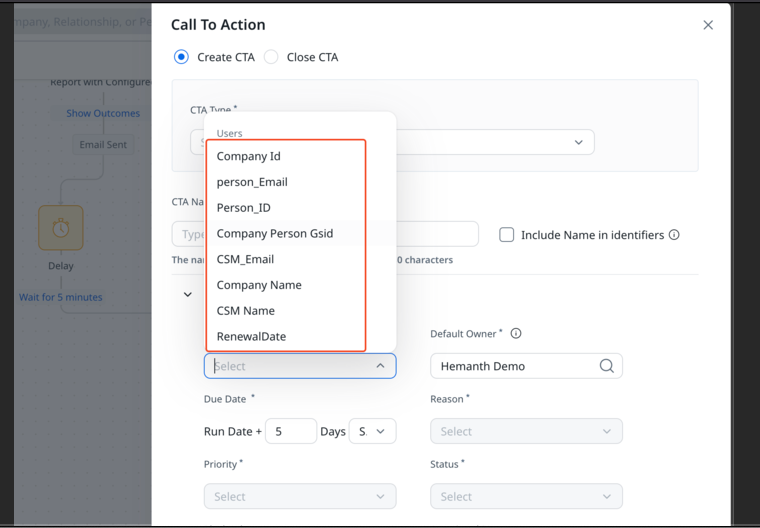
In Dynamic programs whenever we use create CTA step; currently under the CTA Owner dropdown selection, we are listing out all the Audience fields instead of showing only “User GSID” (or User Groups) , GSID & “External ID” field datatypes. 

Typically CTA Owner only accepts GSID format value; but listing out other field types causes ambiguity to the users. Henceforth requesting to exclude any non relevant fields in the CTA Owner dropdown to avoid confusion
 

++ ​@vmallya 

5 replies

alizee
VIP ⭐️⭐️⭐️⭐️⭐️
January 9, 2025

Thanks for posting this ​@hemanth_kalidindi 🙂

The most expensive part of building is the mistakes. That's true in construction. Not so much in CSOps. So ask questions, make mistakes and learn. All views expressed here are my own.
vmallya
Gainsight Employee ⭐️
January 10, 2025
New Idea→Discovery
Vijay | PM | JO | Gainsight
alizee
VIP ⭐️⭐️⭐️⭐️⭐️
July 8, 2025

​@vmallya This shouldn’t be considered a new feature needing discovery. It’s clearly a bug. 

The most expensive part of building is the mistakes. That's true in construction. Not so much in CSOps. So ask questions, make mistakes and learn. All views expressed here are my own.
vmallya
Gainsight Employee ⭐️
July 11, 2025

Sorry ​@alizee . I must have confused this with something similar when we were evaluating pooled CSM implementations. Since this was created as an idea, I changed the status. Could you please create a support ticket to track the issue? Thanks. Marking this as closed.

Vijay | PM | JO | Gainsight
vmallya
Gainsight Employee ⭐️
July 11, 2025
Discovery→Closed (Duplicate)
Vijay | PM | JO | Gainsight