Easily Reorder Email Template Versions
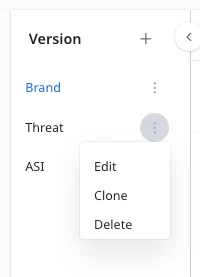
This is something I asked about during the Email Template Builder Beta, and the issue is still present. It should be far easier to re-order email versions within an Email Template.
We frequently send emails that have multiple (6-8) versions, and there is currently no easy way to re-order those versions, which is problematic due to the waterfall nature of how the variant logic is evaluated (default, then next, then next, and so on).
Currently, the only options we have available are to edit, clone, and delete versions. While we can technically clone a version so there are two copies, and overwrite the email code to move an email to a different place, that’s an unwieldy workaround, and our teams frequently have to deal with content submitted at the midnight hour, just before we’re supposed to send a campaign with multiple variations.
Proposed solutions
I see two potential solutions:
- Drag and Drop Reordering -- it would be awesome if we could click and drag a version higher or lower in the email.
- Move Up, Move Down -- not as ideal, but this would allow us to reorder the versions as needed.