

gunjanm
Expert ⭐️
January 26, 2021
New Idea

Edit & Save a Whole Success Plan Section

  • January 26, 2021
  • 18 replies
  • 256 views

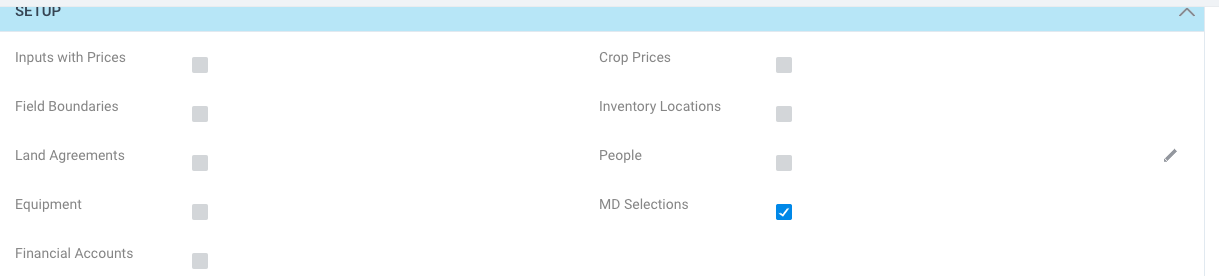
Back in SFDC edition, we had the ability to edit a section of a Success Plan and hit save only once. Now in NXT, our users are being forced to save each field they edit, resulting in far too many extra clicks. Below is the message and screenshot from one of our end users explaining the request:

“in the future is there any way we could get the ability to edit all of these at once? Like still have to check off each one, but instead of clicking the edit and save button plus check it off for every one, we just click one edit button and one save button. Right now I am completing 27-20 clicks to check off 9-10 items.”
  
End Proctoring-
 

18 replies

sai_ram
Expert ⭐️⭐️
June 17, 2021

I would be interested in an advisory session as well!

@ana_g we have a plan for success plan2.0. Thanks!!

seth_schroeder
Gainsight Employee ⭐️⭐️
July 28, 2021

Hello Everyone,

Happy to announce that your request has been considered and implemented in the Success Plan Horizon Analytics available in Gainsight NXT. Success Plan Horizon Analytics has new capabilities such as expandable fields and an auto-save feature when creating new Success Plans.

Thanks for posting!

waynedilworth
Contributor ⭐️⭐️⭐️⭐️⭐️
February 7, 2022

@seth_schroeder - I must be missing something here- if I edit multiple fields at the same time and click save in any one of the boxes - I lose the text I wrote in the other boxes.  can you advise?  We are on stand-alone NXT with Horizon Analytics success plans.

Gainsight Employee ⭐️
February 8, 2022

^Can confirm, when editing rich text fields on a success plan it will allow multiple to be edited at a time, but when you save, it only retains the field that you are clicking save on and the rest of the data is wiped out from the other rich text fields that have been populated in that workflow

Contributor ⭐️⭐️
April 7, 2022

This issue is a huge pain point for my team. I get requests to change it all the time. Are there any plans to continue improving the Success Plan saving functionality? The current layout is making my team lose valuable notes because they assume that the system will save both fields instead of deleting one of them. 

Anil Raj Pujari
Helper ⭐️⭐️
April 10, 2022

Thank you for the feedback. We understand the challenge when simultaneously editing multiple RTE fields. Though not part of immediate roadmap we are evaluating solutions to address the challenge.

andreammelde
Helper ⭐️⭐️
April 12, 2022

Agreed on the multiple rich text fields as well! this confusing for our CSMs that you can technically open all rich text fields to edit at the same time, but only one will save.


There should at minimum be a restriction to only have on RTE editable at a time if you can only save one at a time

Andrea Carroll
Contributor ⭐️⭐️⭐️⭐️⭐️
July 7, 2022

This is a big pain for my team too. This isn’t resolved right yet, as far as I can see!