

Maayan K
Contributor ⭐️⭐️⭐️⭐️
August 1, 2022
Open

Email template variable - {topic_content} - limit characters and add break lines

Related products:CC Notifications & Subscriptions
  • August 1, 2022
  • 7 replies
  • 209 views

Hi there, 

We are using the Product Updates module and prompting user to subscribe to it. 

We customized the email and used the variable available:

 {topic_content}

In documentation it’s described as: Preview snippet of the topic

But defacto it showed the full post and also removed all formatting and breaklines whic made it look super jumbled, see example : 
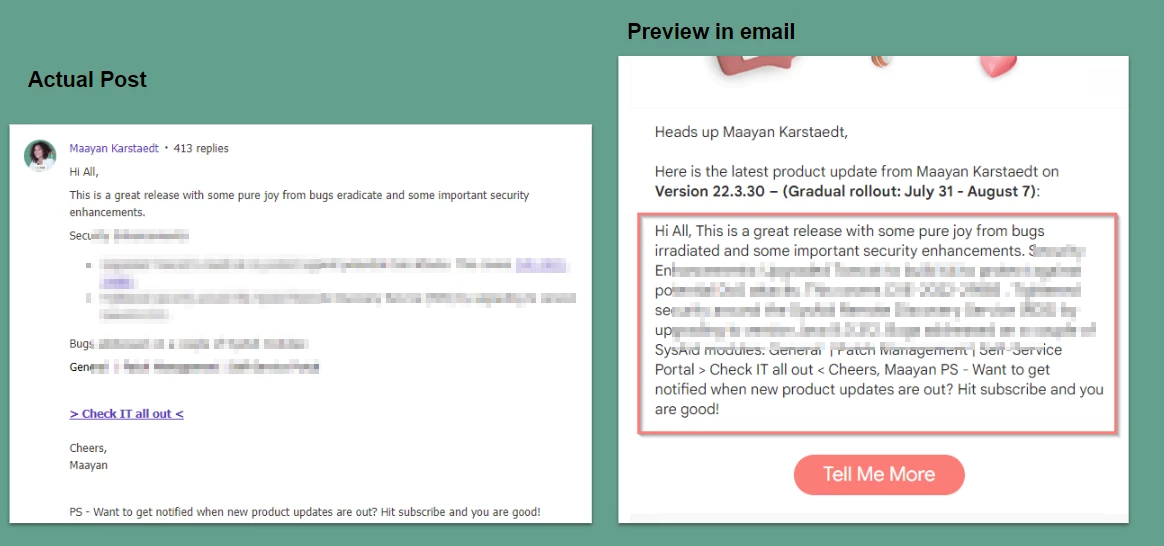
 

  1. Is there a way to improve this that I am missing? 
  2. If it’s indeed and idea then I would want to see 2 things: 
    1. limit to 280 characters in preview (whats good for twitter is good for me) 
    2. represent break lines where there are some 

Let me know what you think!

Cheers,


7 replies

Brooke
Contributor ⭐️⭐️
August 10, 2022

We’d also love to see this!! It looks very confusing as a preview but want to show the content to encourage users to click on 

Daniele Cmty
Helper ⭐️⭐️
August 15, 2022

Upvoted! This is also useful for this use case:


Sebastian
Helper ⭐️⭐️⭐️
September 7, 2022
New→Open
juan.delrio
Helper ⭐️⭐️⭐️
September 28, 2023

I need this in my life @Sebastian ,  for Christmas?

Eva
Helper ⭐️
December 7, 2023

I need this in my life @Sebastian ,  for Christmas?

I need this in my life, too🙂 If all of the formatting could be preserved incl. colors, it would be so great!

Johnk
Helper ⭐️
May 30, 2024

Our Super Users pointed this out, and I had noticed it before as well.

Extremely hard when another member replies to your post/reply BUT they quote your previous post/reply.

Purple arrow shows where the reply actually starts.

We ran into the same issue when trying to accommodate the request to make the formatting easier to read.


すもも
Contributor ⭐️⭐️⭐️
March 17, 2026
I need this too. Showing only a portion of a post is necessary to pique the user's interest.
すもも