
pat
Contributor ⭐️⭐️
Aug 2, 2016 12:57 AM UTC
New Idea

Filter by Fiscal Quarter in Rules Engine

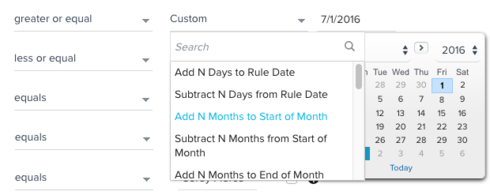
We would like the ability to filter by fiscal date within the Rules Engine Setup Rule. We have some rules that power MDA and reporting that report only on current FQ. Each new quarter, we have to manually adjust the dates to the current quarter, so this will become unscalable once our number of rules grow.
    24 replies

    sundar
    Expert ⭐️
    Aug 4, 2016 1:49 PM UTC
    Hey Pat - Are you looking for options like FQ and FY that you see in report builder when your source object is from SFDC?
    Translate
    steven_doty
    Contributor ⭐️⭐️⭐️
    Oct 12, 2016 5:47 PM UTC
    That is what I am looking for, I need to show opportunity amounts by quarter and feed that into an MDA table. I can't find a way to have the quarter roll over automatically so I am manually updating dates.
    Translate
    pat
    patAuthor
    Contributor ⭐️⭐️
    Oct 12, 2016 5:49 PM UTC
    That's correct. We need the ability to filter by FQ and FY in the Rules Engine like in report builder.
    Translate
    andrew_cummins
    Helper ⭐️
    Feb 6, 2017 9:25 PM UTC
    steven_doty
    Contributor ⭐️⭐️⭐️
    Feb 7, 2017 6:48 PM UTC
    Absolutely. I've voted for your idea as well!
    Translate
    jeffrey_coleman
    Helper ⭐️
    Mar 22, 2017 4:14 AM UTC
    We just need to see 1st and last day of Current, Previous, and Next Quarter, just like we have for month and week, right?
    Translate
    jeffrey_coleman
    Helper ⭐️
    Jan 3, 2018 12:21 AM UTC
    This has to be a really quick fix. I'm happy to beg if it helps!!!
    Translate
    jitin_mehndiratta
    Helper ⭐️⭐️⭐️
    Jan 9, 2018 9:01 AM UTC
    Formula functions:
    FirstDayOfCurrentWeek(), FirstDayOfCurrentMonth(), FirstDayOfCurrentQuarter(), LastDayOfCurrentWeek(), LastDayOfCurrentMonth(), LastDayOfCurrentQuarter() are now available in the transformation task of Bionic Rules. These functions can take Rule date or any date as input.

    Apart from these, there are few other date functions that were introduced in fall release. Let me know if this helps. 
    Translate
    jeffrey_coleman
    Helper ⭐️
    Jan 10, 2018 2:09 AM UTC
    Hey Jitin -- to use those I would need to query data for the current year (using the existing filter option); transform that result, adding the start and end of the current quarter as new columns using the formula above; and then transform it again, using those new field values as the filter criteria. It's doable, but not as simple as picking "Current Quarter" from a drop-down filter would be!
    Translate
    Helper ⭐️
    May 6, 2020 3:47 AM UTC

    +1 for calendar quarters as well!

    Translate
    Anastassia Goidina