

bradley
Expert ⭐️
September 21, 2021
New Idea

GS Assist for Outlook - Log to Timeline Status

  • September 21, 2021
  • 12 replies
  • 184 views

This was a request from one of my end users and I don’t see this functionality but it would be super useful.


Basically, what I would like to see is something similar to the timeline log status that you can get in Gmail/Chrome, but in outlook:
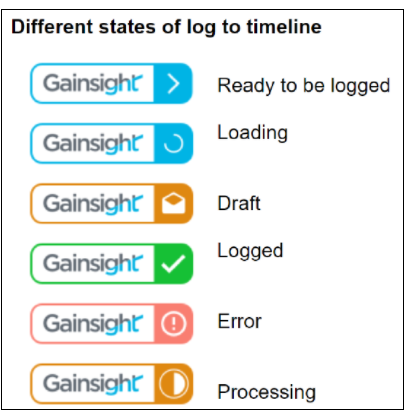
 

As far as I can tell, right now you need GS assist open and the email in question open to see if it is logged, but there’s no way to look at a folder in outlook and quickly see what has/hasn’t been logged.


P.S. if this is currently possible please show me the way.

12 replies

anirbandutta
Expert ⭐️
October 16, 2023

I am checking on latest PM responsibilities in this area.

It's an opportunity for engagement
Abinash
Contributor ⭐️⭐️⭐️
October 16, 2023

Hello Team,

The Timeline log statuses you see in Gmail cannot be replicated in Outlook due to technical limitations existing in the latter. What we understand is the following:

  1. Outlook allows end users to choose and pre define list of color coded categories to their messages. This is probably what Salesforce is doing. In Gainsight, however, we update the status of individual Timeline logs dynamically using API calls
  2. With regards to the UI - the icon and circular container seen in Gmail plugin does not fall under definition of Outlook defined category

We do show the appropriate statuses upon clicking of each email and opening the GS Assist button.

Hope this helps.

Abinash John